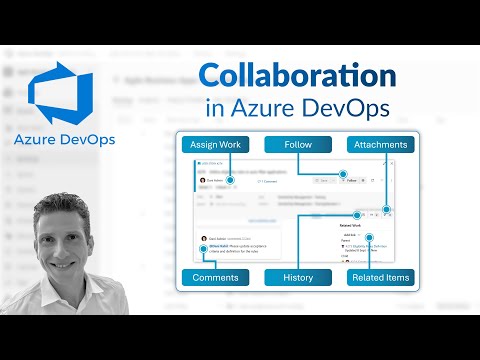
Azure DevOps Boards: Boost Collaboration
Microsoft expert on Azure DevOps Boards: assign work items, comment to relate items, view history and attachments
Key insights
- Assign Work Items
Assign ownership to a single user to keep accountability clear and speed up handoffs.
Use areas and iterations to route work to the right team and sprint for focused delivery. - Comments & Mentions
Use comments to capture context, decisions, and quick updates on a work item.
Tag teammates with @mentions to notify them and link discussion directly to the item. - Relate Items
Create links between work items to show dependencies or blockers and keep related tasks visible.
Use parent-child relationships to visualize hierarchy from epics to tasks and simplify progress tracking. - Follow & Notifications
Follow items you need to monitor to receive timely updates and reduce missed changes.
Adjust notification settings so you get only the alerts that matter to your role and workflow. - History & Audit Trail
Check the history tab to see who changed fields, when, and why—useful for audits and decision tracing.
Use history to recover previous values or understand the sequence of work-item updates. - Attachments & Context
Add files, screenshots, and logs to work items to preserve context and speed troubleshooting.
Drop attachments into comments or the item form so everyone sees the same supporting evidence in one place.
Overview of the Video
Dani Kahil’s recent YouTube video offers a concise walkthrough of collaboration tools inside Azure DevOps Boards. The clip focuses on practical actions such as assigning work items, using comments to tag colleagues, linking related items, following items, viewing history, and adding attachments. Overall, the video aims to show how teams can use these built-in capabilities to keep work visible and conversations connected.
Importantly, the video is paced to match typical team workflows, with each feature demonstrated in sequence and timestamps marking the key sections. Consequently, viewers can jump directly to the topics they need, whether that is assigning tasks or inspecting the change history. The presenter uses real-world examples to make the features easier to understand for both newcomers and experienced users.
Moreover, the video connects these everyday actions to larger trends in 2025 collaboration tooling, including deeper integration with communication platforms and improved hierarchy visualization. Therefore, the demo functions as both a practical guide and a snapshot of how Azure DevOps Boards fits into modern development toolchains. At the same time, it remains focused on hands-on usage rather than product marketing.
Core Collaboration Features Demonstrated
First, the video shows how to assign work items and why that simple step matters for accountability and clarity. Dani explains how assigning owners to tasks removes ambiguity and helps teams balance workload, while also noting that clear ownership supports faster triage during standups. As a result, teams can reduce repeated questions about who is responsible for what.
Next, the commentary around inline comments and tagging highlights how context travels with a work item. By tagging teammates and relating items, the speaker shows how conversations remain attached to the work instead of scattering across emails or chat. This approach improves traceability and ensures decisions are visible to future readers of the history.
Finally, the demo covers history and attachments, illustrating the audit trail that Azure DevOps Boards builds over time. The presenter walks viewers through checking the timeline of changes and adding supporting files to a work item, which supports reproducibility and handoffs. Thus, these features together promote a record of intent and activity that teams can review during retrospectives or incident analysis.
Integration and Workflow Impacts
In addition to the board-level features, the video references broader integrations such as the connection with Microsoft Teams and other services in the ecosystem. Consequently, teams that enable the Microsoft Teams add-in can create or edit work items directly from chat channels, which reduces context switching. However, successful integration requires thought about notifications and channel design to avoid information overload.
Moreover, Dani emphasizes the value of work item hierarchy improvements like parent-child links and clear backlog views for organizing Epics and features. This structure supports both Scrum and Kanban teams, enabling them to choose the process that fits their delivery model. At the same time, customization of boards and states helps teams track work precisely, although increased flexibility can complicate cross-team reporting.
Further, the presenter notes how the boards sit alongside tools such as Azure Repos, Azure Pipelines, and Azure Artifacts, forming a connected workflow from code to deployment. Therefore, linking commits and builds to work items increases visibility across the lifecycle and helps developers and operations collaborate. Nevertheless, integrating multiple systems requires coordination on policies and access control to maintain security and compliance.
Tradeoffs and Practical Challenges
Although these collaboration features deliver clear benefits, Dani also points out tradeoffs teams must manage when adopting them. For example, while customization lets teams model their process precisely, it can create fragmentation that hinders cross-team reporting and tooling consistency. Thus, organizations must weigh the need for tailored workflows against the cost of managing many process variants.
Additionally, notification volume becomes a real concern as integration increases. Although real-time updates through chat and follows can improve response times, they can also create noise that distracts engineers from deep work. Therefore, teams should set notification rules and encourage discipline around when to follow items and when to rely on periodic reviews.
Security and governance also present tradeoffs: attachments and long histories offer traceability but increase storage needs and surface sensitive data if permissions are misconfigured. Consequently, teams must balance openness with appropriate access controls, retention policies, and periodic audits. Without this balance, collaboration features can unintentionally introduce risk.
Recommendations and Takeaways for Teams
To get the most from the features shown in Dani Kahil’s video, teams should start small and iterate. First, standardize a few key fields and a simple board configuration that everyone follows, and then expand customization as needed. Also, invest in brief onboarding sessions so that members understand how and when to use comments, links, and follows to reduce duplicate work and fragmented conversations.
Furthermore, configure integrations thoughtfully to limit notification overload and to ensure required governance is in place for attachments and history. In addition, use the history view and attachments for audits and retrospectives rather than as a primary source for day-to-day updates, because overreliance can slow searches and consume storage. Finally, combine automation with human review so that boards stay accurate without creating bureaucratic overhead.
In short, Dani Kahil’s tutorial offers a practical, accessible guide to everyday collaboration inside Azure DevOps Boards. While the tools can significantly improve transparency and coordination, teams must manage customization, notifications, and governance to realize those benefits sustainably. Therefore, this video serves as a useful starting point for teams seeking to improve how they track and discuss work in 2025 and beyond.

Keywords
azure devops boards collaboration, azure devops collaboration features, azure boards work item collaboration, azure boards comments and mentions, azure devops notifications and activity, real-time collaboration azure boards, azure devops microsoft teams integration, agile planning collaboration azure boards