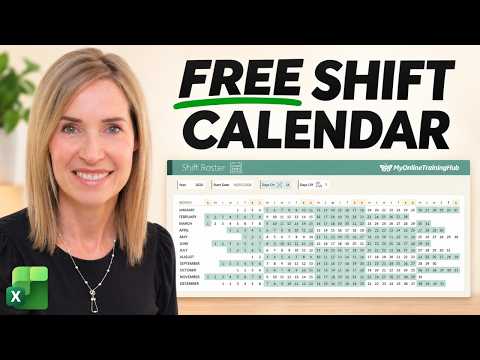
Excel shift calendar: build a reusable roster for any year
Build a year-long Excel shift calendar that updates from four inputs: year, start date, days on and days off.
Key insights
- The calendar uses four inputs: year, first shift date, days on and days off.
- SEQUENCE generates 42 dates per month, covering up to six calendar weeks.
- A MOD formula identifies each date's position in the repeating on/off cycle.
- Conditional formatting hides dates outside each month and highlights working days.
- Changing the year updates the roster while continuing the cycle from its original start date.
An Excel shift calendar can generate a full year of dates and mark workdays in a repeating on/off pattern, so you do not have to rebuild the roster each year. It is useful for people who manage a recurring personal or team shift pattern and want to adjust the year or cycle without manually counting dates. Mynda Treacy (MyOnlineTrainingHub) [MVP] demonstrates how to build this formula-driven calendar from scratch.
What it does
The workbook creates a separate six-week date grid for each month, then uses conditional formatting to display the relevant dates and highlight days on shift. Its four inputs are the year, the first day of the shift pattern, the number of days on, and the number of days off. Changing those values recalculates the calendar rather than requiring each date and workday to be edited individually.
The demonstrated pattern starts on January 5, 2026, with 14 days on followed by seven days off. The cycle is 21 days long. The workbook can use different values, and the demonstration changes the year to 2027 and the cycle to 28 days on and 14 days off. The calendar continues counting the shift pattern from the specified start date.
Who it is for and what you need
This approach is for Excel users who need a repeating shift roster, such as a personal calendar or a basic schedule they want to adapt. The demonstration does not specify a required Excel license, subscription, platform, or minimum version, so those requirements are not established by the source material. It also does not describe shared editing, employee assignments, or a process for managing multiple people’s shifts.
You need a workbook with a monthly grid, month names, and four cells for the inputs. The example uses modern dynamic array formulas, including SEQUENCE, as well as conditional formatting. The video does not identify a rollout or preview status; this is a workbook-building technique, not a newly announced Excel service.
How it works
- Set up a calendar grid with 42 date positions for each month. The example’s week starts on Sunday, and six rows of seven dates allow a month to span as many as six calendar weeks.
- Enter the year, the first shift date, Days On, and Days Off. These are the values the date and shift calculations refer to.
- Use SEQUENCE to return 42 consecutive dates for each month. DATEVALUE combines the month name with the year to create the first day of that month; WEEKDAY adjusts the start back to the Sunday on or before it. The formula can then be copied down for the other months.
- Format the date cells to show only the day number. The underlying cells still contain full dates, which the later calculations use.
- Add conditional formatting to hide dates that belong to the previous or following month. The rule compares each cell’s month with the month represented by that calendar row and formats nonmatching dates with a white font.
- Create the workday rule using AND and MOD. It checks that a date is on or after the start date, calculates its position in the full on/off cycle, and confirms that it belongs to the displayed month. Dates in the on portion of the cycle receive the selected fill color.
MOD returns the number of elapsed days within the repeating cycle: with 14 days on and seven off, the positions run from 0 through 20 before restarting. Positions 0 through 13 are workdays in that example; the remaining positions are days off. Including the start-date and month checks prevents dates before the pattern begins or dates from adjacent months from being highlighted.
The formula can first be tested in ordinary cells to see its TRUE or FALSE results, then moved into a conditional-formatting rule applied to the calendar cells. The demonstration also adds icons and color styling, but those are decorative; the date generation and formatting rules create the roster behavior. For more Excel examples and techniques, the formula logic here is a practical illustration of combining date functions with conditional formatting.
Limitations and open questions
This is a repeating on/off calendar, not a complete workforce scheduling system. The demonstrated workbook does not assign different employees, locations, shift types, hours, leave, or holidays, and it does not show how to handle several people with different cycles. Those requirements would need additional workbook design beyond the example.
The cycle continues from the original start date when the year changes; changing the year does not itself reset the pattern to January 1. That behavior matters when checking a future calendar: verify that the specified start date is the intended anchor for the repeating schedule. The demonstration shows a change of year and shift lengths, but does not describe testing leap years or document edge cases such as a start date after the year being displayed.
Formula-driven dates and conditional formatting also make the display dependent on the workbook’s formulas and rules. The source does not give a troubleshooting guide, instructions for protecting formula cells, or details about Excel compatibility. The free template mentioned in the demonstration is linked from the video description, but its file requirements are not stated here.
Sources
Frequently asked questions
What inputs do I need for an Excel shift calendar?
The demonstrated workbook uses the calendar year, the first date of the shift pattern, the number of days on, and the number of days off.
How does Excel identify which dates are workdays?
A MOD calculation finds each date’s position in the repeating on/off cycle. Conditional formatting highlights dates in the on portion, provided they are on or after the start date and belong to that month.
Does changing the year reset the shift cycle?
No. In the demonstrated workbook, the pattern continues from its original start date when the year changes. The source does not describe a setting to reset the cycle at the start of each year.
What Excel license do I need to make this calendar?
The demonstration does not state a required license, subscription, platform, or minimum Excel version.