Azure AI infrastructure extends from cloud to edge
Azure combines agent sandboxes, AKS and Foundry to run AI workloads across cloud, datacenter and edge environments.
Key insights
- Agent Grid applies network access controls beside an agent sandbox.
- Context Cache stores context in Azure storage so agents can resume more quickly after moving between servers.
- AKS AI Manager adds AI workload capabilities, including GPU resource scheduling across an AKS fleet.
- Foundry can deploy models to AKS clusters and connect deployments to on-premises nodes through AKS Flex Node.
- A factory demo reduced the illustrated diagnosis time from more than two hours to four minutes.
Azure is adding AI infrastructure primitives and deployment options intended to run models and agents across cloud, Kubernetes and edge environments. The changes matter to platform engineers and IT teams deploying AI workloads that need controlled network access, scalable inference or processing close to operational equipment. Microsoft Events demonstrates these capabilities through infrastructure announcements and a factory scenario using Azure Kubernetes Service (AKS) and Microsoft Foundry.
What's new
The announcements frame AI infrastructure as a full stack: compute, storage, networking and silicon, combined with services for model and agent workloads. Three named building blocks are Agent Grid, Context Cache and agent sandboxes. They address network control, reuse of context and isolated execution, respectively.
Agent Grid is described as a way to control an agent sandbox’s network connectivity. Administrators can set which resources or websites an agent can reach, with those policies enforced in the network alongside the sandbox. This is a practical boundary for agent workloads that may use tools or access external resources.
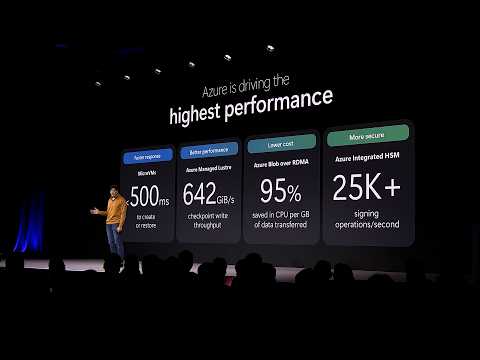
Context Cache stores context in Azure storage. The stated goal is to avoid repeating work when a model encounters familiar context and to help an agent resume quickly after it has been stopped and started on a different server. Agent sandboxes build on Azure Container Instances, with Microsoft describing MicroVM startup or restoration in less than half a second.
Another announcement, AKS AI Manager, adds AI-oriented capabilities on Azure Kubernetes Service. Microsoft describes workload-aware configuration and the ability to schedule resource use across a fleet of GPUs. The approach is aimed at teams that want Kubernetes-based control rather than a fully managed, serverless model deployment.
Who it is for and what you need
These capabilities are relevant to platform engineering teams managing Kubernetes and security controls, AI teams deploying models, and operations teams placing inference near equipment or other data sources. The session does not frame the infrastructure as a single cloud-only deployment pattern: it shows Azure-hosted services working with AKS and a physical node in a factory environment.
For the Foundry and AKS scenario, the starting point is an AKS cluster prepared by a platform engineering team. In the demonstration, that team has already configured security controls and open-source components, and makes an inference cluster available to the AI team. The setup then connects that cluster to Foundry for model deployment.
The scenario also uses an on-site server with a GPU and camera. Microsoft describes adding it to an AKS cluster through AKS Flex Node, then deploying a model to it through the Foundry experience. This illustrates a mix of centralized model management and inference running on hardware near the factory process.
How it works
The Foundry demonstration follows a deployment path from a prepared Kubernetes environment to a factory-floor inference node. The model used in the example is Llama 3.3 70B. The steps shown are:
- In Foundry, add the existing AKS inference cluster and attach it to the Foundry environment.
- Select a model and choose a deployment option. The demonstration lists a serverless API, raw compute, AKS and provisioned throughput, then selects AKS.
- Choose the attached inference cluster and deploy the model so inference is served on the AKS platform.
- Add the factory-floor server using AKS Flex Node, then deploy the model to that node, which has a GPU and camera.
- Use the resulting inference and camera input in the factory application’s diagnosis process.
In the example, the factory application flags repeated stops on a production line. The demonstrated agent-assisted diagnosis takes four minutes, compared with more than two hours for the existing human-led process described in the session. That result is a scenario demonstration, not a general performance guarantee.
Foundry is positioned as one end of a deployment spectrum: it can manage the experience, while AKS gives teams greater control over their own infrastructure and open-source components. The demonstration uses Foundry to connect model deployment to a cluster the platform team has prepared.
Limitations and alternatives
The factory result depends on a prepared AKS environment, a suitable inference cluster and an edge node with a GPU and camera. The example shows how those pieces can be connected; it does not establish that every factory workload will see the same diagnosis time or that the same hardware configuration is appropriate elsewhere.
Teams can choose among the deployment modes shown in Foundry rather than treating AKS as the only option. The session identifies serverless API, raw compute and provisioned throughput alongside AKS. These choices represent different levels of infrastructure management, while the AKS route in the example uses a cluster managed by the platform engineering team.
For agents, the announced infrastructure primitives address separate concerns: network access through Agent Grid, execution isolation through sandboxes, and context persistence through Context Cache. Planning a deployment means considering all three alongside the underlying compute, storage and networking. The session also discusses confidential computing, sovereign cloud and Windows-based AI, but the detailed steps above focus on the Azure and AKS factory scenario.
Sources
Frequently asked questions
What are Agent Grid and Context Cache in Azure?
Agent Grid controls network connectivity for an agent sandbox, including which resources or websites it can access. Context Cache stores context in Azure storage to reduce repeated work and help agents resume after moving between servers.
How does Foundry deploy AI models to AKS?
Attach a prepared AKS inference cluster to Foundry, select a model, choose AKS as the deployment option, and select the cluster. The demonstration deploys Llama 3.3 70B this way.
Can Azure Foundry run inference at the edge?
The demonstrated setup adds a factory-floor server with a GPU and camera through AKS Flex Node, then deploys the model to that node through Foundry.
What is AKS AI Manager?
AKS AI Manager adds capabilities for running AI and agent workloads on Azure Kubernetes Service, including scheduling resource use across a fleet of GPUs.