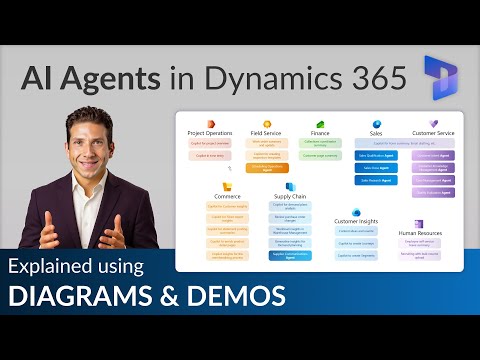
Dynamics 365 AI Agents: Beyond Chatbots
AI Agents in Dynamics Copilot transform Sales Service Supply Chain to qualify leads and automate with Power Platform
Key insights
- AI Agents are autonomous systems in Dynamics 365 that act continuously, not just respond like chatbots.
They move Dynamics 365 from a "system of record" to a system of action by taking decisions and executing workflows with minimal human input. - Model Context Protocol (MCP) connects agents to your business data and workflows so agents understand context and make informed choices.
That integration supports appropriate context and governance controls for safe, auditable automation. - Sales Close Agent and Sales Development Agent automate lead qualification, prospect research, personalized outreach, and routine deal closures.
They run background tasks, escalate complex negotiations to humans, and help sales teams focus on high-value work. - Quality Evaluation Agent reviews customer interactions at scale to surface service problems and performance trends.
It improves case management, AI-driven routing, and omnichannel automation across digital and voice channels. - Account Reconciliation Agent and Supplier Communications Agent automate finance and supply-chain routines like reconciliations and vendor messaging.
Dynamics 365 and Business Central agents also generate reports, optimize orders, and reduce manual errors. - Microsoft 365 Copilot integration brings agents into Word, Excel, PowerPoint, and Teams for document, meeting, and workspace automation.
Availability and licensing vary by agent and product, so plan licensing and governance before deployment.
Intro: A new generation of agents
In a recent YouTube video, Dani Kahil explains how Microsoft is rolling out a new generation of AI Agents across Dynamics 365, arguing these tools are more than simple chatbots. The video positions these agents as autonomous business systems that can act continuously, analyze data, and execute workflows without waiting for user prompts. Consequently, Kahil frames this shift as a move from a traditional "system of record" to what Microsoft calls a "system of action."
What the video covers and where agents fit
Kahil outlines the scope of the rollout and situates the agents within the broader Microsoft Copilot and AI ecosystem, showing how they integrate with business applications and Microsoft 365. He walks viewers through a conceptual overview, then provides a hands-on demo that highlights how an agent can qualify leads and run follow-up tasks. Importantly, the video clarifies that these agents draw context from enterprise data and operate under governance controls, which makes them applicable across Sales, Customer Service, Finance, and Supply Chain functions.
How these agents differ from chatbots
Rather than treating the agents as conversational front-ends, Kahil emphasizes their autonomy and continuous operation, which lets them take action on behalf of teams. For example, agents can monitor lead lists, run eligibility checks, and trigger outreach sequences without a human initiating each step. This difference matters because it shifts expectations: businesses must now manage an always-on decision layer that interacts with transactional systems and people.
Practical applications across the business
The video offers concrete examples: in Sales, a Sales Qualification Agent can research prospects, qualify leads, and draft personalized messages while escalating complex negotiations to people. In Customer Service, a Quality Evaluation Agent can analyze many more interactions than traditional sampling allows, improving insight into service standards. Meanwhile, finance and supply chain agents can automate account reconciliation and supplier communications, reducing routine work and improving consistency.
Demo, deployment and licensing considerations
Kahil’s demo shows how an agent interacts with Dynamics records and triggers actions, and he highlights practical steps for building and testing agents within Microsoft’s frameworks. He also touches on licensing, noting that organizations must consider both platform and agent-specific costs before scaling deployments. Therefore, teams should plan pilots carefully, balancing the potential productivity gains against implementation complexity and ongoing licensing expense.
Tradeoffs, governance and real-world challenges
While agents promise automation and continuity, they introduce tradeoffs around control, accuracy, and oversight; for example, autonomous outreach can increase volume but may also risk off-message communications if the models are not tightly governed. In addition, integrating agents with legacy systems and complex workflows requires careful design to avoid data fragmentation and process drift. Consequently, Kahil advises a staged approach: start small, define clear success metrics, and include human-in-the-loop checks to manage exceptions.
Balancing factors and next steps for teams
Organizations must balance speed and safety as they adopt agents: rapid automation can yield quick wins, yet long-term value depends on robust data quality, monitoring, and change management. Furthermore, teams need to weigh development effort against adaptability, since overly rigid automation may fail when business conditions change. As a result, businesses should combine iterative pilots with governance frameworks that allow agents to learn safely and transfer complex decisions back to people when needed.
Conclusion: Practical promise with design responsibilities
Overall, Dani Kahil’s video presents AI Agents in Dynamics 365 as a meaningful evolution beyond chatbots, offering autonomous capabilities across sales, service, finance, and supply chain. However, the video also underscores that realizing value requires careful planning around licensing, governance, and integration. In short, these agents can deliver significant efficiency and insight, but firms must balance agility with control to turn potential into lasting results.
Keywords
AI Agents Dynamics 365, Dynamics 365 AI agents overview, Microsoft Dynamics AI assistants, Dynamics 365 intelligent agents, AI-driven workflows Dynamics 365, Dynamics 365 Copilot agents, Enterprise AI agents Microsoft Dynamics, Dynamics 365 automation with AI