
Add actions to files with custom actions across Microsoft 365
Software Development Redmond, Washington
Unlock the power of Microsoft 365 with actionable tasks across multiple apps. Comprehensive developer guide by Microsoft expert, Irene Wang.
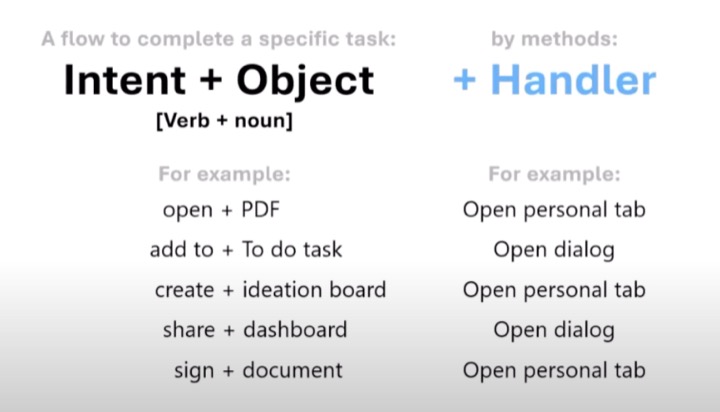
The following summary is based on a YouTube video by Microsoft, focusing on adding actions to files using custom actions across their suite of productivity tools. The video, presented by Irene Wang from Microsoft, is a 12-minute developer-oriented guide. It demonstrates how custom actions can simplify the user experience by reducing task juggling across multiple apps and hence, enhancing workflow efficiency.
The chunk of the video is a comprehensive code walkthrough, which provides detailed, step-by-step instructions on implementing these actions. The video content originally aired on the 5th of September, 2023, during a weekly call on Microsoft 365 & Power Platform updates.
• Join Actions Private Preview: https://aka.ms/ActionsPreview
In the tutorial, the demonstration goes through creating custom actions that allow you to interact with lists and the ribbon in the host web while developing a SharePoint Add-in. Custom actions can open a remote webpage and pass information through the query string, offering two types of custom actions for add-ins: Ribbon and Menu Item. The guide establishes prerequisites for using the examples provided and gives a closer look at core concepts that help with understanding custom actions.
A detailed tutorial on creating a custom action in the host web document libraries is also included. This comprehensive guide covers everything from creating the SharePoint Add-in and opening Visual Studio as an administrator, to adding action pages, setting up the add-in start page to host the web home page, and debugging potential issues.

Microsoft is empowering developers with the capability to add actions to files using custom actions across Microsoft's productivity suite. These actions are aimed at streamlining user experience, making it easier to manage tasks across multiple apps. By integrating these custom actions within SharePoint Add-in, developers can engage with lists and the ribbon in the host web efficiently, and pass information seamlessly through a query string.
The tutorial offers both Ribbon and Menu Item custom actions, taking into consideration the specific needs and preferences of the developers. With a clear-cut example and troubleshooting guide, Microsoft ensures that developers are well-equipped to take full advantage of these custom actions to enhance productivity tools' efficiency.
Learn about Microsoft 365 Development
One of the core aspects of this passage revolves around the implementation of custom actions across Microsoft 365 as seen in the YouTube video. Whether you're a developer or a Microsoft 365 admin, a firm understanding of this process will greatly enhance your knowledge and skill set. Fortunately, there are several ways to boost your understanding of this topic.
For anyone seeking to understand the concept better, Microsoft offers numerous training courses. Particularly relevant are those that delve into optimizing file management, Microsoft 365 usage, and workflow integration in apps. Also, SharePoint Add-in model and related concepts are critical, and learning about UX design for SharePoint Add-ins can give a definite boost.
Two prominent kinds of custom actions available for SharePoint Add-ins, Ribbon and Menu Item, could be central to your learning process. Having a grasp on the creation of these could drastically increase your efficiency. To acquire practical knowledge, training sessions covering Visual Studio's usage can be beneficial, as demonstrated in the text.

The video also covered modernization guidance and the implementation of remote web projects. These concepts can be explored more in courses on SharePoint extensibility options and future-proofing your extensibility. It would be prudent to also look into classes focused on understanding the difference between host webs and add-in webs.
For mastering the code aspect, it would be advisable to explore training courses such as 'Building SharePoint Add-ins', 'Creating Custom Actions in the Host Web Document Libraries', and 'Using Visual Studio for SharePoint Add-in development’. Apart from this, examples and hands-on training are excellent to gain technical proficiency in this domain.
In the upcoming SharePoint deprecation (expected at the end of 2023), understanding the implications and changes that come with this will be very important. Hence, it would be insightful to look into training sessions or workshops about navigating and transitioning during this time.
Finally, understanding the SharePoint Add-in model's UX design is an essential aspect that requires attention. With courses focusing on building SharePoint Add-ins and designing the user experience, you can become adept at handling these aspects.
By exploring these subjects exhaustively, you can gain a more comprehensive understanding of the topic, leaving no queries unattended. Remember, the future belongs to those who prepare for it today.
More links on about Add actions to files with custom actions across Microsoft 365
- Is it possible to add custom actions to files and folders ...
- May 14, 2021 — So looking to add either to the actions menu for files / folders.. or maybe create a custom app that we can use to accomplish the same ...
- Create custom actions to deploy with SharePoint Add-ins
- Sep 26, 2023 — Custom actions can open a remote webpage and pass information through the query string. Two types of custom actions are available for add-ins: ...
Keywords
Microsoft 365 custom actions, add actions Microsoft 365, custom actions across Microsoft 365, files custom actions Microsoft 365, Microsoft 365 actions to files, add file actions Microsoft 365, Microsoft 365 add custom actions, custom Microsoft 365 actions, actions with files Microsoft 365, add actions to files Microsoft 365