- All of Microsoft
Microsoft Agents: How They Work
Software Development Redmond, Washington
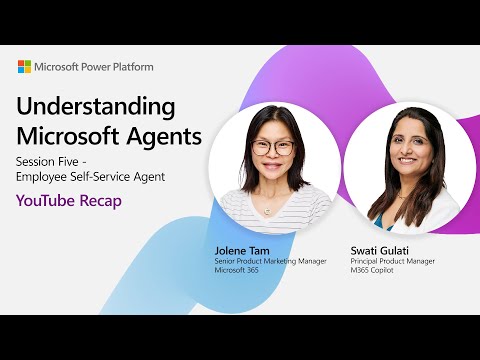
Employee Self-Service Agent in Microsoft three sixty five Copilot centralizes HR and IT with ServiceNow integration
Key insights
- Employee Self-Service (ESS) Agent): Based on the YouTube session "Understanding Microsoft Agents | EP05", the ESS Agent acts as a single front door for HR and IT support.
It automates common requests like leave requests and IT tickets and helps employees get faster answers without opening full service tickets. - Copilot Studio: Copilot Studio is the maker tool where organizations build and configure agents using preconfigured workflows and templates.
Teams can customize workflows, set user context, and tailor responses to roles and locations. - Integrations: The ESS Agent connects to enterprise systems such as ServiceNow, Workday, and SAP SuccessFactors to read and update data securely.
These integrations let the agent complete tasks end-to-end and reduce manual HR/IT workload. - Agent 365 Control Plane: Agent 365 provides a central registry, access controls, and a unified dashboard for managing agents across an organization.
It also offers analytics and visibility to track agent performance and usage. - Teams Mode and Facilitator Agent: Teams Mode turns 1:1 Copilot chats into group-capable agents and enables collaboration-focused workflows.
The Facilitator Agent helps run meetings by creating agendas, taking notes, and tracking action items. - Security and Governance: Agents enforce access control, use user context for personalized responses, and log interactions for compliance.
This approach helps organizations scale agents while protecting sensitive data and meeting governance needs.
Video Summary
The latest YouTube installment from Microsoft, titled “Understanding Microsoft Agents | EP05,” outlines how AI agents in Microsoft 365 Copilot are being designed to streamline HR and IT support. In particular, the video focuses on the Employee Self-Service (ESS) Agent, which serves as a single front door for common employee needs and connects to existing enterprise systems. The session demonstrates preconfigured workflows and templates and shows how the agent can work with platforms such as ServiceNow, Workday, and SAP SuccessFactors. Overall, the video positions the ESS Agent as a practical step toward reducing routine requests and improving response times.
How the Employee Self-Service Agent Works
The video explains that teams build agents using Copilot Studio, where makers configure workflows, templates, and integrations without starting from scratch. Consequently, organizations can deploy an agent that understands user intent, pulls relevant context like role and permissions, and interacts securely with backend systems to complete tasks. The ESS Agent combines natural language understanding with preset business logic to route or fulfill requests, which helps employees find answers and take actions more quickly. Thus, the system aims to balance conversational flexibility with predictable, auditable operations.
Benefits and Tradeoffs
The video lays out several clear benefits: employees can solve many common issues themselves, support teams face fewer routine tickets, and organizations leverage existing investments in HR and IT systems. As a result, companies may see faster resolution times, higher employee satisfaction, and freed-up specialist time for strategic work. However, the video also implies tradeoffs, since automation of routine tasks can shift complexity to initial configuration and ongoing governance, which requires skilled makers and clear policies.
Furthermore, personalization and integration improve relevance but raise questions about data access and permissions. While the ESS Agent uses user context to tailor responses, that same context requires careful management to prevent overexposure of sensitive information. Therefore, organizations must weigh the convenience of richer interactions against the need for strict access control and audit trails. In practice, this balance often demands cross-functional collaboration between HR, IT, and security teams.
New Features and Management Tools
The episode also spotlights recent platform changes that affect scale and collaboration, such as Teams Mode for Copilot and the generally available Facilitator Agent in Teams. These additions allow agents to operate in group contexts, support meeting facilitation, and help manage agendas and follow-ups, which extends agent utility from individual tasks to team workflows. Importantly, Microsoft introduces Agent 365, a control plane that centralizes agent registries, access control, and dashboard visualizations to help administrators manage a growing agent fleet. Therefore, the vendor seeks to make governance and visibility more straightforward as organizations deploy more agents.
Challenges and Implementation Considerations
Despite the promise, the video acknowledges implementation challenges that organizations must confront, including integration complexity, role-based access, and maintaining reliable data flows across systems. In addition, configuring templates to match local HR processes and compliance needs can require detailed mapping and testing, which creates upfront work that some teams may underestimate. Security and compliance remain central concerns, so the episode emphasizes logging, permission controls, and the need for periodic audits to ensure agents act within defined limits.
Operational Tradeoffs and Long-Term Outlook
Operationally, teams face tradeoffs between rapid deployment using preconfigured templates and the benefits of deep customization for unique workflows. Rapid adoption can reduce ticket volumes quickly, yet overreliance on defaults may fail to meet nuanced requirements or obscure edge cases. Conversely, heavy customization can deliver a closer fit but increases maintenance overhead and the need for maker expertise over time. Consequently, organizations should plan for staged rollouts that begin with core scenarios and expand as governance and metrics improve.
Conclusion
The YouTube presentation from Microsoft provides a practical look at how the Employee Self-Service Agent and related innovations aim to streamline HR and IT support through integration, personalization, and centralized management. While benefits include reduced routine work and improved employee experience, tradeoffs around configuration effort, security, and ongoing governance require careful planning. Ultimately, the video suggests that firms will gain the most by combining thoughtful governance, incremental deployments, and collaboration across HR, IT, and security teams. As organizations experiment with agents, watching real-world usage and refining policies will determine whether these tools deliver sustainable value.
Keywords
Understanding Microsoft agents, Microsoft AI agents, Microsoft Copilot agents, Power Virtual Agents tutorial, Azure autonomous agents, build AI agents with Microsoft, Microsoft agents architecture, Microsoft agent best practices