- All of Microsoft
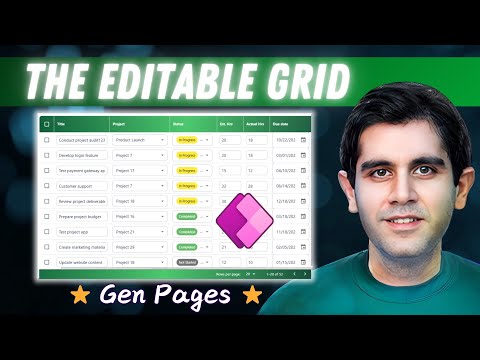
Power Apps: Creating an Excel-Style Editable Grid with Generative Pages
Principal Program Manager at Microsoft Power CAT Team | Power Platform Content Creator
power apps dataverse generative pages excel-like editable grid low-code CRUD functionality dashboards conditional formatting
Key insights
- Generative Pages in Power Apps lets you quickly build an Excel-like editable grid using natural language prompts, removing the need for complex formulas or manual setup. You can describe your needs, and the AI generates a fully functional page with CRUD (Create, Read, Update, Delete) capabilities.
- This feature is only available for model-driven apps and connects directly to Dataverse, ensuring secure data integration and reliable performance. The generated grids support bulk updates, sorting, filtering, searching, and column selection.
- You can use the chat interface with an app agent to refine your grid’s layout, add features like conditional formatting or dashboards, and adjust styling until it fits your requirements.
- The approach offers a modern design that feels like Excel but is much faster to set up—pages are ready in minutes instead of days. It also supports advanced options such as dark mode and exporting data to Excel.
- This new method avoids common issues found in traditional editable grids, such as slow saving or complicated user interfaces. It ensures high responsiveness even as more data is added.
- There are some current limitations: Generative Pages supports only Dataverse tables (up to six per page), requires US English input, does not allow direct code editing on generated pages, and does not support collaborative editing at this time.
Introduction: Redefining Editable Grids in Power Apps
The latest YouTube video by Reza Dorrani demonstrates an innovative way to build an Excel-like editable grid in Power Apps using the new Generative Pages feature. This approach leverages Microsoft’s AI-powered technology, enabling creators to develop dynamic and responsive grid UIs that closely mimic Excel’s experience, but are driven by Dataverse and low-code solutions. With minimal setup and no complex formulas, the process is both rapid and accessible.
As organizations seek faster and more efficient app-building solutions, this technique stands out for its ability to reduce development time to mere minutes. Moreover, it enhances app performance and user experience—a significant leap for professionals accustomed to manual configuration and formula-heavy methods.
Understanding Generative Pages in Power Apps
Generative Pages, available as a preview feature for model-driven Power Apps, harnesses the power of generative AI to create app pages from simple, natural language prompts. Instead of designing each screen manually or writing intricate formulas, makers can now describe their desired functionality—such as “an Excel-like editable grid connected to a Dataverse table”—and let the AI generate a fully functional and interactive UI.
This process is iterative, allowing users to refine and modify their pages by chatting with an AI assistant. The system supports full CRUD (Create, Read, Update, Delete) operations, ensuring that the generated grids are not only visually appealing but also robust in terms of data management and security.
Benefits and Tradeoffs of Using Generative Pages
One of the most significant advantages is speed; users can build or rebuild Power Apps pages in minutes, bypassing the days or weeks usually required. The elimination of complex formulas and manual control setups also reduces maintenance overhead, making apps easier to update and manage over time. Additionally, the automatically generated layouts are modern, responsive, and user-friendly, providing an experience familiar to Excel users.
However, these benefits come with certain tradeoffs. For instance, while the AI-driven method allows for quick iteration and refinement, it currently supports only Dataverse data sources and is limited to US English. There is also no support for code editing on generated pages, and collaboration on page building is not yet available. These limitations may pose challenges for teams with more complex requirements or those seeking greater customization.
Building an Excel-Like Editable Grid: The Process
The creation process begins by simply describing the desired grid’s features, data connections, and UI elements using natural language. The generative AI then produces a React-based page, complete with editable cells and inline editing similar to what Excel offers. Users can further refine the grid by adjusting filters, adding interactive features, or modifying the theme—all through a conversational interface with the AI agent.
Once the grid meets expectations, it can be published directly to the model-driven app environment for immediate use. This workflow not only streamlines app development, but also ensures that each grid is tightly integrated with Dataverse, maintaining both performance and security.
Comparing Traditional Methods and New Approaches
Traditionally, building editable grids in Power Apps required manually wiring up galleries and collections, often involving extensive formula writing and troubleshooting UI slowdowns. The Generative Pages approach removes these hurdles, allowing for the creation of production-ready, high-performing editable grids with features like conditional formatting, dashboards, and export options—all generated by AI.
Nevertheless, this new approach is currently restricted to model-driven apps and does not support canvas apps. While it offers rapid development and modern UI capabilities, organizations must weigh these advantages against the current limitations in customization and collaborative editing.
Conclusion: A Step Forward in Low-Code App Development
In summary, Microsoft Power Apps’ Generative Pages feature, as showcased by Reza Dorrani, marks a significant step forward in low-code app development. It empowers users to create Excel-like editable grids rapidly, offering modern design, seamless Dataverse integration, and a user-friendly interface—all without the need for complex coding or manual UI assembly.
While there are some limitations to consider, the potential for accelerating enterprise app creation and improving user experience is substantial. As Microsoft continues to refine Generative Pages, its role in transforming business app development is likely to grow even further.

Keywords
Excel-like editable grid Power Apps generative pages build tutorial low code app development Microsoft Power Platform data grid customization user interface design