- All of Microsoft
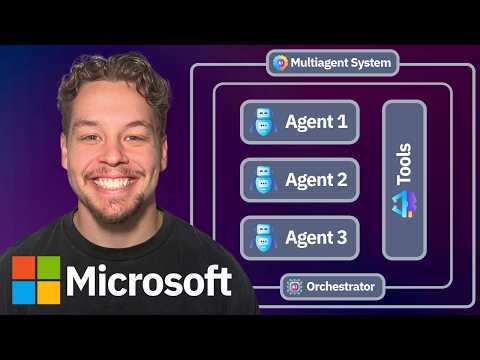
Azure AI: 5 Agent Patterns in 18 Min
Certified Power Apps Consultant & Host of CitizenDeveloper365
Master Agent Orchestration patterns for AI efficiency with Microsoft Copilot Studio, Power Automate and Power Platform.
Key insights
- Agent Orchestration: Coordinates multiple AI agents so they work together to solve complex tasks that a single model cannot handle.
- Five Core Patterns: The video explains Sequential, Concurrent, Magentic, Group Chat, and Handoff orchestration as the main ways to structure agent teamwork.
- When to Use Each: Use Sequential for step-by-step pipelines, Concurrent for parallel subtasks, Magentic for dynamic manager-driven planning, Group Chat for collaborative brainstorming or consensus, and Handoff when control needs to pass between specialists.
- Key Components: Orchestration relies on agents, workflows, shared sessions, tool integrations, and protocols for agent-to-agent communication. Microsoft tools and SDKs support building, testing, and scaling these components.
- Benefits and Use Cases: Patterns improve scalability, reliability, and task specialization. Common uses include customer service escalation, code review teams, onboarding flows, and supply chain automation.
- Practical Steps: Start small by choosing one pattern, define clear prompts and tools for each agent, run tests, add observability and retries, and scale the design into production when stable.
Video Snapshot: What Griffin Lickfeldt Explains
Griffin Lickfeldt (Citizen Developer) offers an 18-minute walkthrough that breaks down the essentials of Agent Orchestration for practical use. He targets both newcomers and experienced builders, aiming to make complex ideas accessible without heavy jargon. Consequently, the video serves as a compact primer on how multiple AI agents can coordinate to solve tasks more efficiently than a single model. The presentation emphasizes real-world examples and step-by-step explanations to help viewers apply these concepts quickly.
Moreover, Lickfeldt aligns his guidance with Microsoft 365 and common developer workflows, showing patterns that map directly to existing platforms. He clearly lists five orchestration patterns and explains when each one fits best, which helps developers decide on architecture early in a project. The video also uses straightforward analogies—such as comparing agent teams to a kitchen or campaign—so viewers can relate abstract ideas to everyday work. Overall, the clip is practical and focused on immediate applicability.
Breaking Down the Five Orchestration Patterns
First, the video explains Sequential Orchestration, where agents execute a fixed series of steps to complete a pipeline. Lickfeldt notes this pattern is predictable and easy to debug, which makes it suitable for data transformations or handoffs that require a strict order. However, he cautions that sequential flows can become slow when tasks could run in parallel, so tradeoffs between simplicity and latency must be considered. In short, sequential works when determinism matters more than speed.
Next, he covers Concurrent Orchestration, which runs agents in parallel and merges results afterward to save time on independent subtasks. While concurrency improves throughput, the video points out that it increases complexity around result reconciliation and error handling. Therefore, developers need robust aggregation logic and consistent contracts for agent outputs to avoid inconsistent states. Lickfeldt recommends concurrency when tasks are independent and short-lived to justify the overhead.
Interactive Patterns: Group Chat, Handoff, and Magentic
Lickfeldt then moves to collaborative designs like Group Chat Orchestration, where agents participate in a shared dialogue to reach a consensus or refine outputs. He argues this pattern is useful for creative work or debates because multiple perspectives can improve final quality, but it can also be slow and costly if agents keep reprocessing the same context. Consequently, teams should limit conversation depth or implement intelligent stopping rules to control cost and latency. The video highlights that group chats shine when diversity of thought matters more than raw speed.
Following that, the Handoff Orchestration pattern shows agents transferring control based on context, which mimics escalation or delegation in human teams. Lickfeldt emphasizes the benefit of dynamic specialization: one agent can identify the need for a specialist and forward the task, reducing wasted compute on ill-suited agents. Yet, he warns that clear interfaces and state transfer mechanisms are essential to prevent dropped context during handoffs. Finally, the Magentic pattern is introduced as a manager-style approach that dynamically assigns and reprioritizes subtasks, which is powerful for open-ended problems but requires careful planning to avoid bottlenecks at the manager node.
Practical Tools and Microsoft Ecosystem Fit
The presenter connects these patterns to common Microsoft tools and workflows, showing how they can map to platforms that many organizations already use (for example, Azure DataCenter). He explains that orchestration logic can live in workflow engines (for example, Power Automate), middleware, or agent frameworks and that choosing where to implement patterns affects monitoring and reliability. Therefore, teams must weigh integration ease against operational control, since embedding logic in managed services may reduce maintenance but limit customization. Lickfeldt encourages testing patterns on small projects before scaling to production.
Moreover, the video stresses the importance of observability and error recovery, particularly when multiple agents interact across different services. He suggests adding logging, checkpoints, and retry policies to maintain resilience and make debugging feasible. At the same time, he notes that stronger observability increases development overhead and potential costs, which teams must budget for. Thus, the decision is often between fast deployment and long-term maintainability.
Tradeoffs, Challenges, and Recommendations
Throughout the video, Lickfeldt balances optimism with realistic tradeoffs: orchestration unlocks scale and specialization, yet it introduces complexity in state management, cost control, and testing. He recommends incremental adoption, starting with clear contracts for agent inputs and outputs and iterating on orchestration patterns as requirements evolve. This approach helps teams manage technical debt and learn which patterns deliver the best ROI for their domain. In addition, he advises documenting decision points so future teams understand the rationale behind chosen patterns.
Finally, the video closes with actionable guidance: experiment with small, well-defined tasks, measure latency and cost, and add governance as complexity grows. Lickfeldt’s plain-language approach makes the material approachable while still offering depth for builders looking to implement these strategies. For organizations using Microsoft tooling, the patterns provide a practical framework to design multi-agent solutions that balance speed, accuracy, and maintainability. Ultimately, the video is a concise resource for teams ready to move from single-model thinking to orchestrated AI systems.

Keywords
agent orchestration patterns, multi-agent orchestration tutorial, AI agent orchestration, orchestration patterns for AI agents, agent orchestration best practices, scalable agent orchestration, agent orchestration patterns 18 minutes, real-time agent orchestration