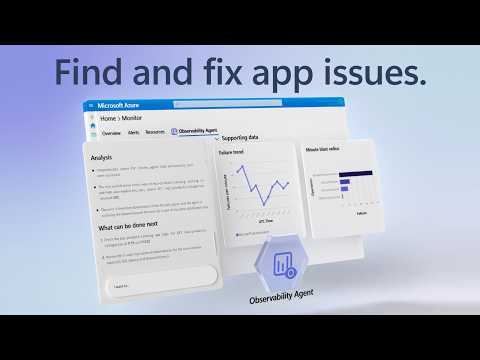
Azure Copilot Observability: Debug Apps
Software Development Redmond, Washington
Control incidents with Azure Copilot Observability Agent: full-stack telemetry, root cause, Foundry Gen AI tracing
Key insights
- Azure Copilot Observability Agent is an AI-driven tool in Azure Monitor that autonomously investigates incidents by correlating logs, metrics, traces, alerts, application health, and ML anomalies.
It surfaces likely root causes with charts and recommended next steps to speed up resolution. - Zero-query investigation lets teams ask plain-language questions instead of writing complex queries; the agent translates prompts into the right telemetry queries and returns clear findings.
This reduces manual query work and shortens mean time to diagnosis. - Root cause explanation and actionable mitigation steps are generated automatically, giving engineers a concise explanation of what happened, why it happened, and how to fix it.
The agent persists results in an Azure Monitor issue for team review and follow-up. - Smart scoping and deep investigation expand the search to related resources and map dependencies, enabling autonomous alert correlation and triage across full-stack telemetry.
Teams can re-run investigations to refine findings or explore new leads without starting from scratch. - AI agent coverage includes tracking of Gen AI errors and token consumption at trace level for agents running in Microsoft Foundry, and it accepts plain-language instructions to tune autonomous behavior to your workflow.
This helps teams monitor costs and failure modes of generative workloads with detailed traces. - SREs and developer teams benefit by moving from noisy detection to focused root-cause work, so they can act on high-impact incidents faster and follow recommended next steps at scale.
Microsoft expert Matt McSpirit demonstrates how to use the agent to take control of incident response and reduce troubleshooting overhead.
Microsoft published a YouTube video demonstrating the Azure Copilot Observability Agent, and the clip is presented by Microsoft Azure expert Matt McSpirit. The video shows how the agent moves teams from simple detection to full root-cause analysis, and it highlights integrations across logs, metrics, alerts, application health, and ML anomalies. Consequently, the demo aims to show IT teams how to reduce alert noise and speed up incident response at scale.
What the video shows
In the demo, the presenter walks through an automated investigation that correlates multiple signals to surface likely causes and recommended next steps. The agent produces charts and natural-language findings that explain what happened, why it happened, and how to remediate the issue. Moreover, the video points out that the agent can extend coverage to AI agents running in Microsoft Foundry and show trace-level details for Gen AI errors and token consumption.
Additionally, the recording highlights hands-on features such as re-running investigations, drilling into specific traces, and triggering deeper correlations that map related resources. These actions let teams expand or narrow scope automatically, which helps avoid siloed troubleshooting. As a result, the demo emphasizes speed and clarity in responding to complex, multi-service incidents.
How the agent works in practice
The video explains that the agent acts as an investigatory component inside Azure Monitor, translating plain-language queries into telemetry queries across logs, metrics, and traces. Instead of writing Kusto Query Language manually, responders can ask natural questions and receive findings that persist as Azure Monitor issues for follow-up. Furthermore, the agent can correlate alerts from sources such as Application Insights and surface a prioritized summary for teams to act on.
Importantly, the demo also shows a workflow integration where alerts in the portal or email link to an “Investigate” experience that launches the agent’s analysis. This seamless path from alert to diagnosis reduces context switching and helps teams keep pace during an incident. In practice, those built-in links and the ability to re-run investigations create a repeatable investigation loop for continuous improvement.
Benefits and tradeoffs
The advantages of this approach are clear: it can markedly cut mean time to resolution by automating correlation, reducing alert noise, and providing actionable mitigation steps. Teams gain the ability to run deep investigations without writing complex queries, which frees engineers to focus on fixes rather than data wrangling. As a result, many organizations will see efficiency gains when they adopt these capabilities.
However, the video also implicitly points to tradeoffs that teams must consider. First, automated findings depend on the quality and completeness of telemetry, so gaps in instrumentation can lead to partial or misleading results. Second, running more detailed traces and storing more data can increase cost, forcing teams to balance depth of insight against ingestion and retention budgets. Therefore, teams must weigh automation benefits against data coverage and cost controls.
Challenges and operational considerations
Another challenge highlighted in the video is the need for human oversight when AI-driven agents propose root causes or fixes. While automation reduces manual work, it can also surface incorrect correlations or suggest steps that require context-specific judgment. Consequently, maintaining trust in the agent’s outputs requires review processes, playbook alignment, and a feedback loop to correct agent behavior over time.
Security and privacy are additional concerns, particularly when trace-level data includes sensitive tokens or user data related to Gen AI workloads. The demo notes the ability to tune autonomous behavior, but teams must enforce access controls and data governance to prevent leakage. Finally, operational teams should expect to invest time in tuning the agent for their environment so that it learns relevant patterns and reduces false positives.
Adoption guidance and next steps
For organizations interested in trying the agent, the video suggests starting with a pilot and focusing on high-value services where observability gaps most often cause downtime. Teams should instrument key services, set reasonable retention and cost guards, and integrate the agent’s findings into existing incident workflows and runbooks. Over time, repeated investigations and manual reviews will help refine the agent’s recommendations and reduce noise.
Moreover, the presenter recommends using plain-language customization to align autonomous responses with team processes, which helps the agent act more predictably. By combining gradual rollout, governance, and active feedback, teams can balance automation gains with control and clarity. In summary, the video presents the Azure Copilot Observability Agent as a useful step toward faster, smarter incident response while reminding viewers of the practical tradeoffs and operational work needed to succeed.

Keywords
Azure Copilot Observability Agent, Copilot Observability Agent troubleshooting, Find and fix app issues in Azure, Azure app monitoring and diagnostics, Azure application performance monitoring, Troubleshoot Azure Copilot agent, Detect and resolve app errors Azure, End-to-end observability with Azure Copilot