- All of Microsoft
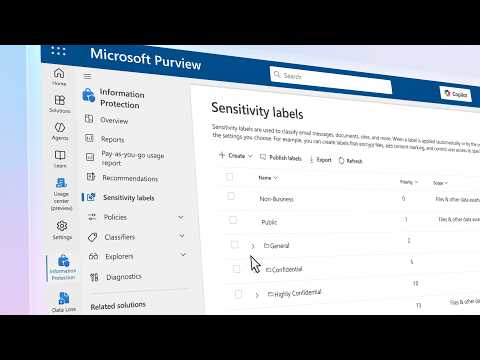
Microsoft Purview: Label Files for Speed & Safety
Software Development Redmond, Washington
Microsoft expert: Purview Information Protection labeling and classification enforce DLP and AI aware data protection
Key insights
- Microsoft Purview sensitivity labels
The video explains how labels classify and protect files across services like SharePoint, OneDrive, Teams and more. Labels add persistent metadata that enforces access, sharing and encryption rules as data moves. - Auto-labeling and auto-override
Admins can set policies to auto-apply labels and to override incorrect manual labels on files at rest. This keeps classification consistent and creates an auditable trail for compliance. - Layered protections (DLP, IRM, Endpoint DLP)
Labels work with Data Loss Prevention, Information Rights Management and Endpoint DLP to block risky sharing, control AI access and apply encryption when needed. The layered approach protects data without blocking everyday workflows. - Classification vs labeling
Classifiers detect sensitive content; labels apply the protection and policy actions. The video shows how trainable classifiers help identify complex or custom data patterns before applying labels. - Speed and protection benefits
Automating labels speeds governance and reduces manual work, while consistent protections cut accidental exposure and limit unauthorized AI or external access. Labels help teams move fast without increasing risk. - Admin controls and reporting
Administrators configure label scopes, inheritance and enforcement from the Purview portal, and use reporting to monitor labels, scans and policy actions in real time. New enhancements in the video were described as rolling out in mid-April 2026 to improve scale and accuracy.
Microsoft Mechanics Breaks Down Labeling in a New Video
The Microsoft-authored YouTube video, presented by Matt McSpirit with Jeremy Chapman, explains why labeling files matters for modern data protection. In succinct demos, the hosts show how Microsoft Purview applies sensitivity labels across services like SharePoint, OneDrive, Teams, and external data stores. Furthermore, the video timestamps guide viewers through topics from basic data loss prevention to real-time protection and examples of labels in action.
Overall, the piece frames labeling as both a technical control and an operational practice that supports AI-safe workflows. Consequently, organizations can see labeling as an enabler for secure collaboration while preparing data for responsible AI use. The video also highlights recent updates that extend auto-labeling and library inheritance to existing files at scale.
How Labeling Works in Practice
The presenters describe labeling as metadata-driven protection that "travels with the data" and enforces rules like encryption, access limits, and sharing restrictions. Specifically, administrators define labels in the Purview portal, then choose whether labels apply manually, automatically, or via library inheritance so that new and existing content can receive consistent tags. This approach lets protections persist as files move between apps and services, which helps reduce accidental exposure during routine collaboration.
Moreover, the video explains policy mechanics such as auto-override and label removal when conditions change, improving accuracy and auditability. The demo also shows how trainable classifiers and predefined sensitive information types trigger automated labels. As a result, teams can balance centralized control with automated classification to reduce manual effort while keeping visibility into changes.
Speed and Protection Benefits
According to the video, labeling delivers clear speed gains by automating routine classification tasks and scaling governance without adding friction for users. For example, the introduction of library-level inheritance and auto-override for existing files accelerates deployment and prepares large repositories for AI workloads like Microsoft 365 Copilot. At the same time, labeling supports compliance by creating auditable trails that regulators can review, which often shortens audit cycles and reduces manual evidence collection.
Protection benefits are equally emphasized: labels can block unauthorized sharing, restrict access by domain, and apply encryption that survives file transfers. In addition, integration with controls such as DLP and Endpoint DLP extends protection to non-Office files on devices and enforces encryption at egress. Consequently, organizations can reduce data leakage without slowing team workflows, provided policies are tuned carefully.
Tradeoffs and Operational Challenges
However, the video does not gloss over tradeoffs. While automation speeds classification, it can introduce false positives that frustrate users or block legitimate work, so teams must tune classifiers and policies over time. In contrast, manual labeling offers accuracy but increases user burden and leads to inconsistent coverage when adoption lags, which undermines protection.
Scaling labeling across legacy content and diverse repositories also presents a challenge because administrators must balance comprehensive scans against performance and cost. Moreover, policy complexity can grow quickly when organizations attempt to cover many file types, geographies, and AI access rules, which increases the risk of misconfiguration. Therefore, the presenters recommend staged rollouts and monitoring to detect issues early and refine policy logic.
Adoption Guidance and Practical Steps
The Microsoft video concludes with pragmatic steps for IT teams: start with a clear classification scheme, pilot labels in high-value libraries, and use reports to measure effectiveness. Furthermore, teams should combine manual and automated methods—initially applying library inheritance to bring existing content under governance and then refining rules with trainable classifiers. This blended approach helps organizations move from reactive responses to proactive risk management.
Finally, the hosts advise ongoing review and alignment between security, legal, and business teams so labels reflect real workflows and compliance needs. By continuously measuring impact and adjusting policies, organizations can strike a sustainable balance between protection and productivity. Thus, although labeling demands effort up front, the video argues it pays off through faster operations and stronger, persistent safeguards for data in a hybrid, AI-enabled environment.

Keywords
Microsoft Purview labeling, file labeling benefits, sensitivity labels Microsoft Purview, data protection Purview, labeling files speed benefits, information protection Microsoft, document classification Purview, secure file labeling