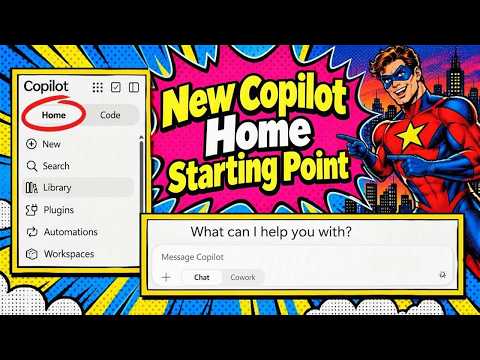
Microsoft Copilot Home brings Chat and Cowork together
M365 Adoption Lead | 2X Microsoft MVP |Copilot | SharePoint Online | Microsoft Teams |Microsoft 365| at CloudEdge
Copilot Home puts Chat and Cowork under one starting point, while Projects, Workspaces, plugins, and automations organize related work.
Key insights
- In the demonstrated interface, users open Chat or Cowork from the Home experience instead of separate top-level tabs.
- Agents appear in Plugins; the Added section can include agents, skills, and connectors.
- Notebooks are labeled Workspaces in the interface, with options to create, rename, pin, share, and delete them.
- Projects group related tasks or chats, but moving a chat into a Project did not work reliably in the demonstration.
- Cowork uses Work IQ in the demonstrated interface; the presenter could not turn it off there.
Microsoft Copilot Home brings Chat and Cowork together under a shared starting point, so users can choose conversational help or delegated work from the same experience. It matters to people who use Copilot Chat and Cowork and need to find the right mode, tools, or context for a task. Ami Diamond [MVP] demonstrates the interface and its navigation in a YouTube video.
What's new
The change described here is primarily a reorganization of Copilot’s web experience. In the demonstration, Home is the entry point, with Chat and Cowork presented as choices within it rather than as separate top-level tabs. The presenter opens office.com and lands on the new Home experience, but notes that the default selection may depend on the last-used mode.
The left navigation also brings together areas that previously appeared elsewhere. Agents are now presented under Plugins, and the Added section can contain agents, skills, and connectors. The interface distinguishes agents added by the user, agents shared with them, and options to discover Microsoft-built, organization-built, and third-party agents.
Other labels and groupings have changed too. The presenter says Notebooks are now called Workspaces, while Projects group related work such as multiple tasks or chats. Automations are also available in the navigation; the demonstration’s presenter believes this area covers automations created in Cowork, but does not verify that scope.
Who it is for and what you need
This layout is relevant to people using Copilot Chat or Cowork in the web experience, especially users who switch between quick prompts and more involved assignments. It may also help people who use agents, skills, Workspaces, Projects, or automations and need to locate them after the navigation change. The interface shown includes both Chat and Cowork, but the presenter says Cowork can appear blocked for organizations where it is not enabled.
The transcript does not establish a specific license requirement, eligible plan, tenant configuration, region, or general rollout status. The presenter refers to a premium experience and says they do not know whether the update applies to basic users. Treat the demonstrated screen as an example, not confirmation that every organization or account has the same options.
No administrator setting or activation path is given. If Home or Cowork does not appear in your organization, the material does not explain how an administrator can enable it or when it will become available. Check the experience available to your account and your organization’s Copilot guidance before planning a wider user rollout.
How it works
The basic flow is to enter Copilot Home, select Chat for a conversational request or Cowork for work handled through that mode, then use the navigation to locate supporting tools and saved work. In the demonstrated Chat experience, users can choose whether to use Work IQ; Cowork is shown as always using Work IQ. The presenter also says users can select a specific model, though the transcript does not give model names.
- Open office.com and go to the Copilot Home experience, if it is available to your account.
- Choose Chat for a prompt or Cowork for the Cowork capabilities available to you. The presenter describes Cowork as supporting more advanced tasks, but the exact capabilities depend on what is enabled.
- Open Plugins to find agents. Look under Added for items such as agents, skills, and connectors; the interface also shows discovery and shared options.
- Open Workspaces to continue notebook-style work. The example includes creating a chat, document, presentation, workbook, report, mind map, or infographic, and offers workspace actions such as renaming and sharing.
- Use Projects to group related work, or Automations to find items shown in that section. The presenter was unsure whether Projects worked across both Chat and Cowork.
The New control replaces the previous New Chat label in the screen described. A Workspace is more than a renamed navigation item in practical use: the example shows saved content and custom instructions alongside actions to pin, share, or delete it. Projects are described as groups of tasks or chats that can be asked questions about, although the demonstrated move-to action was not dependable.
Limitations and open questions
Several parts of the experience are not settled by the demonstration. The presenter could not confirm the default Home mode, whether the change reaches basic users, or whether Projects work with Chat as well as Cowork. A chat move into a Project had produced an error previously, so the organization feature may not have been reliable in that test.
The presenter also expects skills to become part of Chat plugins but says they are not visible there in the interface shown. They distinguish Cowork skills under Added from agents, while the broader Plugins area appears to collect both. That is a useful navigation clue, not confirmation that every skill or plugin works in both modes.
The video does not verify rollout timing, licensing, regional availability, or an admin control. It also does not establish that Automations covers every automation type. For now, users can check which sections their own Copilot experience displays and test the move and sharing actions before depending on them for established work processes.
Sources
Frequently asked questions
What is Microsoft Copilot Home?
In the demonstrated web interface, Home is a shared starting point where users can choose Chat or Cowork and reach related areas such as Plugins, Workspaces, Projects, and Automations.
How do I find agents in Copilot Home?
Open Plugins. The Added section can show agents alongside skills and connectors, while the interface also provides discovery and shared-agent views.
Does Copilot Home require a particular license?
The available material does not establish a license requirement. The presenter says they are unsure whether the change applies to basic users and notes that Cowork may be blocked for some organizations.
Are Copilot Notebooks now called Workspaces?
The demonstrated interface labels Notebooks as Workspaces. The example includes options to create, rename, pin, share, and delete a Workspace.