- All of Microsoft
Claude Skill Powers SharePoint App
A Microsoft MVP 𝗁𝖾𝗅𝗉𝗂𝗇𝗀 develop careers, scale and 𝗀𝗋𝗈𝗐 businesses 𝖻𝗒 𝖾𝗆𝗉𝗈𝗐𝖾𝗋𝗂𝗇𝗀 everyone 𝗍𝗈 𝖺𝖼𝗁𝗂𝖾𝗏𝖾 𝗆𝗈𝗋𝖾 𝗐𝗂𝗍𝗁 𝖬𝗂𝖼𝗋𝗈𝗌𝗈𝖿𝗍 𝟥𝟨𝟧
Ported Claude Skill into SharePoint with Microsoft Lists and Copilot proving Skills portability and creative prompts
Key insights
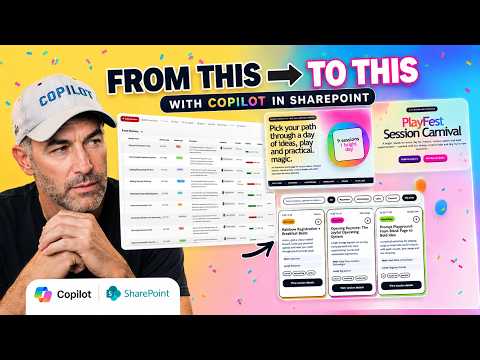
- Hands-on test: I downloaded Anthropic’s Claude Skill, dropped it into a SharePoint Agent Assets library, and ran it against a Microsoft List holding a conference itinerary.
It produced a live, interactive event page (confetti, ticker, filters, tabs, modals) and a second run produced a different creative interpretation from the same input. - Shared architecture: Claude Skills and SharePoint Skills use the same SKILL.md architecture with identical YAML frontmatter, progressive disclosure, and reference patterns.
One skill file can work on both platforms without reauthoring. - Integration layer: The connection relies on the Model Context Protocol (MCP) to let Claude read and act on content across Word, Outlook, Teams, SharePoint, and OneDrive.
That protocol enables a multi-model, agentic workflow rather than a simple chat overlay. - Security model: Claude respects normal Microsoft permissions via Microsoft Entra, using a read-only, delegated permission model so the AI only accesses data the user is allowed to see.
This preserves tenant security while enabling direct content queries. - Operational benefits: Agent Skills let teams store SOPs as a SOP as Markdown file and have the AI follow them consistently, removing repetitive setup and manual file uploads.
Progressive disclosure limits context bloat and keeps performance and cost under control compared with native Copilot alternatives. - Practical takeaway: For SharePoint admins and builders, any Claude Skill can become an installed SharePoint Skill by placing it in the agent assets library and pointing it at lists or libraries.
This enables reusable, enforceable behaviors and faster, more consistent site experiences.
Quick summary of the video
In a recent YouTube video, Daniel Anderson [MVP] demonstrates how he downloaded an open-source Claude Skill from GitHub and ran it inside SharePoint. He used a Microsoft List containing a conference itinerary and, with a single prompt, generated a lively event landing page with interactive elements. Notably, when he ran the same skill twice against the same data, the outputs differed significantly, highlighting the creative variance of the model.
Moreover, the video lays out clear chapters for viewers, including where the data lives, the single prompt behind the demo, and the download steps for the skill. The main takeaway is that the SKILL.md architecture used by Anthropic maps directly to the SharePoint Skills model, meaning skills designed for one platform can run on the other with minimal changes. Consequently, this demonstration suggests a growing portability across agent frameworks.
What the demonstration showed
First, Anderson dropped the skill into a SharePoint Agent Assets library and invoked it against a calendar-style Microsoft List. The result was a fully interactive landing page with confetti, a session ticker, filter pills, and modal dialogs, which the skill built automatically from the list data. Then, on a second run, the same prompt produced a different creative interpretation, which underlines that generative outputs can vary even with identical inputs.
Therefore, the video makes a practical point about reproducibility and creativity in agent workflows: while automation speeds delivery, it can also introduce variability. Consequently, teams will need strategies to manage that variability if they require consistent output. For many scenarios, however, this creative difference is a feature rather than a bug, especially for marketing or events where variety can be valuable.
How the technology fits together
Technically, the demo rests on three key elements: the orchestrator component in SharePoint, the SKILL.md logic file, and the data reference stored in Microsoft Lists. In addition, the underlying integration uses the open Model Context Protocol (MCP) to let the agent read and act on content inside Microsoft 365 services. Importantly, the setup maintains standard Microsoft permission controls so the model only sees what the user can access.
Furthermore, Anderson explains progressive disclosure as a performance strategy: load lightweight metadata first, then fetch full content and resource files when needed. This approach reduces context overload and keeps response times reasonable while still enabling deep operations when required. As a result, organizations can balance responsiveness with depth of analysis.
Tradeoffs and operational challenges
There are clear benefits but also tradeoffs to consider. On one hand, integrating third-party skills like Claude into SharePoint can eliminate manual file handling and automate standard operating procedures, which saves time and reduces human error. On the other hand, reliance on external model behavior introduces variability and raises questions about versioning, auditing, and governance.
Moreover, teams must address security, compliance, and cost tradeoffs. While Anderson notes potential cost advantages versus native offerings, any integration with an external model requires careful review of data handling, tenant policies, and vendor SLAs. Consequently, enterprises should plan for change control, testing, and rollback mechanisms when deploying agent skills at scale.
Implications and next steps for organizations
Looking ahead, this demonstration points toward a more agentic workplace where modular skills travel across platforms, reducing duplication of effort. However, organizations should treat such capabilities as tools that require governance, testing, and human oversight rather than one-click cures. Therefore, pilot programs that include reproducibility checks, approval workflows, and clear documentation will help teams adopt the technology responsibly.
In conclusion, the video by Daniel Anderson [MVP] offers a clear, hands-on look at how a Claude Skill can run inside SharePoint and what that portability means in practice. While the promise of faster, smarter automation is real, decision-makers must weigh creativity against consistency and openness against control. Ultimately, careful planning and iterative rollout will help organizations capture the benefits while managing the risks.

Keywords
claude skill sharepoint integration, download claude skill, claude ai in sharepoint tutorial, build claude assistant in sharepoint, sharepoint ai automation with claude, claude bot sharepoint walkthrough, deploy claude skill to sharepoint, enterprise ai integration sharepoint