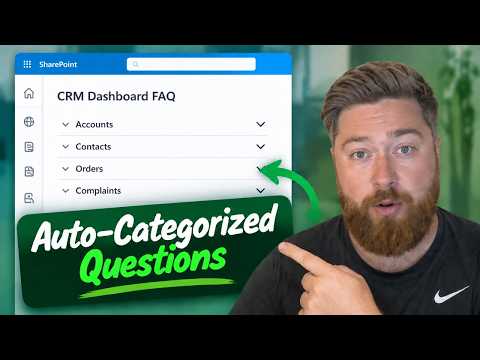
SharePoint FAQ web part: create an AI-drafted FAQ
SharePoint page authors can generate FAQ categories, questions, and answers from selected content, then review and edit them before publishing.
Key insights
- Add the FAQ web part while editing a SharePoint page, using the toolbox or a section’s web part area.
- The setup can use the current page or other available content, including recent files, meetings, and SharePoint pages.
- AI drafts the FAQ in stages: categories, questions, then answers.
- Authors can add and reorder categories, revise questions and answers, and change the FAQ layout.
- The FAQ can include a field for visitors to submit additional questions to its author.
SharePoint’s FAQ web part can use selected content to draft FAQ categories, questions, and answers for a page, giving authors a starting point they can review and edit. It matters to SharePoint page authors building guidance into a dashboard or site, such as an FAQ for employees learning a CRM system. Dougie Wood [MVP] demonstrates the setup using a SharePoint CRM dashboard.
What it does
The FAQ web part puts an expandable set of questions and answers directly on a SharePoint page. In the example, it is placed at the bottom of a CRM dashboard to help employees understand how to use the system.
Rather than enter every item manually, an author can ask AI to draft the FAQ from selected content. The author chooses a purpose, reviews proposed categories, then proceeds to questions and answers.
There is also a manual route: the author can paste questions and answers into the import box. AI-generated content is editable, so the author can correct or replace drafts before publishing the page.
Who it is for and what you need
This workflow is for people who can edit SharePoint pages and want to provide answers in the context where users need them. The example uses an existing CRM dashboard, but the demonstrated choices also include an HR or people site with policy and training information.
The transcript does not state a required licence, tenant configuration, rollout stage, or region. It also does not specify which content types are supported in every tenant, so confirm what the source picker offers in your own SharePoint environment.
For the demonstrated route, you need a page to edit and suitable content to use or questions and answers to import. The author should check generated answers against the source material before publishing; the demonstration explicitly recommends reviewing AI’s suggestions.
How it works
- Edit the SharePoint page. Scroll to the place where the FAQ should appear and, if needed, add a section. The demonstration uses a one-column section.
- Add the FAQ web part from the toolbox on the right, or use the web-part area in the section to find FAQ.
- Choose whether to import your own questions and answers or use the AI option. For AI drafting, select “Get started.”
- Select source content. In the example, the author chooses the current page. The picker also offers recent content such as files and meetings, and the transcript mentions other SharePoint pages and URLs.
- Choose a purpose, such as an event, product, policy, or general FAQ, and select “Start.” The tool drafts categories first, then questions, then answers.
- Review and adjust the draft. Add or reorder categories, add or revise questions, and edit answer text in the SharePoint text editor. The CRM example includes categories for accounts, contacts, and orders.
- Set the display options and publish the page when the content is ready. The demonstrated options include chevron or plus-minus layouts, showing or hiding categories and a title, and enabling a field for submitted questions.
Limitations and open questions
AI-generated answers are drafts, not verified policy or product guidance. The author remains responsible for checking that each answer is accurate and appropriate before publishing. The example’s answer about finding customer account details is simple, but that does not establish that every generated answer will be correct.
The transcript does not give licensing details, explain administrator controls, or confirm broad availability. It also does not describe how submitted questions are delivered or managed, or whether an FAQ automatically changes when its source content changes.
If you do not want AI to draft the content, the demonstrated alternative is to paste existing questions and answers into the import box. The author can also add questions and categories manually and edit generated text before publishing.
Sources
Frequently asked questions
How do I add the FAQ web part in SharePoint?
Edit the page, add a section if needed, and insert FAQ from the toolbox or the section’s web-part area.
Can SharePoint AI create FAQ questions and answers from a page?
The demonstrated workflow lets an author select the current page or other available content, choose a purpose, and generate categories, questions, and answers. Review the generated text before publishing.
What licence do I need for the SharePoint FAQ web part?
The available material does not state a required licence, so check your tenant’s feature availability and licensing guidance.