- All of Microsoft
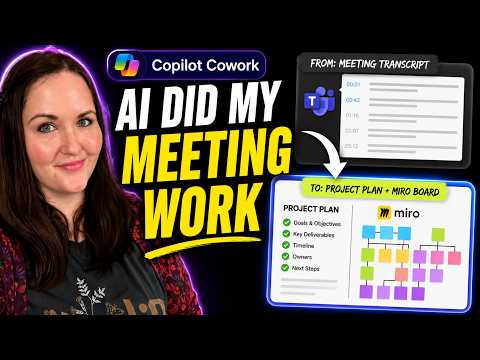
Copilot Cowork: Turn Meetings into Plans
Principal Power Platform Advocacy Team Lead at Microsoft ◉ YouTuber ◉ Speaker ◉ LinkedIn Learning Course Author ◉ Low Code Revolution Host
Microsoft expert demos Copilot Cowork turning meeting transcripts into project plans, Miro maps and Power Platform
Key insights
- Copilot Cowork processed a full meeting transcript to produce a complete project packet and used a Miro plugin to create visual process maps.
It assembled plans, diagrams, and deliverables from one meeting input so the team could review a single, connected output. - Project packet includes a briefing document, requirements summary, process flows, analysis, a client-ready slide deck, and a draft follow-up email.
All files are saved in Microsoft 365 so the team can edit and refine the packet together. - Multi-step execution means Cowork can pull context from Outlook, Teams, and files, then create Word, Excel, and PowerPoint assets, post to Teams, and manage calendar items.
It can also run scheduled prompts and use custom skills stored in OneDrive. - Human-supervised workflow: Cowork prepares actions and shows each step, but asks for approval before carrying out important tasks.
The video demonstrates approving actions, reviewing a Miro board, and packaging the final output. - Miro agent enables whiteboard-style diagrams and visual maps inside the workflow, enhancing process and brainstorming visuals.
The exact end-to-end behavior may vary and isn’t fully documented in available previews. - Benefits: saves time, improves consistency across documents, boosts collaboration, and scales repeatable workflows with recurring prompts and reusable skills.
Caveat: Copilot Cowork is in limited preview stages and features may evolve as Microsoft expands availability.
Overview of the Experiment
In a recent YouTube episode, presenter April Dunnam tested whether Copilot Cowork can convert a full meeting transcript into a ready-to-use project packet. She fed a kickoff meeting transcript into the agent and asked it to produce the usual project artifacts: a plan, requirements summary, process flows, diagrams and follow-up messages. The episode highlights a new plugin capability that connects the agent to Miro for visual process maps, and it shows how modern assistants can reach beyond simple chat. Overall, the test aimed to measure speed, completeness and how well the system handles practical team needs.
Importantly, Dunnam kept the experiment realistic by using a full-length meeting transcript rather than a contrived example, which gave viewers a better sense of how the agent copes with messy, real-world inputs. As a result, the episode offers a practical look at how automation could cut the manual work that usually follows meetings. At the same time, it raised questions about accuracy and human oversight when an agent touches multiple files and tools. Consequently, the results are useful for teams that weigh efficiency against control.
What April Dunnam Tested
Dunnam asked Copilot Cowork to take the transcript and produce a connected set of deliverables, including a briefing document, slide deck, follow-up email and visual process maps in Miro. She also showed the agent requesting approvals before it completed certain actions, which demonstrates a built-in safety checkpoint. During the test, the agent pulled context from the transcript and generated structured outputs that teams often create by hand after a kickoff. Thus, the experiment underscored the agent’s ability to assemble multiple deliverables in one workflow.
Furthermore, she highlighted the agent’s step-by-step transparency, where each action was visible as it worked across apps in Microsoft 365. This transparency matters because it helps users follow what the agent plans to do and where it stores results. As a result, teams can find and refine outputs in a shared workspace instead of hunting through scattered files. Therefore, the demo offered both a demonstration of capability and a way to judge whether the outputs match team expectations.
How the Miro Integration Performed
The new plugin capability to connect to Miro enabled the agent to generate whiteboard-style maps as part of the packet. Dunnam reviewed the produced board and showed how visual flows complemented the written deliverables, which helps teams translate discussion into diagrams more quickly. However, she noted that the fidelity of complex diagrams still depends on clear prompts and sometimes manual cleanup. Consequently, the integration acts as a strong starting point rather than a finished design that needs no human touch.
Moreover, the combination of document generation in Microsoft 365 and visual outputs in Miro highlights a hybrid value: the agent can create structured artifacts while the whiteboard gives teams a shared visual language. Yet, integration limits and the need for correct permissions can complicate the setup, especially in tightly governed environments. Meanwhile, organizations must ensure the agent has proper access without exposing sensitive items beyond policy. Thus, administrators face a tradeoff between convenience and governance.
Tradeoffs and Practical Challenges
The episode made clear that automation brings both gains and risks, and teams must balance those carefully. For example, the agent speeds up preparation, which saves time, but it can also introduce errors when the transcript lacks context or contains ambiguous language. Therefore, human review remains essential to catch missed nuances, fix inaccurate assumptions and confirm priorities. In short, the faster output does not remove the need for human judgment.
Additionally, Dunnam pointed out technical and organizational hurdles: transcript quality, permission settings, and the need for well-crafted prompts all affect results. While Copilot Cowork can reuse skills and run recurring prompts for repeatable workflows, creating those reusable assets requires upfront effort and governance. Consequently, teams that want to scale automation must invest in both training and oversight to keep outputs reliable. As a result, the full benefit emerges when automation complements disciplined human processes.
Verdict and Implications for Teams
Dunnam concluded that the system shows strong promise as a time-saving assistant that can produce a coordinated packet of deliverables after a meeting. She emphasized that the agent works best when users treat it as a collaborator that needs direction and approval instead of a fully autonomous solution. Thus, teams can gain efficiency by having the agent handle routine assembly while team members refine the final artifacts. This model supports a practical middle ground where automation accelerates work without sacrificing control.
Looking forward, the demo suggests organizations should pilot such tools in controlled settings and set clear rules for access and review. In addition, teams should test how well the agent handles their specific meeting styles and documentation norms before relying on it for client-facing materials. Ultimately, while Copilot Cowork and the Miro plugin offer a meaningful leap in meeting-to-project automation, the episode shows that careful setup, ongoing oversight and human editing remain central to delivering accurate, trusted results.
Keywords
Copilot Cowork, Copilot Miro integration, turn meeting into project, meeting to project Copilot, Copilot for meetings, project packet from meeting, Can It Cowork Ep 2, Copilot project automation