- All of Microsoft
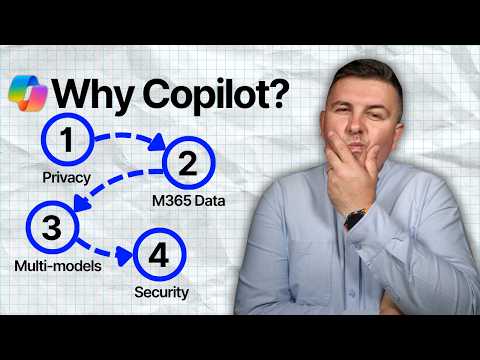
Copilot: 4 Reasons Companies Choose It
Microsoft 365 atWork; Senior Digital Advisor at Predica Group
Microsoft Copilot secure access to SharePoint Teams via Graph with Entra ID and Purview, multi AI models with OpenAI
Key insights
- Microsoft 365 Copilot — an AI assistant built into Word, Excel, Outlook, Teams, and SharePoint that answers natural-language prompts to speed everyday work.
It helps draft, summarize, analyze, and automate routine tasks inside the apps people already use. - Tenant-bound data — Copilot keeps organizational prompts, responses, and accessed content inside your tenant and does not use that data to train foundation models.
It enforces existing access permissions, sensitivity labels, and Data Loss Prevention (DLP) rules. - Access to Microsoft 365 data — Copilot connects to Exchange, SharePoint, OneDrive, Teams and other M365 sources and only surfaces items the user already has permission to view.
This preserves context while limiting exposure to unauthorized content. - Multi-AI model — Copilot routes tasks across models from Microsoft, OpenAI, and Anthropic based on complexity and performance needs.
That lets the service pick the best model for writing, reasoning, or data analysis. - Defense-in-depth security — Copilot integrates Entra ID Conditional Access plus Microsoft Purview controls (sensitivity labels, DLP, DSPM) to prevent oversharing and enforce governance.
Organizations can control who uses Copilot and from which devices or locations. - Business value: productivity, decisions, collaboration, trust — Copilot reduces repetitive work, speeds content creation and analysis, improves decision-making with contextual intelligence, and supports secure adoption inside existing workflows.
Embedding AI in familiar apps lowers the learning curve and boosts adoption across teams.
Introduction
Szymon Bochniak (365 atWork) recently published a YouTube video that explains why many companies pick Copilot as their AI assistant inside Microsoft tools. In clear terms, the video lays out four distinguishing values: data privacy, direct access to organizational content, a multi-model AI architecture, and built-in Microsoft security features. Consequently, the presentation frames Copilot not just as a productivity tool but as a platform that attempts to balance capability with control.
Moreover, Bochniak positions these points for business audiences who must weigh benefits against risks before adopting AI at scale. He highlights practical scenarios that matter to IT leaders, compliance teams, and end users alike. Therefore, the video serves as a concise primer for organizations considering an integrated AI approach.
The Four Core Values Explained
First, the video stresses the importance of privacy by noting that Copilot operates within a customer’s tenant security boundary and does not use organizational prompts or content to train foundation models. In addition, Bochniak emphasizes that the tool respects existing permissions, sensitivity labels, and Data Loss Prevention (DLP) rules so users only access what they are already allowed to see. As a result, the message reassures teams worried about data exfiltration or cross-tenant exposure.
Second, the presenter explains how Copilot connects to content across Exchange, SharePoint, OneDrive, Teams, and other Microsoft services through WorkIQ, and follows the same permission model that governs human access. Consequently, it can surface contextually relevant information without widening access. This approach aims to reduce search time and improve decision-making while maintaining existing security boundaries.
Architecture and Technology
Third, Bochniak outlines a Multi AI Model architecture where prompts route dynamically among models from OpenAI, Anthropic, and Microsoft depending on task needs. This design intends to combine strengths across providers and to optimize for performance and cost. Therefore, organizations can benefit from model diversity without committing to a single provider.
However, using multiple models introduces orchestration challenges, since different models have varied behavior, latency, and cost profiles. Consequently, IT teams must manage model selection rules and evaluate how responses integrate with compliance checks. Ultimately, this multi-model setup trades simplicity for flexibility and potential gains in accuracy and resilience.
Security and Compliance Controls
Fourth, the video highlights Microsoft security features as core to the Copilot experience, naming controls such as Entra ID Conditional Access for identity-level restrictions and Purview for sensitivity labels and governance. In addition, tools like Data Security Posture Management (DSPM) and DLP help prevent accidental sharing of sensitive data during AI interactions. Consequently, Copilot aims to fit into existing corporate risk frameworks rather than forcing new ones.
Even so, Bochniak notes that no system is entirely risk-free and that organizations must keep policies updated and enforce them consistently. Therefore, monitoring, audits, and clear user training remain critical to avoid misuse. This emphasis on ongoing governance reflects a practical balance between enabling productivity and maintaining control.
Tradeoffs and Practical Challenges
While the video presents clear benefits, it also raises tradeoffs that organizations must consider before wide deployment. For example, embedding AI into familiar apps reduces training needs, but it also makes AI outcomes more visible and possibly over-relied upon by users who may not verify results. Consequently, companies face a tension between faster decision-making and the need for human oversight.
Moreover, the multi-model approach and integration with organizational data can increase operational complexity and cost. Teams must decide how much control to exert over model routing, how to log interactions, and how to manage latency and reliability. Therefore, adopting Copilot involves technical, governance, and cultural work to realize benefits while limiting downsides.
When to Choose Copilot and Final Takeaways
Bochniak concludes by suggesting that organizations standardized on Microsoft 365 will find Copilot particularly compelling because it embeds AI into daily workflows and respects existing governance models. Furthermore, he argues that companies seeking to accelerate routine work, improve meeting summaries, and surface contextual insights can gain measurable productivity improvements. Consequently, the decision often comes down to readiness in identity, data hygiene, and policy enforcement.
In sum, the video provides a balanced overview that companies can use as a checklist when evaluating AI assistants. It highlights clear strengths, explains architectural choices, and warns about practical tradeoffs, so readers can make informed decisions based on technical and business priorities. Ultimately, as Bochniak shows, integrating AI into enterprise apps brings promise if organizations pair capability with careful governance.

Keywords
why companies choose Copilot, Copilot business benefits, Microsoft Copilot ROI, Copilot productivity boost, Copilot for enterprises, Microsoft 365 Copilot integration, Copilot security and compliance, Copilot adoption reasons