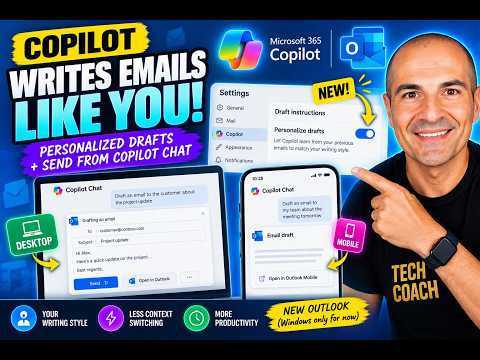
Outlook Copilot now writes like you
Microsoft MVPs, YouTube Creator youtube.com/giulianodeluca, International Speaker, Technical Architect
Giuliano De Luca shows new Outlook Copilot options that personalize email drafts and let users draft or send from Copilot Chat.
Key insights
- Personalization in Outlook lets Copilot learn from previous emails and match your writing style.
- The setting is in Outlook Settings > Copilot > Draft instructions > Personalize drafts.
- The new Outlook for Windows is the only Outlook app mentioned for personalization.
- Copilot Chat can open an embedded Outlook compose form on desktop for editing and sending.
- On mobile, Copilot Chat shows an embedded Outlook draft and can open Outlook Mobile for editing.
- The desktop Copilot Chat email flow needs an active Microsoft 365 Copilot license.
Giuliano De Luca [MVP] recently showed two Outlook updates that change how Microsoft 365 Copilot handles email: personalization for drafts and new email draft flows in Copilot Chat. The takeaway is simple: Copilot can now adapt to a user’s writing style in Outlook, and it can also move an email from chat into a sendable draft without leaving the Copilot experience.
The video separates the updates into three parts. First is a new personalization layer in Outlook. Second is a desktop Copilot Chat flow that opens an embedded Outlook compose form when Copilot detects an email task. Third is a mobile draft experience where Copilot Chat shows an embedded Outlook draft and then hands off to Outlook Mobile for editing and sending.
What's new
The first change is Personalization for Outlook drafts. Until now, the video says users could only guide Copilot with custom instructions such as keeping emails short, sounding professional but friendly, using a specific greeting, or ending with a particular sign-off. With personalization turned on, Copilot learns from previous emails and adapts drafts to match how the user naturally writes.
The second change is the desktop Copilot Chat email flow. When Copilot detects that the user wants to write an email, it opens an embedded Outlook compose form inside Copilot Chat. From there, the user can edit the message, change recipients, send it, or open the draft in Outlook to keep editing.
The third change is the mobile version of that idea. On mobile, Copilot Chat shows an embedded Outlook draft for review, then lets the user open it in Outlook Mobile to finish editing and send it. The material says this is enabled by default and does not require admin configuration.
Why it matters
For end users, the main benefit is less rewriting. If Outlook can learn a person’s typical tone and structure, Copilot drafts should require less cleanup before they are ready to send. That is different from giving one-off instructions every time, because the preference is saved as part of the drafting setup.
For admins, the desktop Copilot Chat email feature matters because it states that existing Outlook and Exchange Online policies, including DLP, still apply. It also says the desktop experience is on by default for eligible users and requires an active Microsoft 365 Copilot license. The mobile experience is also on by default, with no admin configuration needed.
For organizations that already use Microsoft 365 Copilot, these changes move email work closer to the chat interface while keeping Outlook in the loop. That may reduce context switching for users who start in Copilot Chat but still need Outlook to review or finish a draft.
How it works
The video shows the Outlook personalization setting inside the app. The path is:
- Open Outlook.
- Go to Settings.
- Open Copilot.
- Select Draft instructions.
- Choose Personalize drafts.
Once turned on, Copilot uses previous emails to shape future drafts so they sound more like the user. The source material does not describe the exact training period, the data scope, or any admin controls beyond the mobile note.
For the Copilot Chat desktop flow, the process is triggered when Copilot detects an email request. It then opens an embedded Outlook compose form inside Copilot Chat. From there, the user can edit the body, change recipients, send the email, or open the draft in Outlook for more editing.
For mobile, Copilot Chat presents an embedded Outlook draft for review. The user can then open it in Outlook Mobile to continue editing and send it. The material lists Microsoft 365 Copilot mobile app, Outlook Mobile, and Teams Mobile as the platforms involved.
Limitations and open questions
The personalization feature is only mentioned for the new Outlook for Windows. The material explicitly says it is not in classic Outlook. It does not say whether the feature is available elsewhere, and we could not verify any broader rollout details from the source.
The desktop Copilot Chat email feature is tied to eligible users and an active Microsoft 365 Copilot license, but the source does not define which licenses are eligible beyond that. It also does not explain how Copilot decides when to detect an email intent or what the embedded compose form can do beyond editing, recipient changes, sending, and opening in Outlook.
The video focuses on the user experience rather than policy detail. While it says existing Outlook and Exchange Online policies, including DLP, still apply, it does not describe specific policy interactions, audit behavior, or tenant prerequisites. We also could not verify any timing, region, or staged rollout information from the material.
Sources
Frequently asked questions
Where do I turn on Outlook personalization for Copilot drafts?
The video shows it under Outlook Settings, then Copilot, then Draft instructions, then Personalize drafts.
Does the personalization feature work in classic Outlook?
No. The material says it is only in the new Outlook for Windows and is not in classic Outlook.
Can Copilot Chat send emails without opening Outlook?
On desktop, yes. The video says Copilot Chat can open an embedded Outlook compose form where you can edit and send the email.
Do existing Outlook and Exchange Online policies still apply?
Yes. The material says existing Outlook and Exchange Online policies, including DLP, still apply to the desktop Copilot Chat flow.