- All of Microsoft
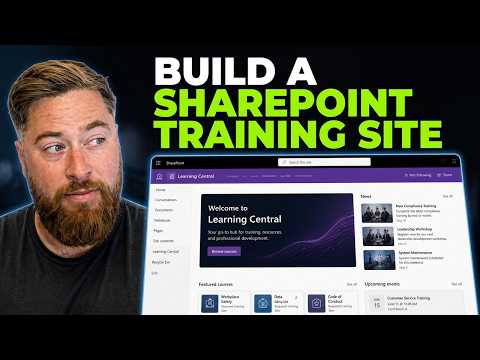
SharePoint Training Tracker: Quick Build
Microsoft expert builds SharePoint training hub for employee compliance, templates, site design and Origami Connect
Key insights
- SharePoint training site tracker: A practical video walkthrough shows how to build a central training hub to store courses, track completions, and surface news for staff.
Presenter Dougie Wood (MVP) demonstrates step-by-step setup and design choices you can copy for your organization. - Communication site and Topic layout: Modern guidance favors creating a Communication site with a Topic layout as the foundation for publishing training content and announcements.
This layout helps you present courses, news, and events clearly to a wide audience. - Microsoft Lists and lookup fields: Use Microsoft Lists to store employees, courses, and completed trainings and connect them with lookup fields for relational tracking.
Lists let you view, filter, and export training data without building a custom app. - SharePoint pages, navigation, and news and events: Build clear site pages, department-specific navigation, and roll-up news or event feeds to keep staff informed and help them find resources fast.
Design a simple homepage that highlights current courses and upcoming sessions. - Compliance, ISO 9001, and QMS: The tracker can capture training records and support compliance or quality-management needs when you keep accurate, auditable lists and documents.
Maintain consistent metadata and retention practices to support audits and reporting. - Fast to build, No custom app, and view formatting: The main benefits are speed and flexibility—assemble a working tracker using out-of-the-box SharePoint features and view formatting for usability.
Start with templates, publish when ready, and iterate based on user feedback to keep the site practical and current.
Dougie Wood [MVP] publishes a practical YouTube walkthrough that shows how to build a SharePoint training site from scratch, and this article summarizes the video for editorial review. In the tutorial, he focuses on using built-in templates and standard features so organizations can set up a training hub quickly. Consequently, the approach targets administrators and HR managers who need a centralized place for course materials, events, and compliance records. The video combines step-by-step configuration with design tips to help teams deploy a usable training tracker without custom development.
Overview of the tutorial
In clear, paced segments, the presenter outlines why a centralized training site matters and which modern SharePoint tools to use. He recommends building a Communication site for broad publishing and then adding structured content with Microsoft Lists to record training progress and resources. As a result, the solution becomes a single place for news, events, and training records that staff can rely on. The video emphasizes practical setup steps so teams can replicate the design quickly.
Moreover, the presenter highlights that this method is not a Microsoft product but a community-driven walkthrough using SharePoint Online features. He demonstrates the use of templates, page layouts, and list lookups to link participants with courses, which keeps the site maintainable. In addition, he points to third-party tools such as Origami Connect only as optional integrations for expanded functionality. Thus, the tutorial frames SharePoint as the core platform and other tools as possible extensions.
Step-by-step walkthrough
Dougie walks viewers through creating the site, applying a template, and configuring the homepage, and he shows how to add department navigation so users can find content quickly. He then builds lists to store employees, courses, and completed training entries, and demonstrates how lookup fields tie those records together. After that, he configures news rollups and events so managers can broadcast upcoming sessions and compliance reminders. This sequence gives an actionable path from blank site to operational training hub.
To help viewers follow along, the video is organized into clear chapters that mark each setup phase. For quick reference, the tutorial timestamps include:
- 00:00 SharePoint Training Site
- 04:47 SharePoint Homepage Design
- 15:20 SharePoint Compliance
These markers let teams jump to the parts most relevant to their needs while retaining the full context of the workflow. Therefore, practitioners can adopt parts of the build without reworking the entire site if they prefer incremental changes.
Key components and design choices
The tutorial centers on three main components: a Communication site for publishing, Microsoft Lists for tracking, and modern pages for organizing resources and news. Using the Topic layout makes the homepage suitable for broad communication, and lists provide the relational data model needed for training records. Additionally, view formatting and page sections help present information clearly to end users. These choices prioritize maintainability and low administrative overhead.
However, the presenter balances simplicity with useful features by showing how to surface training records and events without heavy customization. For example, roll-up news feeds and event web parts can display department-specific updates while a central list holds authoritative records. Consequently, the site remains flexible enough to adapt to different organizational structures. At the same time, it avoids the complexity of a bespoke application that would require ongoing development resources.
Tradeoffs and common challenges
One tradeoff in this approach is between speed of deployment and depth of functionality. On one hand, using out-of-the-box templates and lists lets teams launch a tracker quickly and cheaply. On the other hand, the solution may lack advanced features like automated certification workflows, detailed analytics, or tightly integrated learning management system capabilities. Therefore, organizations must decide whether the initial simplicity meets their long-term compliance and reporting needs.
Another challenge is data governance and scale. As lists grow, teams must plan for data retention, permissions, and performance. Additionally, linking courses, users, and completion records through lookups keeps relationships simple but can become complex if you need bulk imports or federated identities. Thus, planning the data model and governance rules early reduces technical debt and keeps the site usable as adoption grows.
Practical advice and next steps
For teams considering this path, start small and iterate: create a pilot site for one team, validate workflows, and then expand across departments. Also, document governance policies for list ownership, retention, and access control to prevent inconsistent records. Finally, if you need advanced automation or reporting later, evaluate whether to extend SharePoint with Power Platform tools or integrate a dedicated training system.
In conclusion, Dougie Wood’s tutorial provides a realistic, repeatable way to build a SharePoint training tracker using modern features. While it does not replace specialized learning management systems, it offers a low-cost, centralized option that many organizations can adopt quickly. Consequently, the video serves as a strong starting point for teams that want a practical and maintainable training hub built on SharePoint.

Keywords
SharePoint training tracker, Build SharePoint training site, SharePoint training site template, SharePoint training dashboard, Microsoft 365 training tracker, How to build SharePoint tracker, SharePoint learning management, SharePoint site tutorial