- All of Microsoft
Microsoft Teams: Pilot Frontline Staff
Software Development Redmond, Washington
Microsoft Teams expert guide: deploy a frontline pilot from the Teams Admin Center to manage members, channels, and apps
Key insights
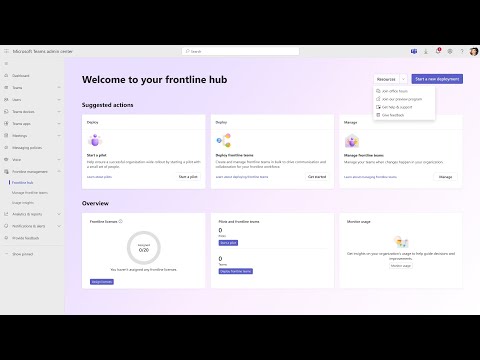
- Frontline hub: The video shows how the Frontline hub in the Teams Admin Center centralizes pilot setup and management, and that the feature became available in November 2025.
- Rapid deployment: Admins can start a pilot in about two minutes by choosing Teams capabilities, adding members and owners, and clicking Deploy; you then manage membership, channels, and apps from one place.
- Custom configuration: Choose pinned apps, channels, Home layout, and Viva Engage settings to tailor the pilot to frontline roles like retail, healthcare, manufacturing, and logistics.
- Centralized management: The hub gathers workloads, membership controls, and settings in a single dashboard to simplify ongoing administration and reduce setup steps.
- Tracking and insights: Built-in adoption tracking and user feedback tools help measure pilot success and guide wider rollouts; organizations should review any compliance needs for their environment.
- Requirements and next steps: A Teams admin role is required to access the hub; start with a small pilot, collect feedback, and use the results to plan a fuller deployment.
Overview
The following report summarizes a YouTube video published by Microsoft that demonstrates a new pilot deployment experience aimed at frontline workers. In particular, the video walks administrators through launching a pilot directly from the Frontline hub inside the Teams Admin Center. It explains how admins select Teams capabilities, add members and owners, and press Deploy to start the pilot quickly.
Furthermore, the video emphasizes centralized management after deployment, showing how membership, channels, and apps are maintained from a single location. The presenter notes that a Teams admin role is required to access this experience. Consequently, the feature is positioned as a time-saving option for IT teams preparing frontline rollouts.
What the Video Demonstrates
First, the video shows a step-by-step deployment flow: choose desired capabilities, add pilot users and owners, pin essential apps, and click Deploy. Then the presenter highlights live management tools that let admins update membership, adjust channels, and manage apps without leaving the Admin Center. This hands-on walk-through is designed to reassure teams that the process is both straightforward and repeatable.
Moreover, the clip includes a brief overview of adoption tracking and monitoring features that help measure pilot success and gather feedback. It points out that rapid deployment can take as little as a few minutes when configurations are pre-selected, which helps teams validate ideas quickly. Finally, viewers are reminded that documentation on setup and best practices will be available through official Microsoft resources.
Benefits for Frontline Workers and IT
For frontline employees in retail, healthcare, manufacturing, and logistics, this pilot experience promises a tailored digital workspace with essential communication tools and pinned apps. Consequently, organizations can test specific Teams features under real conditions before committing to a full rollout, which reduces risk and supports better user adoption. As a result, frontline users receive configurations that are refined by actual usage rather than by assumptions.
From the IT perspective, centralizing pilot management in the Teams Admin Center reduces tool fragmentation and lowers administrative overhead. In addition, built-in adoption tracking gives IT and business leaders actionable insights to prioritize features that drive value. Thus, teams gain both speed and data to inform a more confident expansion of collaboration tools.
Tradeoffs and Challenges
Despite clear advantages, the approach entails tradeoffs that organizations should weigh carefully. For example, rapid deployment reduces setup time but may limit fine-grained customization if teams rush without proper testing, and so a balance between speed and thoroughness is necessary. Similarly, centralization simplifies management yet can constrain flexibility for specialized sites that need unique configurations.
There are also operational and compliance considerations to address. Although Microsoft reported no specific compliance issues tied to this pilot feature, organizations should still review internal policies and regulatory requirements before deploying broadly. In addition, offline or transient frontline workers and device management can challenge adoption measurement, so teams must plan for connectivity variations and security controls when designing pilots.
Deployment Best Practices
To manage these tradeoffs, the video and supporting guidance recommend starting with a focused pilot group and clear success metrics, then iterating based on feedback. Moreover, pairing the technical rollout with concise frontline training and simple documentation improves acceptance and reduces confusion during early use. Therefore, a staged approach that emphasizes both technical readiness and people readiness tends to produce more reliable outcomes.
Another practical tip shown in the video is to pin critical apps and configure Home and Viva Engage settings before deploying to maximize usefulness for frontline staff. In addition, tracking adoption and logging qualitative feedback during the pilot helps justify wider investments and identifies necessary process changes. Ultimately, blending quantitative metrics with user stories gives decision-makers a clearer picture of what to scale.
Implications for Organizations
Overall, the new pilot flow within the Frontline hub aims to accelerate how organizations validate Teams features for frontline roles while keeping management centralized. Consequently, businesses gain a repeatable method to test tools, measure impact, and refine configurations before committing to a full deployment. This approach reduces risk and supports more informed, data-driven decisions about frontline productivity investments.
However, success still depends on careful planning, appropriate governance, and cross-functional collaboration between IT, operations, and frontline managers. As such, organizations should treat the pilot as both a technical experiment and an organizational change initiative, ensuring that lessons learned are captured and applied. In this way, the video’s demonstrated workflow can become a practical template for launching better, faster, and more user-centered frontline solutions.
Keywords
frontline worker pilot program,launch pilot program frontline workers,pilot program for frontline staff,frontline workforce pilot launch,pilot rollout for frontline employees,frontline staff pilot project,pilot testing for frontline teams,best practices for frontline pilots