- All of Microsoft
Power BI: Philly User Group Highlights
Microsoft MVP | User Adoption, Dynamics 365 + Power Platform Expert at Reenhanced
Microsoft expert on Dynamics apps and Power Platform with Azure AI Foundry Copilot and rapid Power BI report tips
Key insights
- Philadelphia Dynamics 365 & Power Platform User Group: Online Q4 2025 meetup on Dec 12, 9:30–11:30 AM ET featuring two sessions — Christopher Gill on Foundry & Copilot (0:00) and Lenore Flower on building a printable Power BI report (48:26).
- Azure AI & Copilot: Gill shows how to add Azure AI and Copilot to Business Apps to automate tasks, summarize data, and speed development with practical implementation steps.
- Power BI practical build: Flower demonstrates a step-by-step method to design and export a clean, printable report in 45 minutes, including layout, page size, and export-to-PDF tips.
- Power Platform: The meetup highlights low-code tools (Power Apps, Power Automate, Power BI) and how they work together to move ideas from prototype to production.
- Power BI Desktop: Bring sample datasets and use Power BI Desktop for data modeling, visual layout, and quick testing before exporting a printable version.
- Copilot Studio & governance: Plan prompts, set data access rules, and test outputs; focus on secure data connections and simple prompts for reliable Copilot-driven reports.
Overview of the Video and Event
Heidi Neuhauser [MVP] published a YouTube video that captures the Q4 2025 meeting of the Philadelphia Dynamics 365 & Power Platform User Group, focusing on Microsoft Foundry and Power BI. The recording features two presentations: Christopher Gill opens with "Supercharge Business Apps with Azure AI, Foundry & Copilot," and Lenore Flower follows with a timed demo titled "Race Against the Clock: Create a Printable Power BI Report in 45 Minutes or Less." Consequently, the video serves both as a showcase of new tools and a practical tutorial for people working with business applications and analytics. Overall, Heidi frames the meeting as a learning opportunity for practitioners who want hands-on approaches to AI, low-code, and reporting workflows.
Christopher Gill: From Innovation to Implementation
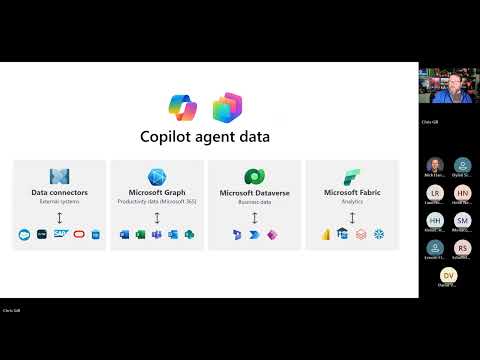
Christopher Gill’s segment explains how teams can combine Azure AI, Microsoft Foundry, and Copilot to accelerate business app development and deliver smarter user experiences. He demonstrates specific scenarios where generative AI and agent frameworks help turn prototypes into production-ready features, while emphasizing automation for routine tasks and AI for decision support. In doing so, Gill stresses the need for well-structured data and clear requirements so that AI components remain reliable and aligned with business goals. Thus, his talk balances excitement about new capabilities with a reminder that success depends on preparation and governance.
Furthermore, Gill outlines practical steps for teams to move from concept to implementation, including setting up environments in Foundry to rapidly prototype integrations and using Copilot to accelerate authoring of analysis and UI elements. He also addresses operational concerns such as model monitoring, access controls, and cost awareness to prevent unexpected resource use. As a result, viewers gain a view of both the technical path and the managerial practices that help scale AI-driven features. Overall, the presentation mixes demos and governance advice to highlight clear next steps for development teams.
Lenore Flower: Fast, Printable Power BI Reports
Lenore Flower offers a practical demonstration that aims to create a printable Power BI report within 45 minutes, showing techniques for layout, pagination, and exportability. Her walkthrough includes strategies to prepare visuals for print, manage page size, and tune visuals so they render predictably when exported to PDF, which remains a common requirement for executive distribution or regulatory filings. She also shares shortcuts for data modeling and page design that reduce iteration time while keeping the content readable and professional. Consequently, the demo is valuable for report authors who need reliable, reproducible output under time pressure.
In addition, Flower highlights common pitfalls, such as inconsistent fonts, interactive elements that don’t translate to static pages, and issues with slicers or drillthroughs that break print layouts. She recommends testing with representative data and iterating layout decisions early to avoid rework as the deadline approaches. By balancing speed with careful checks, she demonstrates that teams can meet tight timelines without sacrificing the clarity or accuracy of the report. Thus, the session pairs practical tactics with a clear view of the tradeoffs involved in rapid report production.
Practical Tradeoffs: Speed, Quality, and Governance
The video makes plain that teams often balance competing priorities: quick delivery versus polished design, automation versus human oversight, and low-code speed versus custom control. For example, leveraging Copilot or generative models speeds development, but it can introduce unpredictable results unless organizations enforce data validation and explainability practices. Therefore, groups must invest time in testing, monitoring, and access management to keep innovation safe and repeatable. In short, the faster path usually requires compensating controls to protect quality and compliance.
Likewise, choosing low-code patterns in the Power Platform reduces development time and broadens participation, yet it can increase technical debt if teams bypass architecture patterns or governance. Integrating systems such as Dynamics 365 and Azure brings value through unified data, but it raises questions about licensing, data residency, and long-term maintenance. Thus, teams should weigh short-term wins against the work needed to scale solutions sustainably, balancing agility with clear standards and lifecycle planning. As a result, the video encourages viewers to plan for both launch and ongoing operation when adopting these tools.
Community Impact and Next Steps
The user group format showcased in Heidi’s video highlights the role of local communities in spreading best practices and troubleshooting real-world problems. By sharing demos and open discussions, presenters help attendees shorten learning curves and avoid common mistakes, while also surfacing new questions about governance and integration that benefit the wider community. Moreover, the virtual format makes it easier for non-local members to attend, although in-person meetings still offer unique networking advantages. Ultimately, the recording serves both as a how-to reference and as an invitation to engage with peers on implementation challenges.
For practitioners who watch the video, the immediate steps are practical: replicate demos in a non-production environment, adopt the recommended governance checks, and iterate on print layouts or AI prompts to match organizational standards. Additionally, teams should document lessons learned from prototypes and align with IT and compliance teams before moving to production. In closing, Heidi Neuhauser’s coverage provides a concise, actionable record of the event that helps practitioners weigh benefits and tradeoffs while planning their next experiments with Foundry, Power BI, and related tools.

Keywords
Philadelphia Dynamics 365 user group, Power Platform meetup Philadelphia, Microsoft Foundry Power BI demo, Power BI workshop Philadelphia, Dynamics 365 community Philadelphia, Power Platform user group PA, Power BI dashboards Microsoft Foundry, Dynamics 365 Power BI event Philadelphia