- All of Microsoft
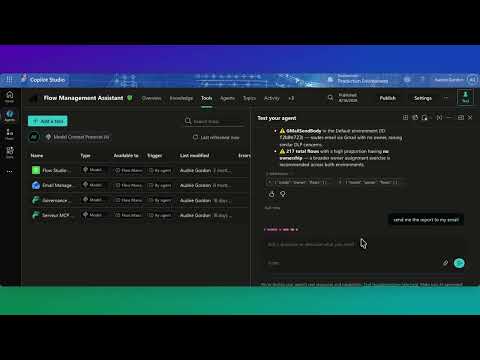
Flow Studio MCP Server: Fast Setup Guide
Explore Flow Studio MCP Server: ask questions about your Power Automate flows to optimize Power Platform automation
Key insights
- Flow Studio MCP Server: An independent server that lets AI agents inspect, debug, build, monitor, and govern Power Automate cloud flows without opening the Power Automate portal.
It forwards agent requests to the Power Platform APIs using delegated permissions. - Action-level operations: Agents can read per-action inputs and outputs, view errors, diagnose expressions, and control runs (trigger, resubmit, cancel).
This moves the tool beyond read-only discovery into full operational control of flows. - MCP (Model Context Protocol): Flow Studio exposes Power Automate features as callable tools via MCP so compatible AI clients can discover and invoke operations programmatically.
Clients connect through an MCP-capable client and authenticate with an API key sent in the x-api-key header. - MCP-compatible clients: The server works with a range of AI tools and copilot-style agents, letting those agents act directly on flow definitions and run history without portal access.
This enables automated, natural-language-driven management workflows. - Operational advantages: Expect faster troubleshooting, hands-free flow management, tenant-aware monitoring, and production-focused governance for enterprise flows.
Agents can inspect failures and apply fixes or patches programmatically. - Independent product: Flow Studio states the MCP server is not affiliated with or endorsed by Microsoft, so organizations should review licensing, security, and tenant governance before deployment.
Administrators should control API keys and audit agent actions.
Overview: What Audrie Gordon’s Video Reveals
In a recent YouTube video, Audrie Gordon walks viewers through Flow Studio’s MCP Server and demonstrates how an AI agent can interact with live automation flows. The video frames the server as a bridge between AI assistants and Power Automate environments, showing both inspection and operational controls. As a newsroom summary, this article highlights the key capabilities Gordon showcases and explains the practical tradeoffs organizations should weigh.
Gordon presents the tool as more than a read-only inspector and instead as an operational interface that can run, resubmit, or even modify flows. Consequently, the demonstration shifts the narrative from passive monitoring to active management by AI agents. This change raises opportunities for efficiency as well as concerns about control and security.
Key Capabilities Demonstrated
First, the video emphasizes action-level debugging, enabling agents to view inputs, outputs, and error details for individual actions within failed runs. This granular visibility can speed troubleshooting and reduce the time engineers spend reproducing errors. Furthermore, Gordon shows agents scaffolding and patching flow definitions, which highlights automation-driven development workflows.
Second, the demo highlights run control features: agents can trigger, cancel, or resubmit executions without opening the Power Automate portal. This capability promises faster remediation for production incidents, but it also means organizations must carefully govern who or what can issue such commands. Finally, the server’s inventory and monitoring views provide environment-level insights that help teams spot failure trends and maker activity at scale.
How the MCP Integration Works
Gordon explains that Flow Studio implements the Model Context Protocol as a JSON-RPC 2.0 layer so AI clients discover and call remote tools. In practice, an MCP-capable client connects to the Flow Studio endpoint and presents an API key to authenticate. Then, the client treats Power Automate operations as callable tools, enabling natural-language-driven tasks to translate into concrete platform actions.
She also shows multi-client compatibility, with agents such as Copilot-style assistants and other MCP clients invoking the same toolset. This brokered approach abstracts the Microsoft Power Platform APIs so that AI ecosystems can interact uniformly. Nevertheless, the architecture depends on reliable API key handling and consistent client implementation to avoid operational gaps.
Tradeoffs: Power vs. Control
While the video underscores clear productivity wins, it also implicitly acknowledges tradeoffs between automation power and administrative control. On one hand, enabling agents to modify flows reduces manual steps and speeds incident response; on the other hand, it expands the blast radius for misconfigurations or unintended changes. Therefore, organizations must balance autonomy with layered governance policies.
Security and compliance issues present further tradeoffs because the MCP server acts as a delegated intermediary with tenant-aware access. Using API keys rather than bearer tokens simplifies some integrations but may complicate rotation and auditing if not paired with robust key management. Moreover, because Flow Studio positions itself as an independent product, teams must assess vendor risk and ensure alignment with internal security standards.
Challenges and Practical Considerations
Gordon’s demo makes clear that implementing this model requires organizational readiness in several areas, starting with permissions and governance. Teams need clear processes to approve which AI agents can operate on which flows, plus monitoring that captures agent-driven changes for audits and rollback. In addition, building trust in automated change processes will likely require staged adoption and human-in-the-loop checkpoints.
Operationally, reliance on third-party middleware introduces latency and potential single points of failure that organizations must plan for. Integrations across multiple MCP clients also demand consistent protocol support and versioning to prevent unexpected behavior. Finally, as the video notes, Flow Studio explicitly states it is not affiliated with Microsoft, so customers must independently validate compliance, support expectations, and licensing implications.
Availability, Next Steps, and Editorial Takeaway
Gordon’s coverage indicates that Flow Studio’s MCP endpoint is available to customers who configure an API key and support MCP-capable clients. Although the video does not present every licensing or enterprise detail, it makes clear that the offering targets teams that need deeper, action-level control of cloud flows. Consequently, organizations interested in the approach should run proof-of-concept tests with strict governance and logging in place.
In summary, the video by Audrie Gordon highlights a meaningful shift: Flow Studio’s MCP Server moves from a read-only integrator to a full operational interface for Power Automate. This evolution offers efficiency and troubleshooting advantages while introducing important security, governance, and vendor-risk considerations. Therefore, teams should weigh these tradeoffs carefully before broad adoption and plan pilots that validate both functionality and controls.

Keywords
Flow Studio MCP Server, MCP Server tutorial, Flow Studio setup guide, MCP Server configuration, Flow Studio deployment, MCP Server best practices, Flow Studio integration, MCP Server performance tuning