- All of Microsoft
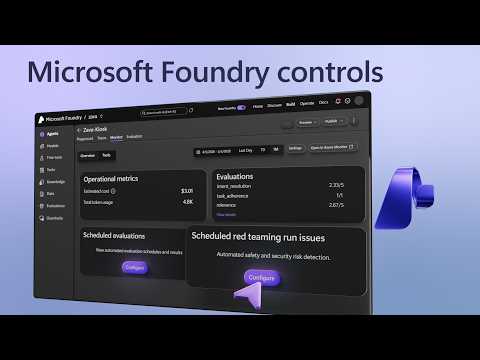
Microsoft Foundry: Automate Evaluations
Software Development Redmond, Washington
Harden AI agents with Microsoft Foundry and Azure AI using traces, guardrails, automated evaluations and Red Team
Key insights
- Automated Evaluations: Microsoft Foundry runs repeatable tests on agents to check correctness, safety, and regressions at scale.
These evaluations help teams find problems early and keep AI behavior consistent. - Evaluation flow: Define a scenario and schema, provide a dataset, choose evaluators, run the agent, then review scored results and summaries.
Foundry shows results in the portal or exposes them via SDKs for further analysis. - Integrations: Start evaluations from the Foundry portal, the Python SDK, or wire them into CI/CD pipelines like GitHub Actions for regular checks.
This makes testing part of development and deployment workflows. - Built-in quality evaluators: Measure correctness, relevance, groundedness, task completion, intent resolution, and tool-call accuracy.
Foundry supports both traditional scoring and AI-assisted judging to match different QA needs. - Safety evaluators: Detect harmful outputs such as hate, sexual or violent content, self-harm, jailbreak attempts, and protected-material risks.
Teams use these checks to assess and reduce deployment risk before users encounter problems. - Synthetic datasets & Guardrails: Generate test data on demand, run automated red-team attacks, trace every run, and enforce runtime safety rules across agent runs.
These features support continuous monitoring, root-cause analysis, and consistent enforcement of safety policies.
Overview of the video and its purpose
The YouTube video, published by Microsoft and presented by Mohammad Abuomar, outlines how Teams can use Microsoft Foundry to automate evaluations for AI agents. It demonstrates a full workflow from a finished agent back to its source, and it highlights how teams can trace every run end-to-end while capturing monitoring and evaluation outputs. The presentation emphasizes production readiness, showing how to convert a coding agent into software that meets quality, safety, and performance requirements. Overall, the video positions automated evaluation as a practical way to keep agents reliable as they evolve.
Key demonstrations and control plane capabilities
The demo centers on the Microsoft Foundry control plane, where teams can start evaluations from several places in the portal and inspect results visually. Viewers see traces, built-in monitoring panels, and the ability to pin down why specific evaluations failed, which helps teams debug regressions faster. The presenter also walks through how to generate synthetic datasets on demand to stress-test agents when labeled data is missing or hard to obtain. These capabilities together create a tighter feedback loop between development and operations.
Moreover, the video highlights runtime inspection and enforcement: teams can lock in guardrails that inspect every tool call while an agent runs, and define risks once to enforce them across every run. The demo shows how evaluations provide both summary scores and detailed evidence, so teams can move from high-level metrics to specific failing cases quickly. This traceability matters for regulated environments and for teams that need to explain behavior to stakeholders. As a result, the platform aims to reduce the guesswork in diagnosing agent problems.
The evaluation workflow and integration points
The video explains a simple evaluation flow: define a scenario and schema, provide a dataset (real or synthetic), choose evaluators, run the agent, and then analyze scored results. Evaluations can be launched from the Evaluation page, a model’s Evaluation tab, an agent’s Evaluation tab, or the Agent playground via Metrics, which gives teams flexibility in how they integrate testing into daily work. Importantly, the demo shows that evaluations are accessible through the portal and programmatically via Python, enabling integration into CI/CD pipelines such as GitHub Actions. This flexibility helps teams automate checks as part of continuous delivery.
However, the video also makes clear that tradeoffs exist when choosing where to run evaluations and how often. Running frequent, comprehensive evaluations improves detection of regressions but increases compute and storage costs and can slow down iteration cycles. Conversely, limiting evaluation scope reduces cost but raises the risk of missing subtle failures. Teams therefore need to balance coverage, cost, and speed, and the platform provides tools like synthetic data generation to reduce some of those tradeoffs without creating unrealistic test scenarios.
Safety evaluators, Red Teaming, and runtime guardrails
The presenter outlines two broad evaluator categories: quality evaluators that measure correctness, relevance, and tool-call accuracy, and safety evaluators that detect harmful content, jailbreak attempts, and other risks. He also demonstrates automated Red Team evaluations that simulate attacks or misuse to probe vulnerabilities. This combination of safety testing and adversarial checks helps teams find both accidental regressions and intentional exploitation vectors before public exposure.
Still, balancing strict safety controls and agent capability is challenging. Tight guardrails can prevent harmful outputs but might also block valid, context-sensitive responses or degrade user experience if rules are too conservative. Conversely, looser settings increase agility but raise safety risks. Teams must therefore iterate on safety definitions and tolerances, and incorporate human review where automated evaluators produce ambiguous or high-risk results, because no automated test replaces careful contextual judgment.
Scaling evaluations and operational tradeoffs
The video emphasizes automation and continuous evaluation as a shift from ad hoc testing to ongoing monitoring of agent behavior over time. Automated checks catch regressions that emerge when prompts change, tools evolve, or data drifts, and the demo shows how traces and logs link failures back to specific runs. At scale, these features reduce manual review work but introduce operational complexity, such as managing evaluation pipelines, storing results, and interpreting noisy metrics.
Cost and interpretability are clear tradeoffs when running large-scale evaluations. Frequent adversarial testing and synthetic stress tests increase cloud spend and create large volumes of telemetry that teams must triage. Likewise, evaluators that rely on AI-assisted judging can speed assessment but may produce inconsistent labels unless calibrations and human audits are in place. Therefore, engineering and product teams should plan for budget, tooling for result triage, and periodic human oversight to keep automated processes trustworthy.
Implications for teams and next steps
For teams adopting Microsoft Foundry, the video makes a strong case for embedding automated evaluations into the development lifecycle to improve reliability and reduce surprise regressions. In practice, teams will need to design evaluation schemas, choose a balance of real and synthetic datasets, configure safety evaluators, and determine where to enforce runtime guardrails. These steps demand cross-functional collaboration between developers, QA, security, and compliance stakeholders to align goals and ensure that automated checks reflect real-world risk tolerances.
Ultimately, the demo shows that automation can significantly improve agent quality while also introducing operational decisions about cost, scope, and oversight. Consequently, teams should start small, iterate on evaluator definitions, and add automation gradually while keeping humans in the loop for high-risk cases. By doing so, organizations can make practical progress toward production-ready agents that meet standards for quality, safety, and performance.

Keywords
Automate evaluations, Microsoft Foundry, evaluation automation, automate model evaluations, AI evaluation pipeline, continuous evaluation automation, Foundry automation tools, scalable evaluation workflows