- All of Microsoft
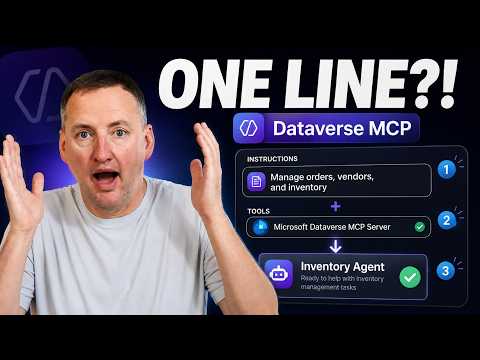
Dataverse MCP: One-Line Inventory Agent
SharePoint & PowerApps MVP - SharePoint, O365, Flow, Power Apps consulting & Training
Build an inventory agent fast with Copilot Studio and Dataverse MCP using Dataverse descriptions in Power Platform
Key insights
- One Line of Instructions + Dataverse MCP builds an Inventory Management Agent in Copilot Studio fast.
The video shows you can go from nothing to a working agent with a single compact instruction set. - Metadata-driven context: use Dataverse table descriptions and column descriptions to give the agent semantic context.
This lets the agent understand fields and relationships without long, manual instructions. - Model Context Protocol (MCP) server exposes live Dataverse data to agents.
In Copilot Studio add the Dataverse MCP Server as a tool so the agent can query and use real-time tables. - Minimal instructions, real results: a short, clear instruction block can direct checks like check inventory and compare thresholds.
The agent can ask for confirmation before taking actions. - Practical capabilities: the agent can read stock, evaluate sufficiency, and trigger follow-up steps via action connectors or workflows.
New MCP tooling also supports create_table/update_table/delete_table for richer interactions. - Best practices: keep table and column metadata accurate, write compact instructions, and maintain good data hygiene.
Clean metadata improves agent accuracy and speeds deployment.
Overview of the Video
In a recent YouTube demonstration, Shane Young [MVP] walks viewers through how a single compact instruction combined with the Dataverse MCP Server can produce a working inventory management agent in Copilot Studio. He shows an agent going from minimal setup to answering real inventory questions and interacting with live Dataverse tables in about a minute. The presentation highlights practical steps, and the host emphasizes how metadata makes the difference between brittle scripts and a flexible agent.
The video frames this approach as notable because it shifts critical context into the data platform instead of burying it in long agent scripts. In particular, table descriptions and column descriptions in Dataverse supply the semantic clues the agent needs to interpret fields and relationships. As a result, you can rely on simpler high-level instructions while the platform handles much of the mapping and intent alignment.
How the Agent Works
The demo uses the Model Context Protocol exposed by the Dataverse MCP Server so that Copilot Studio agents can query metadata and records directly. In practice, the agent treats Dataverse as a live, queryable knowledge source rather than a static document store. This connection turns structured tables and columns into meaningful context the agent can use to answer questions about products, vendors, and stock levels.
Shane demonstrates that a short instruction set can tell the agent when to check inventory, how to compare quantities against thresholds, and when to escalate or ask for confirmation. The video also shows examples where agents not only read data but can write or trigger downstream workflows if configured, moving beyond read-only checks. Thus, a clear tradeoff appears: compact instructions simplify behavior, but expanded capabilities require careful permissioning and operational guardrails.
Demo and Setup Highlights
The walkthrough is structured and fast-paced, covering a GitHub Copilot harness, how to add table and column descriptions, writing test data, and a production instruction example. Shane adds the Dataverse MCP Server as a tool in Copilot Studio, points to the standard MCP endpoint pattern, and then runs the agent through live queries. Along the way, he shows how the agent discovers the right tables even in a messy schema by relying on descriptive metadata.
He also uses the GitHub Copilot App to help craft better descriptions, which underscores another practical tip: automated writing tools can speed data documentation. In short, the setup path is straightforward for people who already use the Power Platform, but the demo makes it clear that the quality of documentation inside Dataverse determines how well the agent performs. Therefore, investing a little time in descriptions pays off quickly.
Tradeoffs and Challenges
One major tradeoff is dependence on metadata quality. When table and column descriptions are thorough and accurate, the agent behaves predictably, but in neglected or inconsistent Dataverse environments the agent may misidentify fields or make incorrect inferences. Consequently, teams must weigh the speed of deployment against the effort to clean and document data so the agent can do its job reliably.
Security and governance introduce another challenge. If the agent is allowed to write data or trigger workflows, organizations need strict access controls and testing regimes to prevent unintended changes. Moreover, multi-agent scenarios and operational scaling raise questions about latency, error handling, and monitoring, which require additional tooling and policies. Thus, the benefits of rapid prototyping must be balanced by careful design for production use.
Implications for Organizations
For many organizations using the Power Platform, the video illustrates how quickly a useful assistant can be built with less custom code and more reliance on platform-native semantics. This approach suits citizen developers who want fast results and IT groups that prefer standardized integrations over bespoke connectors. As a result, teams can prototype inventory checks, vendor lookups, and threshold alerts much faster than with traditional integration work.
However, the broader implication is that good data hygiene and governance now matter more than ever. Shane’s demonstration makes a clear recommendation: maintain concise table and column descriptions, apply role-based access, and test agents in staging before production. In conclusion, the video offers a compelling view of how a few platform-focused practices can turn simple instructions into a capable inventory agent, while reminding organizations to manage the operational and security tradeoffs as they adopt this pattern.

Keywords
Dataverse inventory management,Inventory management agent Dataverse,Dataverse MCP automation,One-line instruction automation,Power Platform inventory agent,Dataverse inventory bot,Low-code inventory management Dataverse,Dataverse connector inventory