- All of Microsoft
Power Apps Modern Screens: Responsive
Principal Program Manager at Microsoft Power CAT Team | Power Platform Content Creator
Build responsive Power Apps fast with new Modern Screens, Modern Controls and SharePoint data on the Power Platform
Key insights
- Modern Screens
Prebuilt, ready-to-use Canvas App screen templates from Microsoft that give makers a fast starting point for polished app pages. They follow Fluent design and aim to reduce the need to build each screen from scratch. - Modern controls
These templates use updated controls instead of classic ones, improving visual consistency and giving a more current user experience across apps. - Responsive containers
Layouts adapt automatically to different device sizes, so screens behave well on desktop and mobile without manual repositioning or complex formulas. - List Page
The video demo connects a List Page template to a SharePoint list and customizes it to show real business data in minutes, illustrating rapid prototyping and real-data testing. - Speed and consistency
Using these templates speeds app delivery, lowers layout work, and helps teams standardize UX, making it easier for new makers to start building quickly. - Availability and customization
Microsoft continues to expand templates in 2026 and availability can vary by authoring experience or release channel; every template remains fully customizable to fit specific scenarios.
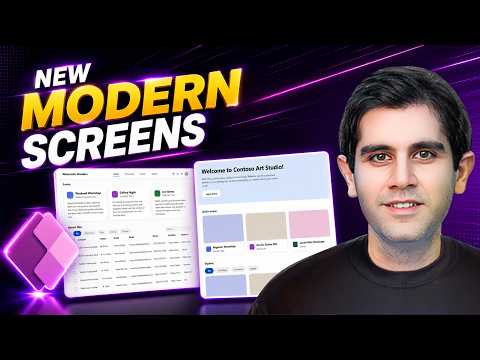
In a clear and practical walkthrough, Reza Dorrani’s recent YouTube video highlights Microsoft Power Apps’ new Modern Screens, a set of prebuilt, responsive canvas templates that aim to shorten development time for makers. The video demonstrates how quickly a screen can be added, connected to data, and customized, and it puts the spotlight on templates built using modern controls and responsive containers. Consequently, the tutorial serves both as an introduction and a hands-on example for professionals seeking faster ways to build apps without sacrificing polish. Overall, the presentation emphasizes speed, consistency, and the ability to adapt screens across device sizes.
What Modern Screens Bring to Power Apps
The video begins by explaining that Modern Screens provide ready-made layouts for common app scenarios, such as landing pages and lists, which users can insert instead of designing every view from scratch. Reza points out that these templates follow Microsoft’s Fluent design cues and use mostly modern controls, so apps look and behave more like current Microsoft experiences. Moreover, the templates include responsive layout patterns so elements rearrange automatically on different devices, reducing manual tuning. As a result, teams can standardize appearance and accelerate delivery while preserving scope for customization.
Demo: Connecting a List Page to SharePoint
In the hands-on portion, Reza selects a List Page template and connects it to a SharePoint list to show a real-world data flow in minutes. He configures the screen, maps fields, and tweaks visual elements to match business needs while keeping the layout responsive, which illustrates how quickly an operational screen can emerge from a template. Additionally, the video shows that makers can change controls, adjust styling, and add data connections without losing the responsive behavior, which is particularly useful for teams that must deliver working apps fast. Consequently, the demonstration supports the claim that these templates lower the barrier to producing usable, data-driven apps.
Tradeoffs: Speed Versus Flexibility
While templates speed up app creation, Reza and the video implicitly highlight tradeoffs that organizations should weigh, especially when they have unique UI needs. For example, templates impose an initial structure that can be efficient but may require extra effort to diverge significantly from the intended layout or to implement highly custom interactions. Furthermore, relying on modern controls brings visual consistency but may raise compatibility questions for legacy integrations or lesser-known connectors. Therefore, teams must balance the time saved by starting from a template against potential rework when requirements deviate from the template’s assumptions.
Challenges and Practical Considerations
The video also touches on practical challenges makers might face as they adopt Modern Screens, including version and availability differences across release channels and the learning curve for new responsive patterns. Reza notes that template names and options can vary depending on the Power Platform update cadence, which means users should verify what appears in their authoring environment. Additionally, designers must consider performance tradeoffs, since more complex modern controls and containers can influence app load and runtime behavior, particularly on lower-end devices. Consequently, testing across devices and careful data handling remain important despite the convenience of templates.
Benefits for Teams and Next Steps
Despite these challenges, the video makes a clear case that Modern Screens help new makers start with a polished base, speed up prototyping, and enforce a consistent design language across organizational apps. Moreover, connecting templates to common data sources like SharePoint demonstrates how quickly a pilot or production feature can appear in users’ hands. As a next step, makers should explore the template set in their own Power Apps Studio, test responsiveness, and document any deviations that require custom work. Overall, the approach promises faster delivery while still allowing experienced makers to tailor apps where necessary.
Reza Dorrani’s tutorial offers a useful, measured introduction for both developers and citizen makers who want practical examples rather than abstract features. By showing a step-by-step connection to real data and by highlighting both benefits and tradeoffs, the video helps viewers judge when templates are a fit and when a custom screen remains preferable. Therefore, teams planning to adopt these templates should pilot a few scenarios, monitor performance, and align on when to extend templates versus building custom screens. In sum, the Modern Screens update represents a notable shift toward faster, more consistent app authoring within Power Apps.
Keywords
Power Apps modern screens, responsive Power Apps, build responsive apps Power Apps, Power Apps responsive design, Power Apps new features 2026, Power Apps modern UI components, Power Apps canvas app responsiveness, low-code responsive apps Power Apps