- All of Microsoft
Dataverse: Scheduled Flow with Teams
Microsoft MVP | User Adoption, Dynamics 365 + Power Platform Expert at Reenhanced
Scheduled cloud flow with Dataverse, Teams and Power Automate sends Won Opportunities to Sales via Flow bot.
Key insights
- Scenario overview: Create a scheduled cloud flow that runs each evening to find Won opportunities in Dataverse and post them to a Sales channel in Teams as the Flow bot.
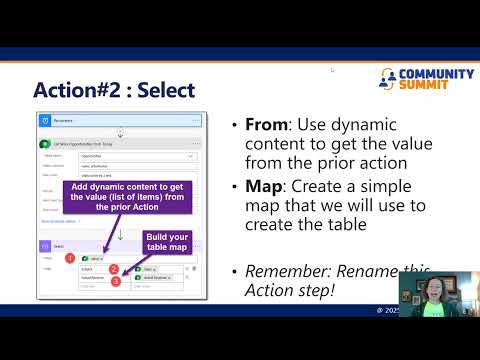
Design the flow to run automatically without manual triggers and deliver a clear message summary to the team. - Core steps to build the flow: Start with the Recurrence trigger to schedule the run.
Use List rows from Dataverse with an OData filter (e.g., status = Won) and paging to retrieve results.
Compose the message or adaptive card and use Post a message as the Flow bot action to send it to the Sales channel. - Dataverse choices and configuration: Choose between Dataverse for Teams (single team environment, smaller limits) and Full Dataverse (richer integration, more APIs).
Use connection references and environment variables in solutions to simplify deployments and manage credentials. - New platform features to leverage: Flows now default to Dataverse solutions by default, giving better lifecycle and security management.
Use the Power Platform Connector SDK and centralized tools in Copilot Studio when available to standardize connectors and reusable logic. - Performance and reliability best practices: Implement paging and set sensible page sizes to avoid missing rows.
Use batching when updating multiple records and design retries to handle throttling limits.
Confirm you have proper licensing for premium connectors or high-volume runs. - Testing and troubleshooting tips: Run test executions and review the run history to inspect inputs, outputs, and errors.
Use a dedicated service account or connection owner and verify role-based security so the flow can read records and post to the channel reliably.
Video Summary and Context
The YouTube video from Heidi Neuhauser [MVP] demonstrates how to build a scheduled cloud flow that posts a nightly list of won deals into a Teams channel. In the video, she walks through a scenario where every evening a message from the Flow bot delivers a list of Won Opportunities to a Sales channel. The presentation mixes step‑by‑step guidance with explanations about connectors and environment choices, which makes the approach practical for team makers. Overall, the video targets citizen developers and IT pros who use the Microsoft Power Platform together with Teams.
Key Steps and Technical Highlights
First, Neuhauser shows how to start with the Recurrence trigger in Power Automate to schedule the flow on a nightly cadence. Then she uses the Microsoft Dataverse connector to query opportunity rows filtered by status and date, demonstrating how to shape the data before posting. Finally, the flow uses the Teams connectors to post the formatted message into a channel as the Flow bot, or to send an adaptive card when more interactivity is needed. This order—schedule, query, post—represents a clear pattern applicable to many automation needs.
What’s New and Why It Matters
Neuhauser highlights recent changes such as the move to Dataverse solutions by default, which creates stronger lifecycle and environment management for flows. She also references improvements in the connector surface and previews of the Power Platform Connector SDK that promise better schema awareness for complex data. These developments make flows easier to maintain and safer to move between environments, but they also add new steps for makers who must adopt solution-aware practices. As a result, teams will need to update how they package and deploy flows, even as those changes improve governance.
Tradeoffs: Simplicity vs. Scalability
Neuhauser contrasts using Dataverse for Teams with a full Dataverse environment, noting clear tradeoffs between convenience and capability. Dataverse for Teams keeps everything inside one team with simpler access, but it limits rows and integration features, which might be fine for small projects. Conversely, full Dataverse supports richer APIs, larger datasets, and advanced eventing, yet it requires more setup, governance, and likely higher licensing costs. Therefore, teams must weigh ease of use against long‑term scale and integration requirements.
Practical Challenges and Mitigation
The video calls out common challenges such as API throttling, connection management, and error handling when flows run at scale. Neuhauser recommends using filtered queries, pagination, and incremental markers to avoid overloading the system and to keep runs predictable. She also stresses the importance of using environment variables and connection references within solutions so that flows move safely across environments without manual reconnection. These steps reduce runtime failures but add administrative overhead and require planning.
Best Practices and Recommendations
For reliability, the presenter advises testing the scheduled run in a safe environment and monitoring the flow with built‑in run history and notifications. In addition, designing clear message formats and considering adaptive cards helps teams present opportunities more readably inside a channel. She further recommends documenting connector limits and setting alerts for throttling or failures so that makers can react quickly. Taken together, these practices make the automation robust while preserving the low‑code benefits that attract business users.
Implications for Teams and IT
Neuhauser’s walkthrough shows how automation can streamline routine reporting while keeping collaboration within Microsoft Teams. IT organizations should expect to support makers by defining environment boundaries, setting governance rules, and clarifying licensing for premium connectors where needed. At the same time, empowering business teams to build simple scheduled flows reduces manual work and speeds up decision cycles, provided IT and makers coordinate on scale and security. Ultimately, the approach blends convenience with the need for disciplined management.
Conclusion
The video from Heidi Neuhauser [MVP] offers a clear, actionable path for building a nightly report flow using Dataverse and Teams connectors. It balances hands‑on steps with strategic advice about solutions, governance, and scaling, so both makers and IT can evaluate the approach. While the method is powerful for routine automations, teams should plan for tradeoffs around limits, costs, and lifecycle needs. Overall, the tutorial provides a solid blueprint for adding scheduled automation into a Teams‑centric workflow.

Keywords
Scheduled cloud flow Power Automate, Create scheduled cloud flow, Dataverse connector tutorial, Teams connector Power Automate, Recurring flow Dataverse Teams, Automate Teams notifications Power Automate, Power Automate Dataverse integration, Schedule trigger Power Automate