- All of Microsoft
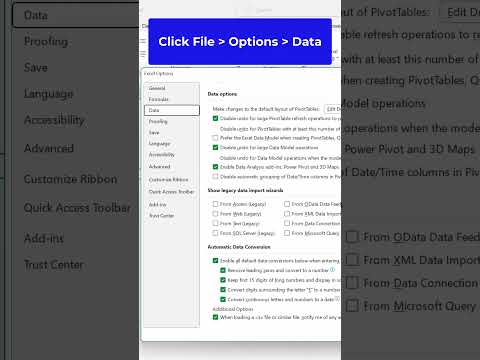
Fix Vanishing Leading Zeroes in Excel: Universal Guide
Master Excel: Preserve Leading Zeroes in All Workbooks with This Quick Guide!
Key insights
- Utilize All Workbooks setting in Excel to prevent leading zeroes from disappearing.
- Applicable for users who frequently handle data such as zip codes or account numbers.
- Ensures data integrity and accuracy in presentations and reports.
- Accessible and easy adjustment suitable for all levels of Excel users.
- Can significantly enhance workflow efficiency and data management in Excel.
Understanding the Importance of Preserving Leading Zeroes in Excel
Leading zeroes in Excel are often a critical component of data sets, especially for users who deal with precise data entries like postal codes, social security numbers, or specific financial records. The absence of these zeroes can lead to misunderstandings or errors in data interpretation and processing. Excel's All Workbooks setting is a key feature that helps preserve these zeroes, ensuring that the data remains accurate and consistent across various documents. Adaptation of this setting can prevent common mistakes and save time for users by avoiding the need to repeatedly correct the same issue. Moreover, it limits the potential for data mismanagement in professional environments, reinforcing the reliability of Excel as a pivotal tool in data handling.
Keywords
Excel leading zeroes fix, prevent disappearing zeroes Excel, maintain leading zeroes Excel, Excel all workbooks setting, Excel data formatting, Excel zeroes tutorial, Excel numeric format fix, Excel settings for zeroes