SharePoint Brain vs Claude: Which to Use
A Microsoft MVP 𝗁𝖾𝗅𝗉𝗂𝗇𝗀 develop careers, scale and 𝗀𝗋𝗈𝗐 businesses 𝖻𝗒 𝖾𝗆𝗉𝗈𝗐𝖾𝗋𝗂𝗇𝗀 everyone 𝗍𝗈 𝖺𝖼𝗁𝗂𝖾𝗏𝖾 𝗆𝗈𝗋𝖾 𝗐𝗂𝗍𝗁 𝖬𝗂𝖼𝗋𝗈𝗌𝗈𝖿𝗍 𝟥𝟨𝟧
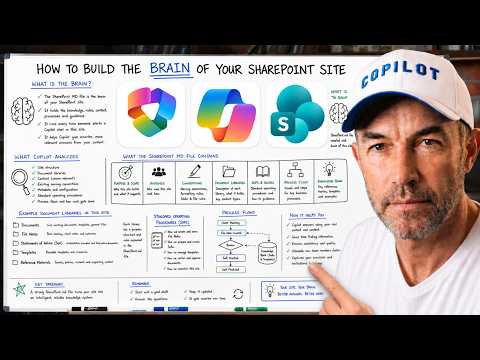
Copilot in SharePoint scaffolds native SHAREPOINT.md via initialise skill in Agent Assets library, contrasted with Claude
Key insights
- YouTube walkthrough summary: a demo shows Copilot in SharePoint using the built-in initialise skill to create a SHAREPOINT.md file that becomes the site's editable "brain."
It is a practical live setup that anyone on the team can edit in the Agent Assets library. - Platform difference: Copilot Cowork runs inside Microsoft 365 and lives in Word, Teams, Outlook, and SharePoint, while Claude Cowork is Anthropic’s standalone experience that connects via a connector and opens in a separate Claude window.
The key contrast is where the AI runs and how deeply it integrates with Microsoft apps. - Data access and governance: Copilot respects your existing identity and permissions (Entra), Purview rules, and Microsoft security controls.
Claude Cowork also follows user access rules but operates outside the Microsoft app shell, so sub-processor opt-in and governance choices differ. - How they read SharePoint: Copilot uses the Microsoft Graph to access live content inside the Microsoft ecosystem.
Claude uses a connector built on the MCP (Model Context Protocol) to pull SharePoint and OneDrive content into a conversation context. - Walkthrough steps shown: start with a single initialise prompt, review the draft and clarifying questions, watch the Agent Assets library get created, and see Copilot confirm the file is loading.
This produces a scaffolded SHAREPOINT.md file ready for team edits. - Practical takeaway: both approaches let Claude “see” SharePoint files, enabling an AI second brain that summarizes and answers from real documents using RAG (retrieval-augmented generation).
Choose Copilot for tighter Microsoft integration and governance, or Claude Cowork for a cross-environment, standalone setup.
Overview of the Video
In a recent YouTube walkthrough, Daniel Anderson [MVP] demonstrates how to initialize a site-level AI brain in SharePoint using Microsoft’s Copilot. He compares the familiar project-level CLAUDE.md approach to the new site-focused SHAREPOINT.md and shows the steps that the built-in initialise skill performs in real time. The video highlights that, as of the July 2026 Copilot in SharePoint update, SHAREPOINT.md is now a native artifact and a scaffold can be created automatically for teams to edit.
Anderson timestamps the demo so viewers can jump to key moments, such as when the prompt starts the initialization and when Copilot confirms the file has loaded. His narration explains what the draft contains and how the file differs from admin configuration or vendor code. Overall, the video aims to make the new experience approachable for site owners and contributors.
The Walkthrough: What Happens Step by Step
The demo begins with a single prompt that launches the initialise skill, which then drafts a SHAREPOINT.md file for the site. Copilot asks clarifying questions and then creates an entry in the newly generated Agent Assets library, showing a receipt that confirms the file is loading. This sequence illustrates that the brain for a site is a simple markdown file stored alongside other assets, not hidden configuration.
Because the file lives in the site library, the whole team can open and edit it, which encourages collaborative refinement of the AI context. Anderson emphasizes that the draft is a starting point and that human authors must tailor the content to reflect project practices and goals. In practice, this means teams control the narrative that the Copilot instance sees and uses during conversations.
Technical Differences: Where the AI Lives and How It Connects
One of the video’s core points is the distinction between a native Microsoft 365 experience and a standalone model connection. Anderson explains that Copilot Cowork runs inside Microsoft 365 and uses Microsoft Graph to read SharePoint, OneDrive, Teams, and Office files while respecting Entra identities and permissions. By contrast, Claude Cowork is Anthropic’s standalone offering that can connect to SharePoint through a connector built on the MCP protocol, but it opens in a separate conversation screen outside native apps.
Anderson also describes how both approaches use techniques like RAG (retrieval-augmented generation) so the model pulls live documents into context for better answers. However, the integration depth differs: Copilot embedded experiences can trigger actions across apps, while standalone connections may offer deeper model-specific reasoning but require additional connectors. Thus, implementation choices change how tightly AI-supported workflows fit into daily productivity tools.
Tradeoffs and Challenges for Teams
The video makes clear that teams must balance capability with control when choosing between embedded and external AI layers. For instance, using an embedded Copilot Cowork experience simplifies governance because it honors existing enterprise policies, but it may limit access to specialist model behavior that an external Claude Cowork could provide. Conversely, a direct Claude Cowork connector can offer richer reasoning across tools but raises questions about sub-processor agreements and regional opt-in requirements.
Anderson points out practical challenges such as permissions, audit trails, and data residency, which can become complex when an external model accesses corporate content. Teams should expect to establish clear policies for who edits the SHAREPOINT.md file, how changes are reviewed, and how logs are retained for compliance. In addition, relying on multiple vendors increases operational complexity and requires coordinated testing and monitoring.
What This Means for Organizations and Next Steps
Ultimately, the video offers a pragmatic view: the new native SHAREPOINT.md scaffold makes it easier for teams to shape their site-level AI, but organizations must still invest time in governance and training. Anderson recommends that teams treat the markdown brain as a living document and involve cross-functional stakeholders to capture important rules, tone, and scope. Doing so helps the AI stay aligned with company standards and reduces the risk of inconsistent outputs.
Finally, organizations should prepare for a phased rollout by testing the experience in pilot sites, validating permission models, and documenting any vendor opt-in or sub-processing steps required for regions. As Microsoft and Anthropic continue to evolve these integrations, teams that plan ahead will better balance innovation with security and compliance.

Keywords
SharePoint Brain vs Claude Brain, difference between SharePoint Brain and Claude Brain, SharePoint Brain vs Claude AI comparison, SharePoint knowledge management vs Claude Brain, Claude Brain features vs SharePoint Brain, enterprise AI knowledge base SharePoint vs Claude, how SharePoint Brain compares to Claude Brain, integrating SharePoint Brain with Claude Brain