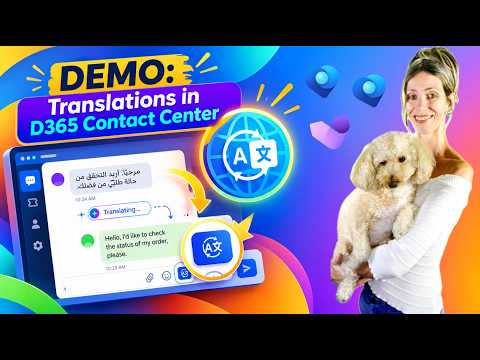
D365 Contact Center: Live Translation
Microsoft MVP | Dynamics 365 CE Presales Engineer - Director at RSM US LLP | LinkedIn Learning Author
Real-time translation in Dynamics Three Sixty Five Contact Center boosts multilingual customer service with Copilot AI
Key insights
- Real-time translation: Translates chat messages as they are exchanged and shows the original text plus the translated version to the agent.
It works for customer chats and internal representative conversations, keeping original text for context and auditing. - Enhanced real-time translation: Microsoft plans a public preview in September 2026 that offers an out-of-box experience.
This aims to reduce or remove the need for custom translation web resources and simplify admin work. - Admin setup: Current setup uses the Copilot Service admin center → Insights → Real-time translation, then turn the feature on, set a default input language, and enter a Web resource URL for the translation script.
Samples show custom JavaScript using translation APIs (Azure or equivalent) when a web resource is required. - Agent experience: Agents see the customer’s original message plus a live translation in their default language and can reply in either language.
Real-time display speeds responses and improves agent confidence. - Voice transcripts: For call translation, enable call recording, transcription, and real-time translation together.
When all three are active, the system can produce translated call transcripts. - Benefits and scope: Offers cross-language support, faster handling, and broader global coverage for contact centers.
The feature is available for Dynamics 365 Contact Center (embedded and standalone) and Dynamics 365 Customer Service, with English (en-us) as the default input language unless changed.
Introduction: Video Snapshot
Dian Taylor - [MVP] (Dynamics 365 Talk) published a hands-on demo showing real-time translation in Dynamics 365 Contact Center. In the video, she walks viewers through a live chat scenario where messages translate as they are typed, preserving the original customer text while presenting a translated version to the agent. Consequently, the demo highlights both chat and transcripted voice scenarios and previews Microsoft’s upcoming enhancements. Overall, the presentation aims to show how translation fits into everyday customer service workflows.
What the Demo Shows
First, Taylor demonstrates how an agent receives a customer’s message in the original language together with a translated copy into the agent’s default language. Then she explains the current admin steps required to enable this capability, such as turning on the feature in the Copilot Service admin center and setting the default input language. She also shows how a custom JavaScript web resource can be used to connect translation APIs and notes that the same approach applies to internal chats between representatives. Thus, viewers get a practical sense of both the user experience and the administrator setup.
How the Technology Works Today
According to the demo, administrators currently enable the feature under Real-time translation by selecting a default input language and supplying a custom Web resource URL. Moreover, the web resource often contains JavaScript that calls translation services such as Azure or equivalent APIs to do the heavy lifting. For voice calls, Taylor shows that the system needs call recording, transcription, and real-time translation to be active together so that transcripts can be translated. As a result, the live demo clarifies the dependencies and gives a realistic view of what an operational deployment looks like today.
What’s Changing: Enhanced Real-Time Translation
Importantly, Microsoft announced an enhanced real-time translation feature slated for public preview in September 2026, and Taylor points this out as a major shift. The new version promises an out-of-box experience that reduces or removes the need for custom web resources, which should lower administrative overhead and simplify rollouts. However, she also cautions that organizations will still need to validate language coverage and compliance requirements before switching to the enhanced mode. Therefore, the update looks to streamline setup while still requiring thoughtful planning.
Benefits, Tradeoffs, and Challenges
The demo highlights clear benefits: faster agent handling, better global coverage, and preserved original text for context and auditing. Nevertheless, Taylor discusses tradeoffs, such as reliance on external translation services and the need to manage API keys, cost, and latency. She also points out operational challenges like ensuring accuracy for industry-specific terms and maintaining privacy when call recording and transcripts are involved. Consequently, teams must weigh the speed and convenience of automated translation against potential gaps in nuance and the administration burden of integrating third-party services.
Implementation Considerations
Taylor emphasizes practical details that matter in real deployments, noting that English (en-us) is the default input language unless changed by an admin. She also clarifies that the feature is available in multiple deployment models, including embedded and standalone versions of Dynamics 365 Contact Center and Dynamics 365 Customer Service. Additionally, she recommends testing with sample conversations and validating transcription quality for voice channels before large-scale adoption. Thus, organizations should pilot the feature to understand operational cost, translation accuracy, and agent training needs.
Conclusion and Outlook
In summary, Dian Taylor’s demo makes a practical case that real-time translation can reduce friction in multilingual customer service while preserving context and auditability. Looking ahead, the planned enhanced release in September 2026 may lower the setup barrier and speed adoption, yet teams still must manage cost, privacy, and accuracy tradeoffs. Finally, the video serves as a useful guide for administrators and service managers who want to evaluate the feature in their own environments and prepare for the upcoming simplified experience.
Related resources

Keywords
D365 Contact Center real-time translation, Dynamics 365 live translation, real-time translation demo D365, multilingual customer service Dynamics 365, Dynamics 365 contact center translation features, real-time speech translation contact center, AI translation for D365 Contact Center, demo Dynamics 365 language translation