Microsoft 365 Message Center: 406 Fix
Microsoft Message Center alerts meet Copilot Chat scheduling and new Office app entry with LinkedIn Learning agent
Key insights
- 406 Not Acceptable — Summary from the video: this error appears when Microsoft services can't return the response format a client asked for or when the service enforces rate limits in the Message Center.
It covers causes, fixes, and recent Microsoft 365 updates shown in the clip. - Accept headers — The server rejects requests asking for unsupported media types; if your request's Accept header lists formats the API cannot produce, the server returns 406.
Use supported content types to avoid this error. - Push notifications and throttling — Message Center and web push systems return 406 when you exceed internal send limits; this is a deliberate throttle that can block sends for about an hour.
Reports show even small bursts can trigger the limit, so control send rates. - Subscription validation — Webhook and subscription endpoints must return the exact validation response and correct content type (often text/plain) or the API returns 406.
Echo validation tokens and return HTTP 200 to complete subscription setup. - Backoff strategy — Fixes include pausing sends after a 406, spacing retries, testing Accept headers with tools like Postman, and checking caches or configs that affect content negotiation.
Implement exponential backoff and verify the exact formats Microsoft expects. - Copilot Chat and Learning agent notes — The video also highlights Microsoft 365 changes: Organizational messages now support Action Segments and email delivery, Copilot Chat can schedule meetings and has new entry points in Word/Excel/PowerPoint, and a Learning agent delivers training and role-play lessons.
These changes may affect how notifications and message flows behave in admin workflows.
The latest episode from the YouTube channel 365 Message Center Show centers on an awkwardly titled installment, "406 - Unacceptable Message Center Show Response," and it mixes practical Microsoft 365 updates with a deep dive into a common HTTP error. The episode walks viewers through new capabilities for Copilot Chat, updates to organizational messaging, and a newly surfaced Learning agent in Frontier. Meanwhile, the hosts explain how the 406 error can show up in different parts of the Microsoft ecosystem and what administrators and developers should do about it. In short, the video blends feature news with troubleshooting guidance, offering both immediacy and technical context.
Episode highlights: Copilot Chat and app entry points
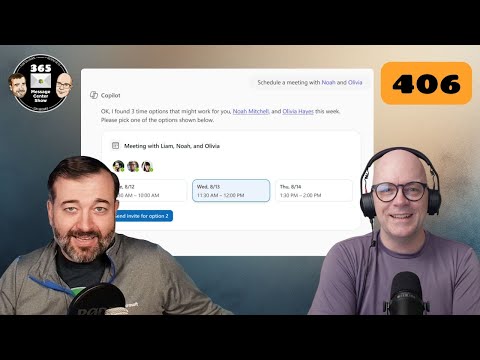
First, the hosts describe how Copilot Chat can now schedule meetings directly from chat, which aims to streamline workflows for users who juggle calendars during conversations. Additionally, Microsoft is adding a new entry point for Copilot Chat inside the desktop apps for Word, Excel, and PowerPoint, so creators can access AI assistance without leaving the document. These changes promise to save clicks and reduce friction, but they also raise questions about permission settings and how organizations will control access. Therefore, IT teams must balance ease of use with governance and privacy controls.
Organizational messages: Action segments and email delivery
The episode then reviews improvements to organizational messages in Microsoft 365, noting support for Action Segments that let admins embed interactive steps directly into messages. In addition, the Message Center is rolling out support for email delivery of organizational messages, which helps reach users who prefer inbox alerts rather than portal notices. While these options improve reach and engagement, they introduce tradeoffs in consistency and noise: more channels can dilute attention and increase the risk of missed critical updates. Consequently, communicators should weigh channel choice against urgency and audience preferences.
Understanding the 406 error: throttling and content negotiation
Crucially, the hosts clarify that the 406 status is not a single-cause problem in Microsoft environments; it often appears either as a content negotiation mismatch or as a throttling signal for push notifications. For APIs like Microsoft Graph, a 406 typically means the client's Accept header asks for a format the server cannot return, so the server refuses to deliver a default payload. Conversely, when Message Center or push endpoints return 406, it can reflect internal rate limits designed to protect services, which forces senders to pause and retry later. Both scenarios require different fixes, so identifying the root cause is essential before taking action.
Troubleshooting and practical tradeoffs
For administrators, the video recommends simple steps such as verifying content types in API requests and reducing notification frequency to avoid throttling, while also testing endpoints with tools that reveal acceptable header values. However, these mitigations involve tradeoffs: reducing notification frequency preserves service availability but can delay urgent alerts, and strict Accept headers increase compatibility but limit flexible responses. Moreover, subscription validation endpoints and webhook logic need precise handling, so teams must invest time in robust error handling and replay strategies. Ultimately, the best approach balances resilience, timely delivery, and manageable operational overhead.
Learning agent in Frontier: training and role play
Finally, the episode showcases a new Learning agent inside Frontier that surfaces LinkedIn Learning content and can run role-playing lessons for users. This agent aims to make in-app learning more interactive, which could accelerate onboarding and skill development across roles. Yet, organizations must consider how this blends with existing training frameworks and whether role-play outputs meet compliance needs or require moderation. Therefore, while the feature offers appealing productivity gains, it also calls for clear policies and monitoring to ensure consistent learning outcomes.
In conclusion, the 365 Message Center Show episode delivers a mix of actionable product updates and helpful troubleshooting advice, with the 406 discussion serving as a useful reminder that similar error codes can have multiple root causes. As these changes roll out, IT leaders should weigh tradeoffs between faster user experiences and the need for governance, and they should test integrations carefully to avoid avoidable outages. Overall, the video is a practical resource for administrators and developers who manage Microsoft 365 communications and integrations, and it underscores the ongoing need to balance usability, reliability, and control.

Keywords
406 Not Acceptable error, Message Center Show Response 406, Microsoft 365 Message Center 406, Microsoft Graph 406 response, Fix 406 Not Acceptable Microsoft, HTTP 406 troubleshooting, Message Center API error 406, Resolve unacceptable response 406