Citizen Developer
- All of Microsoft
Zeitspanne
explore our new search
Power Automate
5. Dez 2024 01:01
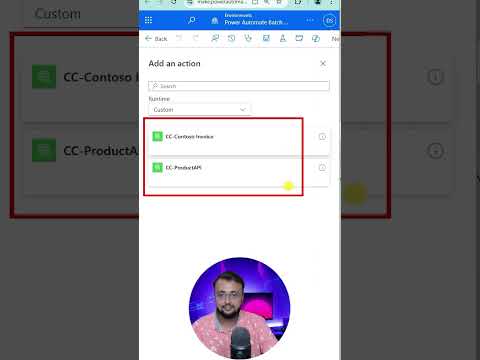
Locate Custom Connector Actions in Flows New Designer
von HubSite 365 über Dhruvin Shah [MVP]
Microsoft MVP (Business Application & Data Platform) | Microsoft Certified Trainer (MCT) | Microsoft SharePoint & Power Platform Practice Lead | Power BI Specialist | Blogger | YouTuber | Trainer
Master Custom Connector Actions in Power Automates New Designer! #PowerAutomate #PowerPlatform #DigitalDhruvin
Key insights
- Finding a custom connector action in the new flow designer can be challenging.
- The updated version of Power Automate aims to simplify this process.
- Users should familiarize themselves with the modern interface to efficiently access features.
- The new designer provides tools to enhance workflow management.
- Understanding these changes can improve process automation efficiency.
The main topic revolves around navigating Power Automate's updated flow designer to access custom connector actions. Power Automate, part of Microsoft's Power Platform, is a service that helps automate workflows between apps and services, making repetitive tasks more manageable. With updates to the flow designer, users can expect a more intuitive interface designed to streamline the creation and management of automated workflows. This helps users integrate various applications seamlessly, enhancing their productivity and simplifying complex processes. Understanding these new elements is crucial for users looking to leverage Power Automate's full capabilities. The tool emphasizes ease of use and increased efficiency, which are essential for businesses aiming to optimize their digital workflows. As technology evolves, such updates ensure that users can maintain an edge by using sophisticated yet user-friendly automation services.

What Question Does This Text Answer?
- How to find a custom connector action in the new Flow designer of Power Automate?
- What are the steps to locate specific actions within Power Automate's updated interface?
- Where can users efficiently access custom connectors in Power Automate?
Power Automate's new designer interface presents a challenge for users trying to locate custom connector actions. This blog clarifies where to find these connectors, simplifying your automation tasks. By understanding the improved layout, users can enhance their workflow efficiency. Staying updated with these features helps you leverage the platform's full potential. Custom connectors are vital for integrating unique data sources into automation solutions. As Power Automate evolves, familiarizing yourself with these changes is crucial. Embrace the upgrades to efficiently execute your automated processes. With practice, navigating Power Automate's interface will become intuitive. Explore how to optimize your use of Power Automate for business success.
## Questions and Answers about Power Platform/Power Apps
Keywords
Custom Connector Action, New Flow Designer, Microsoft Power Automate, Find Custom Actions, Flow Designer Tips, Power Automate Guide, Workflow Automation, Connector Configuration.