- All of Microsoft
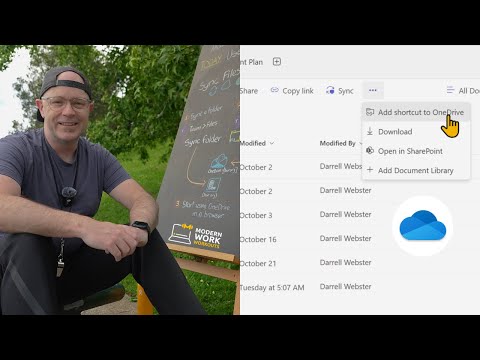
Master OneDrive Shortcuts & Files on Demand: Modern Guide
Modern Work Mentor, Change Consultant, Content Creator, Community Conduit.
Master OneDrive shortcuts & file sync with our Modern Work Workouts video. Visit modernworkmentor.com for more info.
Key insights
- Learn how to use **OneDrive shortcuts** and **files on demand** for better file management.
- Improve file management skills using **syncing folders** and **adding shortcuts**.
- Gain insights from a workout that focuses on **syncing a folder** from Microsoft Teams.
- Understand the process of **adding a OneDrive shortcut** to a folder in a team setup.
- Enhance your Microsoft Teams usage with practical **OneDrive techniques**.
More about using OneDrive shortcuts and files on demand:
Using OneDrive Shortcuts and Files on Demand: An Overview
The use of **OneDrive shortcuts** and **files on demand** is essential in today's digital workspace. With these tools, you can access files easily and maintain organization within your team. **Syncing folders** from Microsoft Teams improves workflow efficiency, ensuring that your team's resources are always up-to-date. Adding a **OneDrive shortcut** simplifies access to crucial folders, enabling quick collaboration and file sharing. These features help in reducing clutter and managing files effectively. They also enhance productivity by allowing team members to synchronize important data with ease. Understanding these functionalities can transform how organizations work collaboratively. The integration of OneDrive shortcuts into Microsoft Teams showcases the seamless connectivity between platforms. This approach to file management is vital for teams aiming to optimize their digital environment.
This summary delves into a YouTube video by "Darrell Webster Modern Work Mentor," focusing on enhancing skills with Microsoft file management tools. The video is part of a series titled "Modern Work Workouts," aimed at boosting user confidence in navigating Microsoft Teams and related applications.
The tutorial is structured around two main exercises: syncing folders from a Microsoft Teams team and creating shortcuts for easier access to these files. These exercises are designed to streamline file management and improve productivity.
In the first exercise, users learn how to sync a folder from a Microsoft Teams team. This method ensures that team members always have the latest data at their fingertips, removing the need to manually update documents or worry about version control.
Darrell Webster demonstrates the step-by-step process effectively, making it easy for viewers to follow along. This exercise is particularly beneficial for teams working remotely or across different locations, ensuring seamless access to shared files. The focus is on minimizing disruptions and optimizing workflow efficiency.
In the second exercise, Darrell introduces the concept of adding shortcuts to OneDrive for folders stored in teams. This shortcut acts as a direct link to the team folder, simplifying access and reducing the time spent navigating complex folder structures.
The use of shortcuts is a powerful way to keep frequently accessed folders within easy reach. It promotes better organization and quicker retrieval of important documents. This technique is crucial for users juggling multiple projects or collaborations within Microsoft Teams.
Overall, the video provides a clear, concise guide to mastering these Microsoft tools, with exercises that reinforce learning. This approach ensures users can implement new skills immediately within their workflows.
- Sync folders from a Microsoft Teams team to ensure the latest updates
- Create a shortcut to access important folders directly via OneDrive
Such practices empower users to manage their files effectively, enhancing productivity and collaboration within their teams. The video's practical insights make it a valuable resource for organizations looking to leverage cloud storage solutions effectively.
Understanding the Importance of Effective File Management with Microsoft Tools
Efficient file management is crucial for productivity in today's digital work environment. The ability to sync files from a Microsoft Teams team ensures everyone is working with the most up-to-date versions. It minimizes errors and improves teamwork quality.
Creating shortcuts for quick access means less time spent searching for critical documents, leading to optimized workflows. These methods help users make the most of cloud storage, ensuring accessibility and security.
The techniques covered in Darrell Webster's video highlight Microsoft's integration of cloud-based solutions into everyday work practices. This enhances both individual productivity and overall team collaboration. These skills are vital for organizations aiming to stay competitive in a rapidly evolving digital landscape.
People also ask
"Should I use OneDrive file on-demand?"
Answer: Utilizing OneDrive Files On-Demand is beneficial for device space management. It enables you to save space by keeping files online until needed. You also have the option to set certain files or folders to be permanently accessible locally on your device. Additionally, it provides insights into file statuses, like whether they are shared.
"How to use OneDrive files on-demand?"
Answer: You can enable Files On-Demand within OneDrive by activating the feature through the app settings.
"What is the difference between OneDrive sync and OneDrive shortcuts?"
Answer: Both OneDrive shortcuts and sync functions serve to access files through local computer interfaces like Explorer or Finder. However, while shortcuts enable access to content across multiple devices, the sync function is device-specific, allowing access primarily on the device where sync is configured.
"How to use OneDrive effectively for work?"
Answer: Maximizing OneDrive’s utility at work can be achieved by following a set of strategic practices, including utilizing various available features and settings for enhanced productivity and file management.
Keywords
OneDrive shortcuts, files on demand, Modern Work Workouts, OneDrive features, Microsoft 365 tips, cloud storage optimization, OneDrive productivity, file management skills.