- All of Microsoft
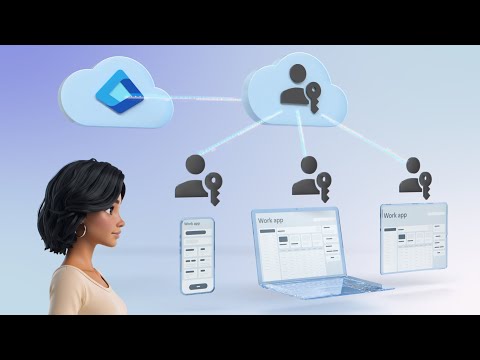
Microsoft Entra: Synced Passkeys for MFA
Software Development Redmond, Washington
Passkeys in Microsoft Entra deliver phishing-proof MFA with device sync, biometrics Verified ID and Conditional Access
Key insights
- Synced passkeys: Let users sign in without passwords by syncing cryptographic credentials across devices via trusted cloud storage.
They provide a fast, seamless sign-in experience and remove password-based attack vectors. - Microsoft Entra ID: Integrates passkeys at the identity provider level so phishing-resistant MFA applies across single sign-on and federated apps.
Admins can enforce passkey policies centrally for the whole organization. - WebAuthn & FIDO2: Use public-key cryptography bound to real domains to block phishing and man-in-the-middle attacks.
These standards ensure passkeys remain cryptographically strong and interoperable across platforms. - Biometrics: Users register and authenticate with device biometrics and simple camera prompts for quick and local verification.
This removes extra steps like codes or additional authenticator apps while keeping keys secure on devices. - Conditional Access: Enforce risk-based policies and automate remediation in real time, while supporting account recovery through Verified ID.
These controls protect privileged accounts and respond to threats without manual intervention. - Operational efficiency: Reduce help-desk workload with self-service registration, faster rollouts, and fewer password resets.
Microsoft demos (presented by Jarred Boone) show improved user confidence, quicker deployments, and better compliance alignment.
Microsoft released a concise demo video that walks through Microsoft Entra, and the presentation aims to show how organizations can move toward phishing-resistant multifactor authentication without relying on traditional passwords. The host, Jarred Boone, Identity Security Senior Product Manager, demonstrates registration, daily sign-in, device synchronization, administrative configuration, account recovery, and conditional access in under eight minutes. Consequently, the video positions synced passkeys as a practical, user-friendly step toward enterprise passwordless security. Moreover, it highlights tradeoffs between convenience, security, and operational control that IT teams must weigh before rolling out the technology.
Overview of the Demonstration
The video opens by framing synced passkeys as a way to sign in securely across devices while avoiding passwords and extra authentication apps. Jarred Boone proceeds to show a step-by-step registration, then authenticates into business applications using a device camera and built-in biometrics, illustrating how a real user experience flows. In addition, the demo covers how passkeys synchronize to updated devices and how administrators can configure which passkey types are allowed.
Importantly, the presenter also outlines recovery options and how risk can be remediated automatically in real time using built-in Microsoft controls. He closes with a quick summary of how organizations can adopt passkeys within existing identity frameworks. Thus, the demo serves both as a high-level introduction and a concise operational guide for IT teams.
How Synced Passkeys Work
At a technical level, synced passkeys use platform authenticators and the WebAuthn protocol to store cryptographic credentials that are bound to legitimate domains. Because those credentials do not travel as reusable secrets, they resist phishing and man-in-the-middle attacks more effectively than passwords or OTPs. In practice, users verify their identity with device biometrics like fingerprint or facial recognition, and the authentication completes without typing a password.
Syncing occurs via a cloud-backed mechanism so users can access their passkeys across multiple devices without carrying a hardware key. While this improves convenience and continuity, it does introduce tradeoffs around where cryptographic material is stored and how trust is established across cloud providers. Therefore, organizations must evaluate their cloud trust model and device management posture before full adoption.
Administrative Controls and Account Recovery
The video emphasizes that administrators can control which passkey types are permitted and can set policies through the identity platform. Administrators can also streamline recovery using verified identity flows, which helps reduce help desk calls when users lose access to a device. Moreover, automated risk remediation ties into conditional access so that suspicious activity triggers protective actions in real time.
Nevertheless, the simplicity for end users places new responsibilities on IT teams to design recovery policies that are secure yet usable. Balancing strict recovery requirements with minimal user friction proves challenging, because overly complicated recovery increases support costs while weak recovery paths introduce attack surface. Consequently, careful policy design and user education remain essential.
Security Benefits and Tradeoffs
The chief security benefit is clear: removing passwords and using cryptographic, domain-bound credentials blocks common phishing and credential theft scenarios. Additionally, integrating passkeys with single sign-on propagates phishing-resistant authentication across federated services, benefiting administrative and privileged accounts in particular. As a result, organizations can materially reduce breach exposure and harden their identity perimeter.
On the other hand, tradeoffs appear around compatibility and vendor ecosystems, because not all platforms or legacy applications support passkeys equally today. Also, synchronized passkeys rely on cloud synchronization services, which demand rigorous attention to endpoint security, encryption standards, and regulatory compliance. Thus, teams must weigh immediate security gains against long-term operational and integration costs.
Deployment Challenges and Best Practices
Rolling out synced passkeys involves coordination across identity, endpoint, and help desk teams, as well as phased communication to users. Pilot deployments can surface device compatibility gaps and user experience issues early, allowing IT to refine conditional access and recovery flows before broad rollout. Furthermore, combining passkeys with existing controls such as device management and risk-based policies helps maintain a defense-in-depth strategy.
For best results, organizations should adopt a measured approach: start with high-value user groups, validate recovery and remediation workflows, and track help desk metrics to verify the promised operational savings. Training and clear documentation will mitigate user confusion, while telemetry and conditional access rules will ensure that security does not erode usability over time.
Conclusion
The Microsoft demo offers a compact and practical look at how synced passkeys in Microsoft Entra can deliver phishing-resistant sign-in across devices while reducing help desk overhead. Jarred Boone’s walkthrough balances technical detail with step-by-step usability, revealing both clear security advantages and real-world deployment tradeoffs. Ultimately, organizations that plan pilots, refine recovery policies, and align device and cloud trust models will be better positioned to realize the benefits of passwordless authentication.
In summary, synced passkeys present a promising path toward stronger, simpler authentication when implemented with thoughtful policy design and careful operational planning. As with any identity change, success depends on balancing security, user experience, and manageability.

Keywords
synced passkeys, Microsoft Entra, phishing-resistant MFA, Entra ID passkeys, passwordless authentication, FIDO2 passkeys, synchronized passkeys Entra, MFA phishing protection