- All of Microsoft
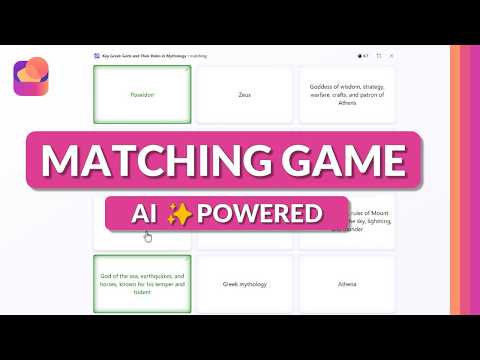
Microsoft 365 Matching Game for Teachers
Principal Group Product Manager - Microsoft Education
AI Matching Game in Learning Activities lets educators auto-make gamified practice with Microsoft Copilot and Teams
Key insights
- Matching Game demo from a YouTube tutorial shows a new AI tool inside Learning Activities for Microsoft 365.
It turns lessons, documents, or notes into interactive match exercises that teachers can use in class. - The tool uses AI generation to extract key terms and definitions and auto-create pairs.
Students complete a timed gameplay challenge that scores speed and accuracy with instant feedback. - Key benefits include higher student engagement, faster review cycles, and better memory retention.
The system supports personalization by adjusting reading level and examples, and it offers progress tracking for quick insight into learning gaps. - The video highlights integration with Copilot and Teams for Education, plus deployment via the standalone Learning Activities app, Teach Module, and Study agents.
That makes it easy to embed activities in assignments and class workflows. - Availability: the feature entered private preview during the January 2026 Bett updates and targets general release in Spring 2026.
It joins other Learning Activities like Fill in the Blanks and Quizzes as part of an expanded education rollout. - Practical classroom tips: paste a lesson or upload notes to generate matches, tweak difficulty and standards, then assign for quick review.
Teachers save prep time with this low-prep approach and can distribute it as shareable assignments for remote or in-class practice.
What Mike Tholfsen Demonstrates
In a recent tutorial video, educator and Microsoft watcher Mike Tholfsen walks viewers through the new Matching Game inside the Learning Activities app for Microsoft 365. He shows how the feature uses generative AI to scan classroom content — such as lessons, notes, or documents — and then automatically builds gamified matching activities. Furthermore, he highlights the ability to share those activities through familiar channels like Teams for Education and the standalone Learning Activities web app.
Tholfsen also points out an educator-facing workflow, demonstrating how Copilot can assist teachers in creating, adjusting, and aligning activities to standards and reading levels. He frames the tool as a time-saver for busy teachers who want high-quality practice materials without spending hours crafting them. Additionally, he clarifies that the video reflects his personal perspective and not an official employer position.
How the Matching Game Works
The core experience begins when a teacher inputs a topic or uploads a document and lets AI extract key concepts and definitions for pairing. Then the app generates a timed matching board where students match terms with definitions, dragging or selecting pairs while a clock encourages quick, accurate play. After each round, students receive immediate feedback, and teachers can assign retries or follow-up challenges to reinforce learning.
Tholfsen demonstrates that the Matching Game integrates across tools: it can appear inside the Teach Module, be shared as Teams Classwork, or used within Study Guides and Study Agents. As he shows, the system supports quick edits, such as adjusting difficulty or adding examples, which helps teachers customize activities for different learners without rebuilding content from scratch. Finally, he notes that the feature is part of a set that also includes Fill in the Blanks and Quizzes, creating varied practice formats.
Classroom Benefits and Teacher Workflow
According to the video, the feature aims to boost student engagement by turning rote review into a competitive, timed exercise that encourages focus and repetition. Teachers benefit because AI reduces the manual work of extracting terms and writing distractors, so they can spend more time on instruction and personalized support. Moreover, integration with existing platforms means teachers do not need to adopt a separate toolset, which simplifies rollout and reduces friction.
Tholfsen emphasizes that faster comprehension and better recall can result when practice becomes more frequent and low-stakes, especially when paired with immediate feedback. At the same time, he indicates that teachers retain control: AI suggestions are editable, enabling educators to refine pairings for accuracy or curriculum fit. This combination of automation plus teacher oversight helps keep content pedagogically sound while improving efficiency.
Tradeoffs and Technical Challenges
While promising, the automated approach brings tradeoffs that Tholfsen addresses indirectly in the video and that schools must consider explicitly. For example, AI-generated pairs may sometimes miss nuance or context, so teachers will need to review materials to avoid factual errors or misleading associations. Consequently, the time saved on content generation can shift toward verification work, especially for specialized subjects or higher-grade material.
Another challenge lies in balancing gamification with depth: timed games motivate some learners but may frustrate those who need more processing time or who are anxious under pressure. Accessibility and equity therefore require careful settings and differentiation, such as adjustable timers or alternative practice modes. Additionally, administrators must evaluate privacy and data governance when enabling AI features tied to Copilot and Microsoft 365, ensuring alignment with district policies and student-data protections.
Availability, Privacy, and Next Steps
Tholfsen notes that the Matching Game entered private preview after its January 2026 announcement, with broader availability planned for Spring 2026 alongside other Learning Activities updates. Schools interested in early access may watch for official preview programs, while everyone else can prepare by reviewing license requirements and settings in Teams for Education and the Learning Activities app. Importantly, district IT and curriculum leads should coordinate to test content accuracy and student experience before full classroom deployment.
Looking ahead, the video suggests that generative tools like this will continue to expand the ways teachers produce practice materials, but they will not replace teacher judgment or curriculum expertise. Therefore, successful adoption will combine AI efficiency with teacher review, careful accessibility settings, and clear data governance. In summary, Tholfsen’s walkthrough presents a practical view of a tool that can save time and increase engagement, while also reminding educators to weigh tradeoffs and implement safeguards as they adopt AI-driven classroom tools.
Keywords
microsoft 365 matching game, matching game for teachers microsoft 365, microsoft teams interactive matching activity, office 365 classroom matching game, powerpoint matching game microsoft 365, digital matching game for classrooms, microsoft education matching activity, edtech matching game microsoft 365