- All of Microsoft
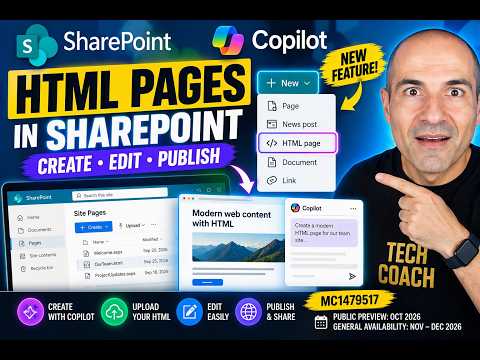
SharePoint: Publish HTML with Copilot
Microsoft MVPs, YouTube Creator youtube.com/giulianodeluca, International Speaker, Technical Architect
SharePoint now supports HTML pages with Copilot in Microsoft three sixty five — create edit upload publish and share
Key insights
- HTML pages now run natively in SharePoint, letting you create, upload, render, edit, publish, and share custom HTML content directly inside a site.
- You can create pages with Copilot (describe the page in plain language) or start from + New - HTML page, the floating Copilot button, or the Publish landing page; each path saves the result to the Site Pages library.
- Copilot builds draft HTML from your prompt and attached files, and it can apply content, layout, or styling changes to the HTML and underlying markup on request.
- You can upload existing .html files or folders to reuse campaign pages, reports, prototypes, or tool-generated HTML without rebuilding them from scratch.
- Uploaded and created HTML pages live in the Site Pages library and follow SharePoint’s permissions and publishing model — publishing a page does not grant new access rights by itself.
- Rollout notes: Public Preview begins in early October 2026 with General Availability expected from mid-November to late December 2026; also note the change that the site-scoped Agent entry is removed from the + New menu on site pages.
Introduction
In a recent YouTube walkthrough, Giuliano De Luca [MVP] explains that SharePoint will support native HTML pages, letting users create, upload, edit, and publish HTML content inside their sites. Moreover, the video demonstrates practical steps for using Copilot to generate pages from a prompt or to upload existing .html files and folders into the Site Pages library. The rollout begins with Public Preview in early October 2026, and Microsoft plans general availability between mid-November and late December 2026. Consequently, organizations should begin planning how to test and govern this capability before full production use.
What the Feature Enables
Giuliano shows that once an HTML file is in the Site Pages library, SharePoint can render it as a site page, allow edits, and present the familiar publish and share controls. In addition, the video clarifies that publishing a page does not automatically change permissions, so visibility remains tied to SharePoint’s existing access model. The workflow supports both creating new content via the Copilot prompt and uploading prebuilt pages, which gives teams flexibility to reuse existing assets. Furthermore, the update removes the site-scoped Agent creation entry from the +New menu on site pages, an administrative change to watch for.
Creating and Uploading Pages
De Luca walks through multiple entry points: using + New → HTML page on a site, invoking the floating Copilot button, or choosing + Create → HTML page from the Publish experience, and he shows how to upload files directly into the Site Pages library. When creating with Copilot, you describe the page in the prompt and can attach files for context, which the assistant uses to produce a draft HTML document. Alternatively, teams can upload existing .html files or folders for immediate rendering, which is useful when migrating established content. Therefore, organizations gain both quick authoring via AI and a path for preserving previously authored pages.
Editing with Copilot and Direct HTML Edits
After a page is created or uploaded, users may edit content directly within the page editor or use the Copilot chat pane for larger content and design changes, as shown in the video. De Luca emphasizes that Copilot can handle HTML structure, inline CSS, and layout adjustments based on clear instructions, which speeds iteration for non-developers. However, he also demonstrates scenarios where manual edits are preferable, especially when precise control over markup or complex scripts is required. In short, the tool supports a hybrid workflow where AI accelerates drafts and human editors refine details.
Governance, Security, and Permissions
Importantly, the feature relies on SharePoint’s governance surface, so pages inherit site-level permissions and storage policies from the Site Pages library, which helps centralize management. Nevertheless, allowing arbitrary HTML into a collaboration platform raises security and compliance concerns, particularly around embedded scripts, external resources, and content sanitization. Therefore, administrators should plan controls such as upload restrictions, scanning, or review workflows to prevent risky content from being published widely. Moreover, because publishing does not grant extra permissions, teams must coordinate sharing and access policies to avoid accidental exposure.
Tradeoffs and Operational Challenges
There are clear tradeoffs between speed and control: using Copilot can produce polished pages quickly, yet automatically generated HTML may require additional accessibility, branding, and performance checks. Conversely, uploading hand-coded pages offers precise control but increases maintenance burden and may complicate versioning inside SharePoint. Additionally, organizations must balance innovation with stability by creating templates, establishing testing processes, and defining ownership to prevent fragmentation. Consequently, teams should adopt a staged approach—prototype with Copilot, validate technical and policy requirements, and then roll out structured templates for broader use.
Best Practices Suggested by the Walkthrough
De Luca’s demonstration implicitly recommends several practical steps: test the new capability in a development tenant, verify license and feature availability for your environment, and train authors on when to use AI generation versus manual uploads. Furthermore, he underscores the value of attaching source files when prompting Copilot to improve context and reduce iteration cycles. For governance, he suggests combining library-level controls, review stages, and clear naming conventions to keep the Site Pages area organized and auditable. Ultimately, these practices help teams get the benefits of speed without sacrificing quality or security.
Conclusion
Giuliano De Luca [MVP] delivers a clear, hands-on walkthrough that highlights how SharePoint’s new HTML page support and Copilot integration streamline page creation while preserving SharePoint’s management model. As organizations prepare for Public Preview and eventual general availability, they should weigh the tradeoffs between rapid AI-assisted creation and the need for governance, security, and consistent branding. In the meantime, teams can experiment, document policies, and align authoring workflows so that the feature enhances productivity without creating operational risk. For editors and administrators, the video serves as a practical starting point for planning adoption and testing strategies.
Related links

Keywords
SharePoint HTML pages, Create HTML in SharePoint, Publish HTML pages SharePoint, SharePoint Copilot tutorial, Copilot for SharePoint publishing, SharePoint Online HTML support, How to create SharePoint HTML pages, Publish HTML with Copilot SharePoint