- All of Microsoft
- Microsoft 365
RBAC vs Granular RBAC: Why Global Enterprises Are Decentralizing Microsoft Teams Management
Automate Microsoft Teams provisioning using Callroute's self-service portal.
RBAC vs Granular RBAC in Microsoft Teams: learn how Orto helps global enterprises decentralize user and number management by limiting tenant-wide permissions to defined regions, departments and number ranges.
Most organizations rely on the default Role-Based Access Control (RBAC) model delivered through Microsoft Entra ID and the Teams Admin Center (TAC). It’s a solid foundation, but in large or multi-tenant environments it often isn’t enough. That’s where tools that offer more Granular Role-Based Access Control (RBAC), like Callroute’s Orto for Teams, make a difference.
What is the standard RBAC in Teams Admin Center?
Role-Based Access Control (RBAC) is implemented through predefined Microsoft Entra roles such as:
Teams Administrator
Teams Communications Administrator
Teams Device Administrator
Teams Communications Support Engineer, and others
These roles are assigned in Entra ID and then surface in the TAC to control who can:
Manage users and policies
Configure voice and calling settings
Administer devices and meeting settings
This model simplifies access management: you assign a role, and that admin gains a broad set of permissions across the tenant.
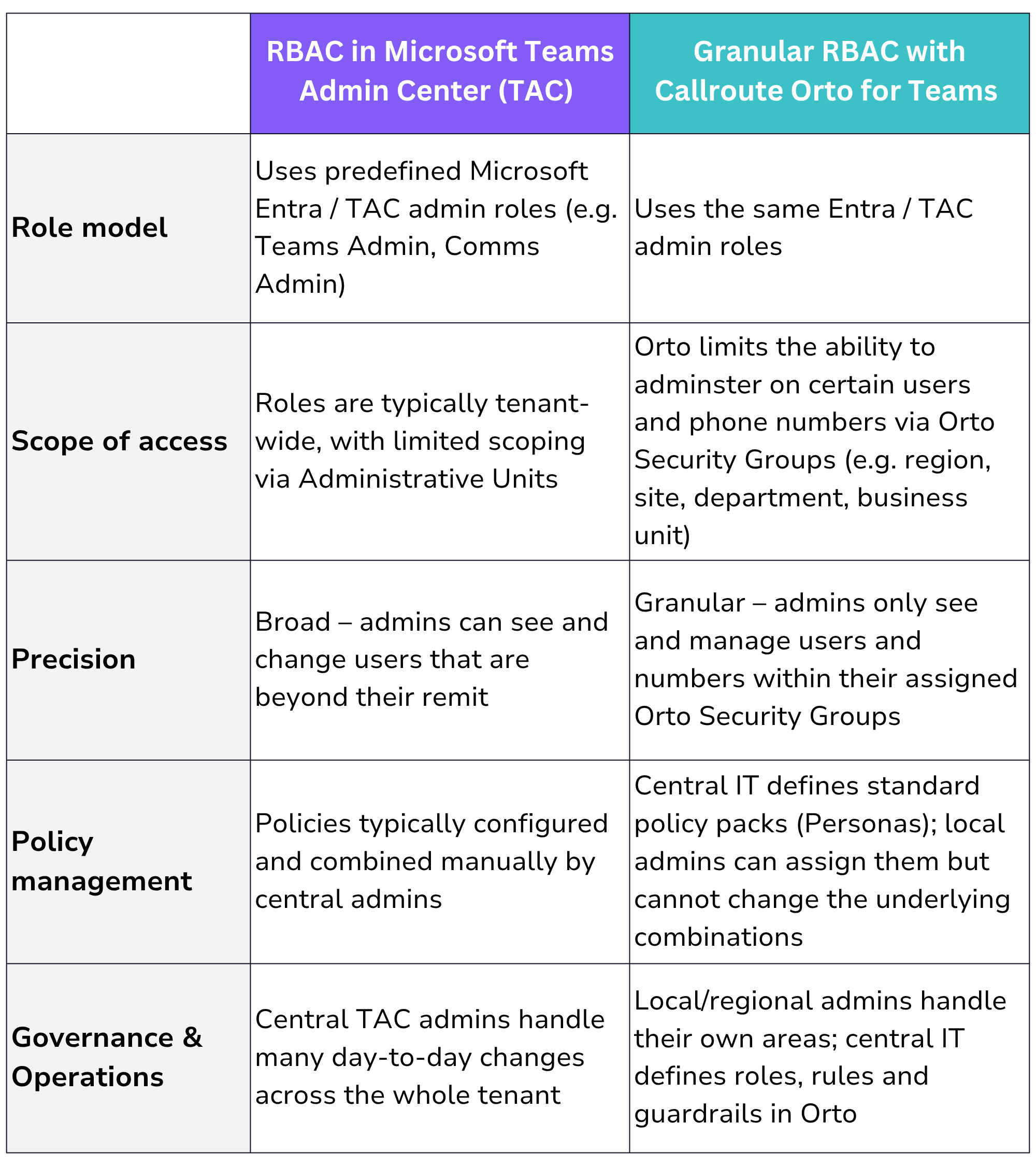
For smaller or simpler environments, this is often enough. However, there are some clear limitations when Teams is used at scale as access is typically tenant-wide, even if that person is only responsible for one region, department, or business unit.
In other words, RBAC in TAC gives you a good baseline – but it’s still a broad-brush model in environments that increasingly need precise, “granular and targeted” control, where admins need to be restricted to a specific set of users or phone number ranges.
What Is Granular RBAC with Orto?
You still use your existing Microsoft Entra / TAC roles (e.g. Teams Administrator, Teams Communications Administrator). What Orto adds is the ability to limit the reach of the tenant-wide permissions through these roles to specific parts of your environment (users and/or phone numbers).
In Orto, that looks like this:
A service user in the 365 tenant is used to connect Orto to the target 365 tenant. The service user roles/permissions (Teams Admin etc.) in 365 define what this user can change. Callroute uses the service to admin the target tenant (act on behalf of).
You define Orto Security Groups that represent the slices of your environment you want to control – for example UK, DACH, Retail Stores, or Enterprise Sales.
You use rules based on Entra ID attributes (like country, department, office) and/or Microsoft 365 group membership to automatically place users into the right Orto Security Groups.
You associate phone numbers with those same Security Groups.
Assign Callroute admins permissions to be associated with Orto Security Groups.
Now when a Callroute user logs in, they only see the users and phone numbers they are allowed to manage in the connected 365 tenant.
So, a “Teams Administrator” in Orto might only see and manage:
Users in the UK group
Numbers associated with the UK region
while another Teams Administrator using only Teams Admin Centre has access to, say, North America or Retail Stores.
That’s the granular part - Orto lets you keep Microsoft’s RBAC roles, but apply them only to the regions, sites, departments, groups, and number ranges they should control.
How Granular RBAC Changes the Game
When you rely on standard RBAC in the Teams Admin Center alone, a small number of high-privilege roles often end up with very broad access. Even with well-run processes, those admins can typically see and change far more than they need to – especially in global or multi-tenant environments.
Granular RBAC with Orto changes this by limiting the reach of existing Entra / TAC roles to the right parts of your environment. Instead of every Teams Administrator having tenant-wide visibility and control, Orto Security Groups and Entra-driven rules define exactly which users and phone numbers each admin can manage.
This delivers several practical advantages:
Stronger security
High-privilege roles are no longer tenant-wide by default. Teams admins only see and change the users and numbers in their assigned Security Groups, reducing the blast radius of mistakes or misuse.
Cleaner compliance and audit
Because access is tied to clear scopes (such as region, site, or business unit) and driven by Entra attributes and Microsoft 365 groups, it’s easier to evidence who can change what, and where. This is especially important in regulated or multi-region organizations.
Faster operations without losing control
Local or regional admins can handle day-to-day tasks for their own users and number ranges, rather than everything being routed through a small central TAC team. Central IT still defines the roles, rules, and overall configuration in Orto.
Standardized policies with local assignment
With Orto, central IT can define policy packs (Personas) – standard combinations of Teams and voice policies – and then devolve the rights to assign those Personas to local admins. Regional teams can quickly assign the correct Persona to their users, but they cannot create their own ad-hoc mix of policies.
This keeps policy configuration consistent, prevents incorrect or incomplete policy sets being applied, and stops regional admins from “going rogue” with their own combinations.
Governance at scale
You keep Microsoft’s RBAC model but gain a governance layer that scales with your organization. As users move role, region, or department, Orto’s rules automatically adjust which admins can manage them based on Entra attributes and group membership.
Put simply: RBAC in TAC defines what an admin can do. Orto’s granular RBAC defines which users and phone numbers they are allowed to do it for – and which standardized policy packs they are allowed to assign.
Put simply, RBAC in TAC defines what an admin can do. Orto’s granular RBAC defines which users and phone numbers they are allowed to manage.
The Smarter Way to Secure Microsoft Teams
For most organizations, RBAC in the Teams Admin Center is the starting point. Microsoft Entra roles and TAC give you a solid, standard way to control what your Teams admins can do.
The challenge is where those roles apply.
In large tenants, admin roles are often too broad. You need a way to keep using Microsoft’s RBAC model but apply it in a way that matches how your business is structured and how your environment is segmented (by region, department, etc.). That’s where Callroute’s Orto for Teams comes in.
Orto doesn’t replace TAC or Entra roles – it limits the reach of those admins to specific numbers and users. Using Orto Security Groups and rules based on Entra ID attributes and Microsoft 365 groups, you can:
Limit high-privilege roles to specific regions, sites, departments, or business units
Ensure admins only see and manage the users and phone numbers within their scope
Delegate day-to-day work safely to local IT, while central IT keeps governance and visibility
You keep the familiar Microsoft RBAC model – and layer on the granular control and automation that complex Teams environments demand.
Discover how Orto adds granular control to help you manage Microsoft Teams securely and efficiently. Try Orto for Teams for free for 14 days to see how it could work for your enterprise!