Microsoft Intune: Windows App Deployment
Software Development Redmond, Washington
Microsoft Intune app inventory and ring based rollouts with Enterprise App Catalog, Autopilot and PowerShell control
Key insights
- App Inventory: Audit every managed and unmanaged app per device with full metadata (publisher, architecture, disk size, install location, uninstall command) to find and stop shadow IT before it spreads.
Use these per-device details to prioritize remediation and compliance work efficiently. - Enterprise App Catalog and Win32 / PowerShell: Pull curated Win32 apps from the catalog or upload PowerShell .ps1 installers to control exact install behavior.
This lets admins standardize installs while supporting custom, complex deployment logic. - Ring-Based Deployment Plans: Stage rollouts across rings so you can deploy to small groups first, then expand; pause or cancel any deployment in flight for rapid response.
Ring staging reduces risk and improves rollback options during updates. - Managed Installer and App Control for Business: Auto-trust apps you push and enforce trusted execution, extending the same trust to new device builds through Autopilot (now supports up to 25 apps during provisioning).
This helps prevent unauthorized apps from running while speeding new-device setup. - Auto-Update & Guided Upgrade Supersedence: Keep apps current automatically when vendors publish new versions or trigger updates on demand using the Guided Upgrade Supersedence report.
Toggle auto-update in the catalog to reduce manual work and close security gaps faster. - Preview Status & Licensing: Note that Intune Deployments (private preview) features may change and some enterprise features require Intune Suite licensing.
Nicole Zhao, Microsoft Intune Product Manager, demonstrates these capabilities in the video and highlights practical admin workflows.
Microsoft released a new YouTube video from its Mechanics series that outlines enhancements to Windows App Management in Microsoft Intune, and the company’s product manager Nicole Zhao walks viewers through the practical steps. The video demonstrates how administrators can now audit every managed and unmanaged app with detailed metadata and pull curated Win32 apps straight from the Enterprise App Catalog. Furthermore, the demo highlights staging rollouts, ring-based deployment controls, and tools to auto-trust apps during provisioning. As a result, IT teams get both broader visibility and finer-grained control over application lifecycles.
Overview of the Release
The presentation centers on a set of built-in capabilities that aim to reduce manual work while improving security and consistency across Windows devices. In particular, the video shows integrated options for deploying apps, uploading PowerShell scripts to manage installs, and using the catalog to keep apps up to date automatically. Importantly, Microsoft notes that Intune Deployments is in private preview, so features shown may change before they reach general availability. Consequently, organizations should treat the demo as a preview of direction rather than a finalized product.
Visibility and App Inventory
One clear emphasis is on inventory and the ability to spot shadow IT early by auditing both managed and unmanaged applications per device. The system collects metadata such as publisher, architecture, disk size, install location, and uninstall command, and then surfaces that information in per-device views and relationship diagrams. This approach helps administrators prioritize remediation and reduce risk, but it also raises considerations about telemetry volume and data handling policies. Therefore, teams must balance the value of detailed visibility against storage, network, and privacy constraints.
Moreover, near-real-time inventory updates reduce latency between software changes and administrator awareness, which is critical for incident response. At the same time, continuous scanning can generate noise, so tuning detection rules and thresholds remains important to avoid chasing false positives. The video demonstrates the Relationship viewer for tracing dependencies, which assists in impact analysis when planning updates or removals. Ultimately, better visibility produces better decisions, provided organizations pair data with sensible governance.
Deployment and Update Controls
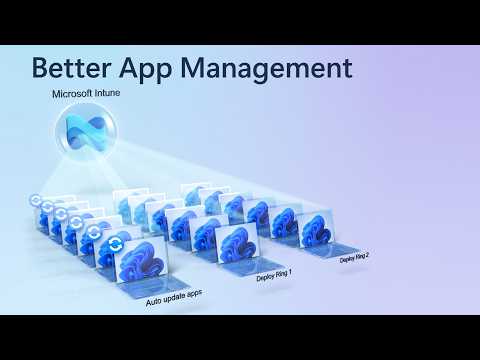
Microsoft shows several deployment options that cater to both packaged apps and scripted installations, allowing admins to upload .ps1 scripts or use packaged .intunewin formats from the catalog. Additionally, ring-based Deployment Plans let teams stage rollouts, pause or cancel deployments in flight, and test changes gradually before broad exposure. Autopilot integration supports up to 25 apps during device provisioning, which speeds onboarding and reduces post-deploy configuration work. Consequently, organizations can choose a low-risk rollout strategy while still automating large parts of the deployment pipeline.
On the other hand, scripted or custom installs give administrators fine-grained control, yet they increase operational overhead and testing needs. Managing detection rules, dependencies, and multi-architecture packages introduces complexity that requires strong CI/CD and test environments. In short, automated catalog-based updates reduce maintenance but may not cover every edge case, and custom scripts fill gaps at the cost of added management effort. Therefore, teams must weigh convenience against the resources needed to maintain custom installers.
Security and Trust Model
Security features featured in the video include integration with application control and automatic trust for pushed apps through App Control for Business and Managed Installer. These tools help ensure that only approved software runs on managed devices and that freshly provisioned machines receive trusted apps without manual steps. However, granting automatic trust also raises supply-chain considerations: a compromised catalog or mistaken approvals could propagate risky binaries widely. As such, governance around catalog publishing, signing, and approval workflows becomes essential to sustain trust without introducing new risks.
Furthermore, the Guided Upgrade Supersedence report supports timely updates by surfacing vendor-published versions and creating superseding packages for administrators to apply. This assists in closing security gaps faster, yet it requires policy decisions about auto-update policies versus staged testing. In practice, organizations must balance speed and safety, deciding when to push urgent fixes automatically and when to vet updates in controlled rings first. That balance depends on risk tolerance, the criticality of affected systems, and available testing capacity.
Operational Tradeoffs and Challenges
The video also makes clear that some capabilities, such as Enterprise App Management, may require additional licensing and operational support, which affects total cost of ownership. Relying on vendor-supplied catalogs and automated update paths reduces administrative burden but increases dependency on upstream processes and vendor quality. In turn, teams should plan for exception handling, rollback strategies, and testing to address vendor updates that break workflows or introduce regressions. Thus, operational resilience requires both automation and clear manual overrides.
Finally, supporting multiple architectures including ARM64 and managing complex application relationships remain practical challenges for diverse fleets. Small IT teams may find the new tooling powerful but overwhelming without documented processes and staged adoption plans. Therefore, teams should pilot features, refine detection and rollback policies, and train staff to ensure the new controls deliver the promised benefits. In doing so, organizations can adopt a measured path that balances efficiency, security, and operational readiness.
In closing, Microsoft’s video presents a cohesive vision for tighter app control in Microsoft Intune, combining inventory, deployment, and trust features to simplify app lifecycles. While the preview shows promise for reducing manual effort and improving security posture, administrators must navigate tradeoffs around telemetry, supply-chain trust, testing overhead, and licensing. For organizations planning to adopt these features, a phased rollout with governance, testing, and rollback plans will make the transition smoother. Overall, the update signals a meaningful step toward more centralized and automated Windows app management, but careful implementation remains key.

Keywords
Microsoft Intune Windows app management, Intune Win32 app deployment, Intune app protection policies, Intune application lifecycle management, Windows 10 app deployment Intune, Windows 11 app management Intune, Microsoft Endpoint Manager app deployment, Intune app distribution and updates