AI That Transforms Your Business
A Microsoft MVP 𝗁𝖾𝗅𝗉𝗂𝗇𝗀 develop careers, scale and 𝗀𝗋𝗈𝗐 businesses 𝖻𝗒 𝖾𝗆𝗉𝗈𝗐𝖾𝗋𝗂𝗇𝗀 everyone 𝗍𝗈 𝖺𝖼𝗁𝗂𝖾𝗏𝖾 𝗆𝗈𝗋𝖾 𝗐𝗂𝗍𝗁 𝖬𝗂𝖼𝗋𝗈𝗌𝗈𝖿𝗍 𝟥𝟨𝟧
How SharePoint.md powers Copilot and always-load Skills for governance, branded dashboards in Microsoft three sixty five
Key insights
- SharePoint.md: A central file that holds your business terms, brand rules, library maps, naming conventions, and always-load instructions so Copilot reads the same context every session.
- Copilot Skills: Small skill files that run alongside SharePoint.md and can be auto-loaded at session start to provide consistent capabilities and actions for every user.
- Governance as a file: Governance moves from training people to maintaining a readable file that enforces rules and limits Copilot will never break when generating outputs.
- Always-load rules: Rules that trigger Skills and context automatically at sign-in, ensuring consistent brand voice, compliance, and naming across the site.
- Copilot updates itself: Demonstrates that Copilot can modify or add Skill files (for example, “remember from next quarter”), letting the system adapt without manual reconfiguration.
- Business impact: Standardized context and agent-driven automation speed decisions, cut task time, improve accuracy, and deliver measurable productivity and cost benefits.
Overview of the video and blog post
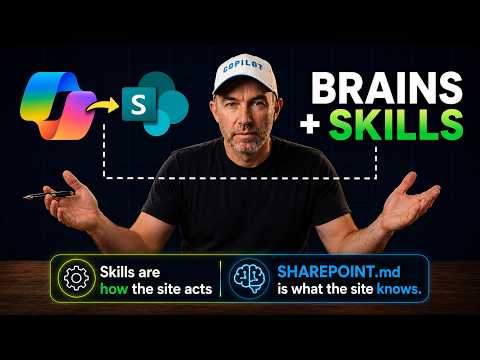
Daniel Anderson [MVP] published a blog post that summarizes his YouTube video, "Why Every Business Needs AI Like This." In both the post and the video he focuses on a simple but powerful pattern: a single file called SharePoint.md that gives Copilot the business definitions, brand rules, and Skills it must load for every user. This approach mirrors developer patterns such as CLAUDE.md and AGENTS.md, and it applies them inside Microsoft 365 sites.
The video is structured with short chapters that walk viewers through a real demo. Anderson shows the file location, how the AI initially gives a wrong answer, and then how it corrects behavior once the site context loads. He also demonstrates adding Skills, auto-loading them with an always-load rule, and even asking Copilot to update a Skill file going forward.
Overall, the post positions governance as code rather than repeated human training. In that sense, the file becomes the primary source of truth that the AI reads every time it works in a site. The format targets IT leaders and business owners who want predictable, branded AI responses across users.
How SharePoint.md shapes Copilot behavior
At the heart of the demo is the SharePoint.md file, which contains a compact set of instructions for the AI. Anderson shows that the file includes the terminology your organization uses, strict rules the assistant must never break, and library maps and naming conventions so content is found and labeled consistently. By centralizing these items, every user in the site inherits the same context and rules when they call Copilot.
Anderson also covers how Skills live alongside that file and can be triggered automatically. With an always-load directive, the site fires one or more Skills at the start of each session so users get the right tools and workflows immediately. This pattern reduces the need for repeated configuration on individual devices and keeps the workspace consistent.
Importantly, the demo highlights that Copilot can update its own Skill after instruction, for example when the presenter says "remember from next quarter." That capability offers agility because the AI can adapt to changing priorities without a developer push. However, it also raises questions about approval flows and auditability when an AI edits behavior files directly.
Demonstration highlights and practical examples
The video opens with an example of the same question producing different answers before and after the site context loads. Anderson uses that contrast to show how much context matters; once the SharePoint.md file is present, answers align with business language and rules. He then walks through where the file lives in SharePoint and how to add Skills alongside it.
Next, the demo covers auto-loading a Skill and building a branded dashboard that surfaces the right Tools to users. Anderson demonstrates that the dashboard and Skills are not separate items but part of the same site-level experience. This makes the Copilot integration feel like an extension of existing SharePoint governance rather than a new, disconnected system.
Finally, the presenter shows Copilot updating one of its own Skill files and notes the potential upside of on-the-fly changes. While that can speed adaptation, it also introduces risk if changes lack human review. Anderson frames governance as no longer just about training people, but about managing a file the AI reads consistently.
Governance, security, and tradeoffs
The blog post and video stress that this model shifts governance from repetitive training to file-based control. On the positive side, a single authoritative file delivers consistent branding and fewer surprises across teams. It also simplifies onboarding because new users inherit the same rules immediately.
On the other hand, centralizing control brings tradeoffs between consistency and local flexibility. Strict site-wide rules can slow innovation in teams that need rapid, tailored responses, and they can create a single point of failure if the file is misconfigured. Therefore, organizations must balance top-down governance with delegated controls and clear review steps.
Security and auditability matter as well because the AI may access sensitive content and could, in some scenarios, update Skills automatically. Practical safeguards include fine-grained permissions, change approvals, version history, and logging to show what the AI changed and why. Those controls help mitigate risks such as accidental leaks, unauthorized edits, or model drift.
Implementation challenges and recommendations
Adopting this approach requires honest work up front: defining terminology, writing clear rules, mapping libraries, and authoring Skills. Anderson recommends starting with a tight scope and a few key Skills rather than a massive rollout. This staged approach reduces risk and helps teams learn how the AI interprets instructions in real settings.
Teams must also build operational processes for updates, testing, and approvals, because giving an AI the power to edit its own behavior without guardrails is risky. Practical steps include using sandbox sites, enforcing review gates for edits, and requiring human sign-off for rule changes that affect compliance or customer communications. These steps preserve agility while limiting harmful outcomes.
In sum, Daniel Anderson’s post and video make a persuasive case that a simple artifact like SharePoint.md can transform how Copilot behaves in a business context. The pattern offers clear benefits in consistency and efficiency, but it also requires careful governance, permissions, and testing to manage tradeoffs between control and flexibility. For organizations experimenting with Microsoft AI, the demo provides a practical blueprint and a reminder that governance must adapt as the tools become more autonomous.
Keywords
AI for business, benefits of AI for small businesses, AI adoption strategies, AI tools for enterprises, AI-driven growth, how AI improves operations, AI use cases in business, AI implementation roadmap