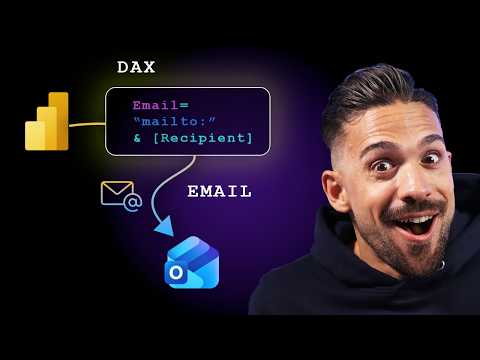
Power BI: Send Emails with a DAX Measure
Microsoft expert on Power BI and DAX: send emails from reports, speed report launches and training with Power BI Desktop
Key insights
- DAX Measure overview: A DAX measure in Power BI can produce structured text or flags that feed an external action to send email alerts directly from a report.
Developers pair the measure with an embedded report action, a custom visual, or a Power Automate invocation to actually dispatch the message. - How it works: The measure evaluates the current report context and returns dynamic content (for example, customer name, region, or KPI values).
That output is read by the caller—an embedded JavaScript API, a custom visual, or a Power Automate flow—so the actual email send happens outside DAX but is triggered by DAX results. - Key DAX patterns: Use conditional logic and formatting functions—IF, SWITCH, FORMAT, and SELECTEDVALUE—to build readable email text based on thresholds.
Query-scoped tools like EVALUATE or SUMMARIZECOLUMNS let you assemble grouped payloads for richer message bodies. - Advantages: You get real-time, context-aware alerts with minimal infrastructure changes.
Benefits include Dynamic Personalization (user- or region-specific content), improved Scalability using query-scoped results, and simpler setups for report-driven notifications. - Implementation steps: Create a New Measure in Power BI Desktop, add it to a visual or hidden table, then attach a trigger (custom visual button, embedded report API, or Power Automate flow) that reads the measure and sends the email.
Test in the Power BI Service and validate the payload and context before rolling out. - Limits & governance: Check tenant licensing requirements (Pro vs. Premium), API and rate limits, and organizational security rules.
Require proper consent and audit logging, avoid sending sensitive data directly in emails, and plan maintainability for future report changes.
Video at a glance
The YouTube video from How to Power BI demonstrates a technique that uses a DAX measure to trigger email sending directly from a report. The presenter explains how the measure evaluates report context and produces text that external code or an embedded report can use to build an email. Consequently, viewers see a practical end-to-end pattern that links on-report interactions to real-time notifications without adding separate middleware in some scenarios.
How the technique works
First, the video shows how to author a conditional measure that returns a string when a business condition is met, such as a threshold breach in sales or inventory. Then, the measure is surfaced in a visual so that the report can expose the evaluated content to an embedding host or a custom visual that invokes an external API. Finally, the demonstration pairs that output with either the Power BI embedding JavaScript capabilities or an automation flow to actually send the message, which means the DAX measure acts as a dynamic payload generator rather than the sender itself.
Benefits and practical advantages
According to the video, this approach streamlines workflows by keeping the trigger and the data close to the report, which reduces friction for users who want immediate alerts. Moreover, because DAX respects filter context, the messages can be personalized by region, product, or user selection, allowing more relevant notifications without extra transformation steps. As a result, teams can create lightweight alerting behavior that complements existing monitoring solutions and improves responsiveness to business events.
Tradeoffs and technical limitations
However, the presenter also makes clear that this pattern involves tradeoffs around responsibility and capabilities; DAX itself cannot send network requests, so an external host or visual must perform the delivery. Therefore, while the approach reduces the need for separate data-processing services, it shifts the responsibility for execution, security, and error handling to the embedding layer or automation service. Additionally, complexity increases when measures must produce structured payloads or when scaling to many recipients, which can require extra tooling and careful performance tuning.
Challenges, governance, and security
The video addresses governance concerns and notes that teams must consider authentication, throttling, and consent when automating messages from reports. For example, using an embedded report with JavaScript requires secure tokens and careful permissioning, whereas piping outputs into an automation flow demands robust connectors and audit trails. Consequently, organizations should balance the convenience of in-report triggers against the operational burden of managing access, protecting data in transit, and monitoring message delivery.
Guidance for implementation and best practices
In practical terms, the presenter recommends keeping measures focused on string generation and leaving network calls to well-tested components. He suggests testing measures with small contexts first and using query-scoped constructs to control execution cost, which helps contain performance impact when many users interact with the same report. Furthermore, the video encourages teams to build retry and logging logic in the delivery layer so that failures do not degrade the user experience or cause data leaks.
When to use this approach
This pattern is most useful for targeted, context-driven notifications such as alerts for critical KPIs or for embedded dashboards where tight integration between views and actions benefits end users. On the other hand, if an organization needs bulk messaging, rich templating, or complex routing rules, a dedicated messaging service or an orchestrated automation platform may be a better fit. Thus, decision makers should weigh immediacy and simplicity against scale, resilience, and compliance requirements.
Key takeaways
Overall, the How to Power BI video offers a clear, practical demonstration of how DAX measures can supply dynamic content that external components use to send emails, and it balances excitement about new possibilities with realistic warnings. In addition to showing step-by-step examples, the presenter highlights important tradeoffs around execution, governance, and performance, which helps viewers decide whether this pattern suits their needs. Ultimately, teams that adopt the technique should plan for secure delivery, test for scale, and centralize logging so that the convenience of in-report triggers does not create hidden operational risks.
Keywords
Power BI send email DAX, DAX measure send email Power BI, send emails from Power BI, Power BI email automation, Power BI mailto DAX, automate emails Power BI reports, Power BI trigger email from report, Power BI DAX email action