Microsoft Entra: Passkey Migration 2027
Product Manager @ Microsoft 👉 Sign up to Entra.News my weekly newsletter on all things Microsoft Entra | Creator of cmd.ms & idPowerToys.com
Microsoft Entra: SMS MFA ends twenty twenty seven—migrate to passkeys with Entra Verified ID, Face Check and recovery
Key insights
- Retirement timeline: Microsoft makes passkeys the default on September 1, 2026, and fully retires Microsoft-managed SMS and voice MFA on February 1, 2027.
Users who only have SMS or voice will be blocked at sign-in and forced to register a passkey with no opt-out, so organisations should act well before the deadline. - Customer-managed telecom: If you must keep SMS or voice, move to a customer-managed telecom provider available through Microsoft’s marketplace instead of relying on Microsoft’s native delivery.
Plan procurement and integration now to avoid service gaps after retirement. - Passkey types & profiles: Tenants can support both synced and device-bound passkeys and apply passkey profiles for admins, information workers, and frontline staff.
Synced passkeys enable multi-device sign-in while device-bound keys improve on-device security. - Security and performance: Passkeys are phishing-resistant and improve user experience—Microsoft’s example shows sign-in time dropping from about 69 seconds with password+MFA to roughly 3 seconds with a synced passkey.
They also reduce exposure to social-engineering and AI-assisted attacks. - Critical migration tasks: Securely bootstrap the first credential during onboarding, find legacy apps that still require passwords, and provide fallbacks like Windows Hello or FIDO2 keys.
Enforce phishing-resistant methods with Conditional Access and test recovery paths to avoid lockouts. - High-assurance tools & recovery: Use Microsoft Entra Verified ID, Face Check, and identity verification partners to strengthen onboarding and account recovery without weak help-desk questions.
These tools augment passkeys for high-value or recovery moments but do not replace passkeys for routine sign-ins.
Overview: A YouTube Conversation on the End of SMS MFA
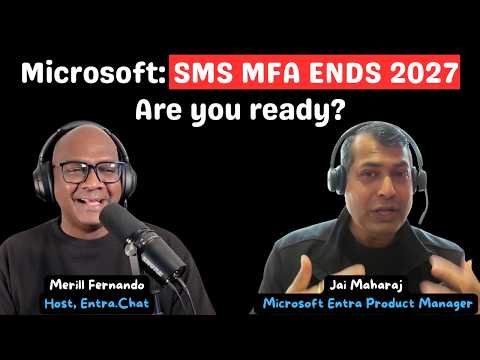
The newsroom reviewed a YouTube video by Merill Fernando that summarizes an episode of Entra.Chat, featuring Microsoft product manager Jai Maharaj. In the video, they explain Microsoft’s plan to retire its native SMS and voice MFA delivery and to make passkeys the default authentication method. Consequently, organizations face a fixed deadline and a clear push toward phishing-resistant authentication.
Moreover, the discussion highlights practical migration issues beyond simply enabling a new method. For instance, the presenters cover secure credential registration, account recovery without weak help-desk questions, and the need to protect high-value access. Therefore, the video frames passkeys as necessary but not sufficient for a secure identity program.
Finally, the hosts stress timelines and enforcement, which matter for planning. Microsoft sets passkeys as the default starting September 1, 2026, and retires Microsoft-managed SMS/voice on February 1, 2027. As a result, tenants that still rely on SMS or voice will face blocking prompts unless they adopt another method or use a customer-managed telecom provider.
What Is Changing and What Stays
The core change is that Microsoft will stop offering built-in SMS and voice delivery for multi-factor authentication while enabling passkeys by default. However, Microsoft allows organizations to keep telephony-based delivery through a customer-managed telecom provider if they choose to do so. This distinction matters because it keeps a migration path open for organizations that cannot immediately switch every user.
Furthermore, the video clarifies that Microsoft will block sign-ins when a user’s only MFA method is an enrolled SMS or voice option after the retirement date. Therefore, affected users must register a passkey during sign-in to regain access. This hard enforcement removes opt-outs and standardizes behavior across tenants, which simplifies policy but raises operational risks for unprepared environments.
In addition, the episode explains that the transition aims to reduce phishing and social-engineering attacks by moving to phishing-resistant methods like FIDO2, Windows Hello, and passkeys. Consequently, this change should improve security posture, but it also forces organizations to manage the tradeoff between rapid adoption and user friction during onboarding.
Migration Strategies and Passkey Options
The video outlines practical migration approaches, starting with widespread rollouts of passkeys while keeping alternatives such as Windows Hello and physical security keys for specific scenarios. Moreover, administrators can use passkey profiles to support different user personas, like administrators, knowledge workers, and frontline staff, which enables mixed deployments. Therefore, a phased approach reduces operational shocks and tailors the user experience based on role and device constraints.
They also contrast synced versus device-bound passkeys, noting synced passkeys shorten sign-in time and ease recovery across devices. Conversely, device-bound passkeys often provide stronger guarantees tied to a single end point. Thus, teams must weigh convenience against device-specific security and choose profiles that align with their threat model and user base.
Finally, the video stresses that enabling passkeys alone does not complete the project: organizations must enforce phishing-resistant requirements via Conditional Access policies. Without enforcement, legacy methods can linger and undermine the security gains. Consequently, IT teams should combine deployment with policy enforcement to realize the full benefit.
Challenges, Tradeoffs and High-Assurance Needs
One major challenge the presenters emphasize is secure bootstrapping: the first credential must be created in a way that does not introduce new attack vectors. Moreover, high-value access requires additional controls so that a stolen device or weak recovery path does not lead to compromise. For this reason, the video highlights augmenting passkeys with capabilities such as Microsoft Entra Verified ID and Face Check for high-assurance moments, rather than relying on them as everyday replacements.
Account recovery also creates a tradeoff between usability and security: self-service flows must avoid weak help-desk questions while still restoring access reliably. As a result, identity verification partners and verifiable credentials can play a role, but they add cost and operational complexity. Therefore, teams must balance budget, licensing implications, and the need for a robust recovery design.
Additionally, legacy applications that still depend on passwords present an enduring problem and require inventories and remediation plans. Meanwhile, customer-managed telecom options add flexibility but increase vendor management work and potentially recurring costs. Consequently, planners must weigh short-term continuity against long-term security gains and expenses.
Roadmap and Practical Next Steps for Administrators
The video concludes with a recommended roadmap that begins with discovery and pilot phases, then expands to broad deployment and enforcement. Administrators should first identify users who rely solely on SMS or voice and prioritize them for migration to passkeys or other phishing-resistant methods. Next, testing and training reduce user friction and cut help-desk calls during the cutover.
Moreover, organizations should align licensing, Conditional Access policies, and recovery options before the retirement date to avoid service interruptions. They also need to instrument telemetry and monitoring to spot users blocked at sign-in and to measure adoption progress. Finally, communication and staged rollouts help manage the human side of change, ensuring security improves without causing unnecessary disruption.
In short, the YouTube video by Merill Fernando offers a practical, balanced view of Microsoft’s transition away from built-in telephony MFA. It presents the timeline, technical details, and the nuanced tradeoffs administrators must manage, while stressing that a successful migration combines technology, policy, and user-focused operations.

Keywords
SMS MFA end 2027, migrate from SMS MFA, Microsoft Entra Passkey migration, Entra passkey rollout guide, passwordless migration Microsoft, plan for passkey migration 2027, disable SMS MFA Microsoft, Entra passkeys best practices