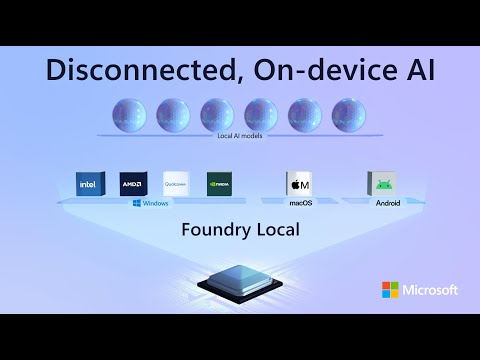
Microsoft Foundry Local: AI on PC or Mac
Software Development Redmond, Washington
Foundry Local: run local AI on Windows macOS with Foundry Local SDK and VS Code tools for privacy and low latency
Key insights
- Foundry Local is Microsoft’s on-device runtime that runs AI models directly on PCs, Macs, and mobile devices.
It lets developers build powerful apps that work without cloud connectivity using on-device inference. - Data privacy and reduced latency are core benefits: sensitive data stays on the device, and apps respond faster for real-time features like voice and vision.
This makes Foundry Local a good fit for offline or low-connectivity scenarios. - Developers get a full toolset with a SDK, CLI, and APIs for easy integration and testing.
Installation is simple (WinGet supported) and the runtime supports browsing, downloading, and testing models locally. - Foundry Local supports a curated model catalog or bring-your-own models, and it uses automatic hardware detection (CPU/GPU/NPU) to pick compatible, quantized models.
It’s built for cross-platform deployment across Windows, macOS, and mobile. - Running models locally cuts recurring cloud inference fees—no cloud costs—and lets apps use existing or even older devices with integrated graphics and limited RAM.
That improves cost-effectiveness and broadens device reach. - Foundry Local now ties into Windows AI Foundry for a unified developer lifecycle, with ready APIs and options to fine-tune models using techniques like LoRA.
Developers can scale from local apps to cloud scenarios, including Azure, as needs grow.
Overview
In a recent YouTube video published by Microsoft, the company outlines how developers can run advanced AI models directly on personal computers and Macs using Foundry Local. The video frames the technology as a local inference runtime that prioritizes privacy, performance, and offline capability. Moreover, presenters emphasize cross-platform support and simpler deployment as core goals of the offering.
What Foundry Local Brings to the Table
First, the video explains that local execution lets AI models run on-device, which lowers latency and keeps sensitive data from leaving a user’s hardware. Consequently, scenarios that require fast responses—such as voice assistants and real-time image analysis—benefit from this approach. At the same time, the presenters show that local inference helps organizations control costs by reducing reliance on cloud compute for every request.
Second, the demo highlights automatic hardware detection and model recommendations, so apps can adapt to CPUs, GPUs, and NPUs available on the machine. Therefore, developers can target a wide spectrum of devices, including older machines with integrated graphics. In this way, Foundry Local aims to make AI more accessible by leveraging existing hardware rather than requiring new cloud investments.
Developer Tools and Integration
The video demonstrates a practical toolchain that includes a command line experience and an SDK to accelerate development and testing. For example, presenters note that WinGet simplifies installation and that the CLI enables browsing and downloading models locally for quick experimentation. Furthermore, developers can integrate the runtime into apps through SDK APIs or the CLI, and they can test in environments like VS Code using the new AI Toolkit.
In addition, the presenters describe cross-platform portability so teams can write once and deploy to Windows, macOS, and supported mobile devices. They also underline the ability to switch AI engines and manage models on-device, which supports multi-modal experiences such as voice and text. Thus, the toolchain seeks to reduce the friction of building consistent experiences across operating systems.
New Capabilities and Cloud Interoperability
Importantly, the video positions Foundry Local as part of a larger ecosystem by tying it into Windows AI Foundry. As a result, teams can start locally and scale to cloud resources when workloads demand it, enabling hybrid workflows that combine on-device speed with cloud capacity. The presenters also highlight prebuilt APIs and models on select devices, known as Copilot+ PCs, which can simplify adding language and vision features.
Moreover, Microsoft outlines tools for customization, including low-rank adaptation methods like LoRA to fine-tune models such as Phi Silica, and APIs intended for semantic search and retrieval-augmented generation, or RAG. Consequently, developers who need tailored behavior can adapt models locally while retaining the option to leverage cloud-managed services for large-scale indexing or heavier compute tasks.
Tradeoffs and Practical Challenges
While the advantages of on-device AI are clear, the video candidly discusses tradeoffs that teams must consider. For instance, running models locally reduces cloud costs and data movement, but it can complicate model updates and centralized monitoring unless a disciplined deployment and versioning strategy is in place. Therefore, organizations must balance privacy and latency benefits against the operational overhead of keeping distributed models consistent.
Another challenge is hardware variability: older or low-power devices limit the size and complexity of models that can run effectively. Although Foundry Local includes model quantization and hardware-aware recommendations, developers still face tradeoffs between model accuracy, runtime performance, and memory use. Consequently, designing flexible fallbacks and hybrid architectures that offload heavy inference to the cloud when available can mitigate these constraints.
How to Get Started and Outlook
The video closes with practical guidance for trying the platform, showing how to install the runtime and start with sample apps that demonstrate local inference on different devices. Therefore, developers can quickly evaluate whether on-device AI meets their latency, privacy, and cost goals before committing to production. In addition, the presenters encourage testing across a range of hardware to understand performance and user experience tradeoffs.
Looking ahead, Microsoft frames Foundry Local as part of an evolving toolkit that supports both device-first and hybrid AI strategies. Consequently, teams that adopt this approach should prepare to manage distributed model lifecycle, optimize for diverse hardware, and combine local and cloud resources when necessary. Overall, the video makes a clear case that on-device AI is becoming a pragmatic option for many real-world applications, provided developers plan for the operational and technical tradeoffs involved.

Keywords
Microsoft Foundry Local, run local AI on PC, run local AI on Mac, local AI Windows PC, on-device AI for Mac, offline AI assistant for desktop, privacy-first local AI, deploy AI models locally