Power Apps: Vibe Code Tips for Makers
Microsoft MVP | User Adoption, Dynamics 365 + Power Platform Expert at Reenhanced
Microsoft expert: Vibe Coding in Power Apps AI‑native React apps with Dataverse, Power Platform governance and Entra ID
Key insights
- Vibe Coding is an AI-driven app builder inside the redesigned Power Apps: describe the app in natural language, and the system generates a plan, a data model, and a running app so you can iterate by prompts.
Workflow: Idea → Description → Generated plan → Generated app → Refinements. - Three core technical ideas power it: AI as a compiler (text becomes executable design), a unified design–build environment (Plan, Data, App in one workspace), and native Power Platform integration (enterprise auth, security, governance).
- Core capabilities: convert plain language into full apps, support AI-assisted iteration for quick tweaks, and produce modern stacks — a React-based frontend with a Dataverse backend — that follow standard patterns.
- Built-in enterprise features: apps inherit managed solutions, role-based access, Entra ID integration and ALM pipelines, so security and governance are applied from the start.
- Key benefits: lowers the barrier for non-developers (citizen developers), speeds developer bootstrapping, enables rapid prototyping, and improves consistency by generating standard code patterns.
- Current limits and outlook: the experience is in Preview, it cannot yet create classic Canvas or Model-Driven apps, generated React apps stay inside Power Apps (no external IDE edits), and complex enterprise logic still needs human engineering — Microsoft will evolve these limits over time.
In a recent YouTube video, Heidi Neuhauser [MVP] delivers a clear and technically grounded overview of Microsoft’s new app-building workflow called Vibe Coding. She explains how this experience turns plain-language descriptions into a running application, and she balances practical demonstrations with discussion of underlying design choices. Consequently, the presentation helps viewers understand both the immediate benefits and the longer-term implications for teams that build on the Power Apps platform.
What the Video Explains
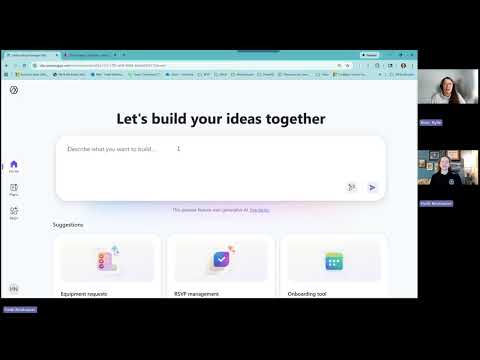
Neuhauser opens by framing Vibe Coding as an AI-native development model inside the redesigned Power Apps environment, and she emphasizes the simple workflow: idea, description, generated plan, generated app, and iterative refinement. She demonstrates how a natural-language prompt produces a structured plan, a Dataverse data model, and a React-based app that runs within the platform. Moreover, she shows how developers and business users can send follow-up prompts to tweak UI, logic, or database fields without rebuilding from scratch.
Next, the video walks through the unified workspace that merges planning, data modeling, and app preview into one chat-like interface. Viewers see how the system presents generated artifacts—requirements, user stories, and architecture notes—so teams can review before accepting changes. As a result, stakeholders can iterate faster while maintaining a record of decisions that the AI used to assemble the application.
How Vibe Coding Works
Neuhauser describes three core technical principles behind Vibe Coding. First, she likens prompts to source code: the AI acts as a compiler that translates intent into full-stack artifacts, including a React frontend and a Dataverse backend. Second, she highlights the unified design–build loop that keeps planning, modeling, coding, and testing within one continuous workflow, which simplifies handoffs between roles.
Third, she points out that apps generated by this approach inherit native platform services, such as managed solutions, role-based access, and integration with Entra ID. Consequently, the initial output is more than a prototype; it already connects with enterprise governance and security features. However, Neuhauser also clarifies that the generated apps are a new code-first class rather than classic Canvas or Model-Driven apps.
Strengths and Practical Uses
Throughout the video, Neuhauser emphasizes that Vibe Coding opens a new entry point for business users who lack coding experience, enabling them to prototype real workflows quickly. At the same time, professional developers can use the AI to scaffold applications—data model, navigation, and standard UI patterns—so they can focus on complex logic, integrations, and optimization. This dual benefit accelerates prototyping and improves agility for organizations that need to test ideas rapidly.
Moreover, because the system produces standardized patterns and consistent structures, applications tend to have fewer common errors and more predictable maintainability from the outset. Neuhauser notes that this consistency helps governance and auditing teams, and therefore organizations can more safely embrace citizen development while retaining appropriate controls. Rapid iteration combined with built-in enterprise services becomes a practical way to balance speed and compliance.
Limitations, Tradeoffs, and Challenges
Importantly, Neuhauser does not gloss over limitations: the new environment remains in Preview, and the generated React apps cannot yet be edited in external IDEs. Consequently, teams that expect full developer control or tight integration with existing developer toolchains face tradeoffs between convenience and direct code ownership. For heavy enterprise logic, deep flows, or complex data architectures, she stresses that experienced engineers remain essential to ensure robustness and performance.
Another challenge she raises is governance and lifecycle management: although the apps inherit platform controls, organizations must still design ALM pipelines and testing practices that account for AI-driven changes. Because the AI rewrites code in response to prompts, tracking changes, running automated tests, and ensuring reproducible builds require new policies and tool adaptations. Therefore, enterprises should weigh the benefits of speed against the need for traceability and strict change management.
Finally, Neuhauser discusses potential vendor-lock and dependency tradeoffs: while integration with Dataverse and platform services simplifies many concerns, it also ties generated artifacts to the Power Platform ecosystem. As a result, organizations must plan exit strategies or interoperability patterns if they expect future migration needs. In short, the convenience of AI generation comes with governance, portability, and control questions that deserve deliberate attention.
What Organizations Should Consider Next
In closing, Neuhauser suggests practical steps for teams evaluating Vibe Coding: start with low-risk pilots, define governance guardrails, and involve both business analysts and developers from day one. She recommends using the preview to explore how the AI handles routine patterns and to build a playbook that balances rapid prototyping with disciplined ALM and security reviews. Consequently, pilots will reveal where the approach speeds delivery and where human engineering must step in to handle complexity.
Ultimately, the YouTube presentation by Heidi Neuhauser [MVP] paints Vibe Coding as a significant evolution in Power Apps that shifts much of the routine work into an AI-assisted loop while preserving enterprise-grade services. For organizations, the decision comes down to tradeoffs: adopt faster iteration and broader participation now, and invest in governance and testing to manage the new risks. Thus, the video provides a measured, practical guide for teams planning to experiment with this emerging approach.

Keywords
Power Apps tips, Vibe Code Power Apps, Power Apps tutorial, Microsoft Power Platform tips, Power Apps best practices, Power Apps performance optimization, Low-code development Power Apps, Power Apps component framework