Sales Opportunity Agent: Essential Tips
Microsoft MVP | User Adoption, Dynamics 365 + Power Platform Expert at Reenhanced
Configure Sales Opportunity Agent in Dynamics Sales with Power Platform automation, guardrails and cost control
Key insights
-
Sales Opportunity Agent: An AI feature in Dynamics 365 Sales that continuously analyzes active opportunities and turns scattered signals into clear recommendations.
It pulls data across systems to help sellers know which deals need attention now. -
Key data sources: The agent combines records from Dynamics 365, emails and calendars (Outlook/Teams), internal activity history, Microsoft 365 collaboration, and public web research.
It synthesizes those inputs into concise, opportunity-specific insights. -
Opportunity prioritization: The agent ranks deals by real engagement signals rather than relying only on manual stages.
Sellers can focus time on opportunities with the highest likelihood to progress or the most urgent risks. -
Early risk detection and stakeholder insights: The agent flags declining engagement, missing decision-makers, and competitor mentions early.
This lets sellers act before issues sink or delay a deal. -
Recommended next actions: Outputs are actionable suggestions, such as follow-ups with a specific stakeholder or steps to address a risk.
The agent aims to tell sellers not only what happened, but what they should do next. -
Guardrails to control cost and scope: Configure frequency, data filtering, and trigger rules to avoid excessive processing and extra charges.
Apply limits and review agent settings so insights stay useful without driving up costs.
The following article summarizes a recent YouTube video by Heidi Neuhauser [MVP] that demos the Sales Opportunity Agent inside Dynamics 365 Sales. The video walks through configuration steps and shows what the agent produces when it runs against live opportunities. Consequently, the demonstration highlights both immediate productivity gains and important practical considerations for deployment. Importantly, the presenter also warns about potential costs and suggests guardrails to avoid excessive charges.
Video overview and key demonstration
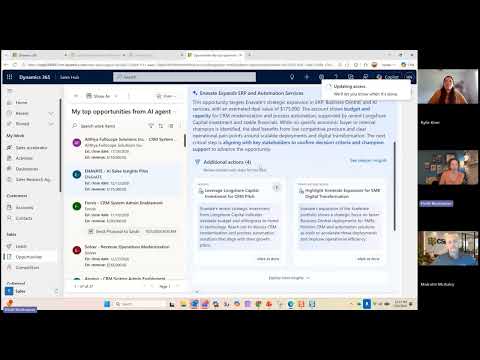
In the demo, Heidi Neuhauser [MVP] configures the Sales Opportunity Agent and then lets it run on sample opportunities to show its output. She explains how the agent collects CRM data, emails, meeting history, and publicly available web information to create actionable insights. Moreover, the video emphasizes that the agent does more than summarize fields: it recommends next steps and highlights risks. Viewers see live examples of prioritized deals, stakeholder maps, and suggested follow-ups.
How the agent synthesizes signals
The video clarifies that the agent uses an agentic approach to combine multiple data sources rather than just pulling static CRM fields. It examines opportunity and account records, activity logs, Outlook and Teams interactions, and web research to infer momentum, stakeholder influence, and competitive pressure. As a result, the output can surface disengaged stakeholders or stalled activity and propose targeted actions for sellers. This synthesis aims to reduce the manual research burden for sales teams.
Core capabilities highlighted
During the walkthrough, the presenter demonstrates several core capabilities such as opportunity prioritization, early risk detection, and stakeholder mapping. For example, the agent can flag declining engagement and spotlight missing decision makers, which helps sellers reallocate their effort. She also shows how recommendations translate into concrete next steps, for instance reconnecting with a specific contact or addressing a newly identified risk. These features are pitched to help sellers spend time where it most likely produces revenue impact.
Practical tradeoffs and technical challenges
However, the video does not shy away from tradeoffs, and the presenter discusses several deployment challenges that organizations must weigh. Privacy and data governance demand careful configuration because the agent accesses emails, meeting content, and collaboration signals; therefore, teams must balance insight depth with compliance. In addition, there is a tradeoff between analysis frequency and cost, as aggressive real-time scanning and broad external research can raise compute and licensing bills.
Accuracy tradeoffs also appear when the agent infers intent from signals that may be ambiguous, which can produce false positives or missed risks if not tuned. Consequently, organizations must plan for human review and feedback loops so sellers can correct and improve agent output. Finally, adoption risks remain: sellers may ignore recommendations that feel generic, so tailoring and training are essential to gain trust. Altogether, these challenges mean the technology must be governed and iterated, not simply switched on and forgotten.
Guardrails, cost control, and recommended practices
One of the most practical parts of the video focuses on guardrails to limit costs and scope. The presenter recommends limiting external web research scope, throttling analysis cadence, and restricting which user mailboxes or Teams content the agent can access. By contrast, leaving connectors open to broad public searches or enabling high-frequency re-scans risks unexpected spend; therefore, careful settings are crucial.
Moreover, the presenter suggests staged rollouts that start with a narrow set of opportunities or pilot teams so administrators can measure value and adjust thresholds. This approach reduces the chance of noisy recommendations and gives time to refine prompts, templates, and filters. Additionally, implementing feedback loops where sellers rate recommendations helps improve relevance and reduces unnecessary analysis over time. These best practices lower cost and improve seller acceptance.
Balancing automation and seller control
The video stresses the importance of balancing automated insights with seller discretion, because automation without control can generate friction. For instance, recommendations should be editable and accompanied by source evidence so salespeople trust suggested next actions. Likewise, administrators should allow opt-in and opt-out controls to respect individual workflows and privacy preferences.
As a result, the best deployments combine agent suggestions with clear audit trails and seller feedback, which helps organizations calibrate the system and measure ROI. In this way, automation becomes an assistant rather than a replacement, helping sellers focus on high-value conversations. The presenter shows configuration screens that enable these controls and demonstrates how to tune recommendation sensitivity.
Concluding assessment
Overall, Heidi Neuhauser [MVP] delivers a practical and hands-on look at the Sales Opportunity Agent, showing both its promise and the thoughtful governance needed to realize that promise. The video makes a convincing case that the agent can lift seller productivity by surfacing risks and suggesting tailored next steps, while also warning that poor configuration can create cost and privacy issues. Therefore, organizations should pilot carefully, set guardrails, and iterate based on seller feedback to capture value safely. In sum, the demo offers useful guidance for teams considering the technology and highlights the tradeoffs they will need to manage.

Keywords
sales opportunity management, sales enablement tips, sales agent training, crm opportunity tracking, lead qualification techniques, sales productivity tools, ai sales assistant, closing sales opportunities