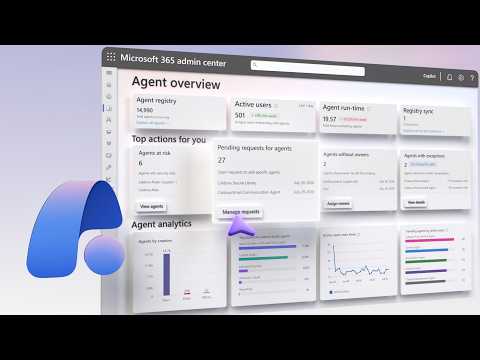
Agent 365: Controls for Microsoft Admins
Software Development Redmond, Washington
AgentThreeSixtyFive unifies AI agent governance, blocks shadow AI and enforces Entra Purview Defender Intune Copilot controls
Key insights
- Agent 365: a centralized control plane that lets admins discover, manage, and govern AI agents across the organization, no matter who built them or where they run.
- Unified Agent Registry: inventories agents from Microsoft and partner ecosystems, logs local AI via OpenTelemetry, and maps connections between agents, people, data, and tools for clear visibility.
- Registry Sync: pulls agents running in other clouds into the same registry with a simple connection string, so you can approve, publish, block, or reassign ownership from one place.
- Tools Governance & Execution Containers: lets you manage MCP servers, plugins, and connectors, block risky tools org-wide, and isolate local agents with Execution Containers while blocking shadow AI by default.
- Security Policy Templates: apply reusable templates that enforce Conditional Access, Access Packages, and Custom Security Attributes using Entra, Purview, Defender, and Intune for consistent identity, data, and device controls.
- Adoption Dashboard & Cost Controls: track agent usage by group, role, and license, set monthly limits, per-user budgets, and alerts, and purchase prepaid credits to keep spending predictable.
Overview of the video
Microsoft’s recent you_tube_video introduces Agent 365, a centralized control plane that aims to help administrators govern every AI agent across an organization. In the demo, Jeremy Chapman walks viewers through a unified registry and governance tools that span Microsoft and partner ecosystems. Moreover, the presentation shows how admins can discover agents wherever they run, from cloud-hosted services to local models on managed devices. Consequently, the video frames Agent 365 as a single place to observe, manage, and secure agents before they create risk.
Unified registry and discovery
The demo highlights a single inventory that surfaces agents from Microsoft Foundry, Copilot Studio, Agent Builder, and partner platforms. In addition, the registry pulls in agents running on AWS Bedrock, Google Cloud, Databricks Genie, and Anthropic Claude through a feature called Registry Sync, which only needs a connection string to begin populating the list. Thus, administrators gain visibility into identity, ownership, permissions, and usage history for each agent, helping to reduce blind spots.
Furthermore, local AI activity on managed devices appears in the centralized view through standardized telemetry. By using OpenTelemetry and a visual Agent Map, the platform lets teams trace how agents connect to people, data, and tools. As a result, organizations can see lateral interactions and potential data exposure paths, which makes it easier to assess risk before approving broader use.
Security and policy controls
Once agents register, Agent 365 layers reusable security policy templates across identity, data, device, and threat protections. For example, admins can apply Conditional Access rules, Access Packages, and Custom Security Attributes that draw on signals from Entra, Microsoft Purview, Defender, and Intune. Consequently, identity and security teams can enforce consistent controls without manually reconfiguring each agent, which reduces human error and improves compliance.
The platform also focuses on tools governance by listing MCP servers, plugins, and connectors that agents rely on, and by allowing org-wide blocks for risky components. Importantly, unsanctioned local agents—commonly called shadow AI—get blocked by default with device policies and can be isolated from user sessions using Microsoft Execution Containers. Therefore, organizations gain both preventive and isolating controls to limit agent-induced data leaks or unauthorized access.
Monitoring adoption, costs, and operational workflows
Besides security, the video emphasizes operational visibility with an Agent 365 Dashboard that breaks down adoption by group, job function, and license type. Moreover, managers and finance teams can set monthly spending limits, per-user caps, and weekly usage alerts for services such as Copilot integrations and the Work IQ API. Consequently, this ties governance to cost control so teams can measure adoption while preventing runaway expenses.
Tradeoffs and implementation challenges
While centralizing control brings clarity, it also creates tradeoffs between governance and developer agility. On one hand, strict templates and default blocks reduce risk and make compliance simpler, but on the other hand they can slow innovation when teams need rapid access to new agent capabilities. Therefore, organizations must balance speed and safety by using staged approvals, exemptions, or pilot sandboxes to keep momentum without compromising security.
Integration complexity also presents challenges: syncing agents across multiple cloud vendors requires consistent telemetry, robust identity mappings, and operational processes to reassign ownership when people leave. Furthermore, enforcing policies across disparate toolchains can generate false positives or block legitimate workflows unless teams tune rules carefully. Consequently, automating governance actions and investing in cross-team training become essential to avoid disruption while maintaining control.
What IT teams should do next
IT and security teams should begin by inventorying existing agents and running a pilot with Agent 365 to understand telemetry gaps and policy impacts. Next, teams should work with finance and line managers to define sensible spending thresholds and adoption metrics, while also preparing escalation paths for blocked agents that need urgent exceptions. Finally, by involving developers in policy design and by automating common lifecycle actions, organizations can both protect sensitive data and preserve the agility needed to adopt useful AI agents at scale.

Keywords
Agent 365 controls, Microsoft 365 admin controls, M365 agent security, Agent 365 admin guide, Agent 365 configuration for admins, Agent 365 compliance settings, Tenant management Agent 365, Agent 365 deployment best practices