Microsoft Zero Trust Assessment 2025
Product Manager @ Microsoft 👉 Sign up to Entra.News my weekly newsletter on all things Microsoft Entra | Creator of cmd.ms & idPowerToys.com
Microsoft Zero Trust Assessment: install and run the PowerShell module and report walkthrough for Azure security
Key insights
- Microsoft Zero Trust Assessment — An automated security evaluation that checks your tenant against Zero Trust principles.
It helps teams find configuration gaps and shows prioritized fixes in plain terms. - PowerShell module deployment — The tool runs as a module you install locally to scan Microsoft 365 and Azure settings.
It performs hundreds of automated checks so you don’t have to test each control by hand. - Coverage and focus — The assessment currently emphasizes Identity and Device security and will expand to cover Data, Network, Infrastructure, and Security Operations.
This phased approach lets teams start where risk is highest and grow protection over time. - Report and remediation — The generated report lists passed and failed tests, shows risk severity and user impact, and gives clear remediation steps.
Each finding ties to practical actions you can apply in admin consoles to reduce risk quickly. - Key advantages — The tool delivers automated checks, prioritized recommendations, and alignment with the NIST Cybersecurity Framework for measurable progress.
This speeds decision-making and helps teams focus on fixes that matter most to the business. - Next steps and support — Microsoft pairs the assessment with Zero Trust Workshops and evolving guidance, including AI-powered security insights, to build roadmaps and detect emerging threats.
Use the assessment results to create a prioritized plan and track improvements over time.
Video overview
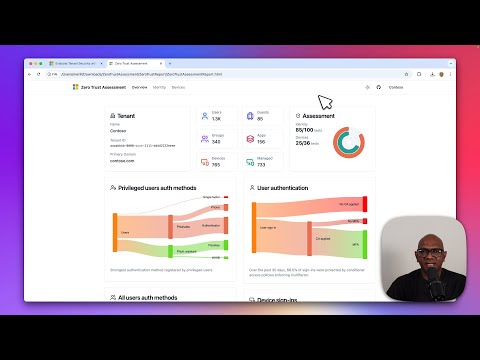
The YouTube video by Merill Fernando demonstrates how to install and run the Microsoft Zero Trust Assessment PowerShell module and then walks viewers through the generated report. The presentation aims to give IT teams a practical, step-by-step view of what the tool checks and how results appear in a real tenant. Consequently, the video is useful for security engineers and administrators who plan to evaluate their Microsoft 365 and Azure configurations.
In addition, Fernando highlights the assessment’s focus on identity and device controls while noting planned expansion to other security areas. He connects the automated checks to commonly accepted standards so viewers can see how results map to broader frameworks. This framing helps organizations understand the assessment’s role within a larger Zero Trust program.
How the assessment works
Fernando explains that the tool runs as a PowerShell module that executes automated checks across your Microsoft 365 and Azure tenant. The module evaluates hundreds of configuration items and produces a report that lists which checks passed or failed, the reasons for failures, and the likely impact on users. As a result, operators can quickly see priority issues and what the remediation might involve.
Moreover, the report includes risk ratings and estimated implementation effort for many findings, which helps teams balance urgency with available resources. The video shows links and references in the report that guide administrators to the right consoles for making changes. Therefore, the assessment reduces manual effort and shortens the time from discovery to remediation.
What’s new and expanding scope
Fernando points out that the current release builds on Microsoft’s earlier public preview and now reflects lessons from the Secure Future Initiative. In particular, the assessment now maps findings to recognized frameworks, such as the NIST Cybersecurity Framework, which helps organizations benchmark progress. Consequently, teams get a familiar frame of reference for prioritizing security work.
In addition, the presenter outlines Microsoft’s plan to broaden the tool beyond Identity and Device pillars to include Data, Network, Infrastructure, and Security Operations. He also mentions that Microsoft is working to integrate AI-powered insights to help detect emerging risks and secure AI workflows. While not all these capabilities are fully released, the roadmap signals an intent to deliver a fuller Zero Trust posture assessment over time.
Tradeoffs and practical challenges
Fernando also discusses tradeoffs organizations should consider when adopting automated assessments. For example, automation speeds detection but can increase false positives or flag items that are acceptable for a particular business context, which requires human judgment to prioritize. Therefore, teams must balance automated findings with their operational realities to avoid unnecessary disruptions.
Furthermore, the video highlights permission and scope challenges: running tenant-wide checks requires adequate administrative rights and careful planning to protect sensitive data. Organizations with complex environments may need to stage assessments to avoid overwhelming IT teams and to prevent changes that might disrupt users. Thus, change management and user impact assessment remain important parts of any remediation plan.
Finally, Fernando points to skill and resource gaps as common hurdles: interpreting findings and implementing fixes often require cross-team coordination across identity, device management, and network teams. In that light, combining the assessment with workshops or guided roadmaps can help align technical fixes with business priorities and reduce friction. Ultimately, the tool is most effective when paired with governance and a clear operational plan.
Recommendations and next steps
In the closing segments, Fernando recommends that organizations start with identity and device checks, prioritize high-risk items with high user impact, and then iterate. He suggests using the assessment’s risk ratings and implementation estimates to sequence work and to involve stakeholders early to reduce resistance. Therefore, the report can serve as both a diagnostic and a planning tool.
Moreover, the presenter advises combining the assessment results with targeted workshops to translate technical findings into a tailored Zero Trust roadmap. This combined approach helps organizations move from assessment to implementation without losing sight of operational realities. As a result, teams can make steady progress while minimizing business disruption.
Overall, Merill Fernando’s video provides a clear, practical guide for teams that want to adopt the Microsoft Zero Trust Assessment as part of a broader security program. It balances hands-on instruction with thoughtful discussion of tradeoffs, making it a useful resource for both technical implementers and security leaders planning next steps.

Keywords
microsoft zero trust assessment, zero trust assessment, microsoft zero trust framework, zero trust security assessment, microsoft security assessment, zero trust maturity assessment, microsoft zero trust implementation, zero trust readiness checklist