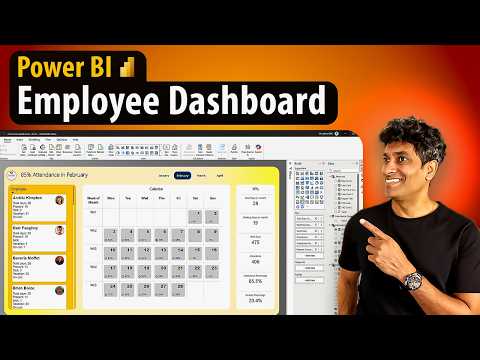
Power BI Tips: Build a Stunning Employee Dashboard with Advanced DAX
Power BI, Power Query, Power Pivot, DAX, SVG Measures, OneNote, PPT
Key insights
- Power BI is a Microsoft tool that helps create interactive dashboards for HR reports and employee data, allowing organizations to analyze attendance, performance, and other workforce metrics easily.
- The dashboard development process uses Power Query for data loading and transformation, Power Pivot for modeling relationships between tables, and advanced DAX (Data Analysis Expressions) formulas to perform complex calculations.
- SVG Measures are used in Power BI to design custom visuals like calendar views and employee cards, improving the visual appeal and clarity of the dashboard.
- The approach includes steps such as designing layouts in OneNote or PowerPoint, formatting dashboards directly in Power BI, and adding features like dynamic titles to make the report more engaging.
- Real-time Insights: By connecting to various sources like HR databases or Excel files, Power BI dashboards can provide up-to-date information for better decision-making.
- User Experience: Recent updates focus on making dashboards more interactive and visually appealing while maintaining ease of use for HR professionals and managers.
Introduction to Chandoo’s Employee Dashboard with Power BI
In a recent YouTube video, renowned data expert Chandoo demonstrates how to create an impressive employee attendance dashboard using Microsoft Power BI. The video guides viewers through each step, from data preparation to advanced visualization techniques, highlighting the key tools and methods required for building a dynamic HR dashboard. As organizations increasingly rely on data-driven insights, Power BI has become a vital tool for HR analytics, and Chandoo’s tutorial offers a comprehensive look at its capabilities.
Throughout the demonstration, Chandoo emphasizes the use of advanced DAX (Data Analysis Expressions), OneNote to sketch out dashboard layouts, Power Query, Power Pivot, and SVG measures. These components work together to transform raw employee data into actionable insights, helping HR professionals make informed decisions. By combining technical expertise with intuitive design, the dashboard aims to balance clarity, interactivity, and depth of analysis.
Step-by-Step Dashboard Creation Process
The video starts by showcasing a completed version of the employee dashboard, offering viewers a clear vision of the final product. Chandoo then takes a closer look at the underlying data, which includes employee attendance records and related metrics. This foundational step is crucial, as understanding the structure and content of the data ensures that the dashboard will accurately reflect organizational realities.
The design process begins with inspiration and planning, often utilizing tools like PowerPoint to sketch out dashboard layouts. Chandoo highlights the importance of thoughtful design, drawing from various sources to create a visually appealing and functional workspace. Once the plan is set, the data is loaded and transformed using Power Query, which streamlines data cleaning and preparation. This step can present challenges, especially when dealing with inconsistent or incomplete records, but Power Query’s robust features help address common issues efficiently.
Advanced Techniques: DAX, SVG, and Visual Design
A significant portion of the tutorial focuses on the power of DAX for creating complex calculations and measures. Chandoo sets up a dedicated measures table in Power BI, demonstrating how advanced DAX formulas can provide deeper insights into employee behavior and trends. These calculations enable dynamic analysis, such as tracking attendance patterns over time or identifying areas for improvement.
Furthermore, the use of SVG (Scalable Vector Graphics) within Power BI marks a notable advancement in dashboard visualization. By incorporating SVG measures, Chandoo enhances the calendar view and employee card visuals, making the dashboard not only informative but also engaging. However, integrating SVG images can introduce technical hurdles, particularly with loading images correctly. Chandoo addresses these challenges by leveraging Power Query to resolve image loading issues, showcasing a practical approach to overcoming real-world obstacles.
Balancing Visual Appeal and Usability
One of the central tradeoffs in dashboard development is finding the right balance between visual appeal and usability. Chandoo’s approach underscores the need for dashboards that are both attractive and easy to navigate. He uses background designs created in PowerPoint and custom page layouts in Power BI to ensure that information is presented clearly without overwhelming the user.
Additionally, the tutorial covers formatting techniques and the use of dynamic dashboard titles to tell a compelling story with data. This focus on narrative helps engage stakeholders and supports better decision-making. While advanced visuals can enhance the user experience, they must be carefully implemented to avoid distracting from the core insights.
Challenges and Future Directions
Building a sophisticated employee dashboard in Power BI comes with its share of challenges. Data integration, especially from multiple sources, can be complex, requiring careful modeling to ensure accuracy. Advanced DAX formulas can also be difficult for beginners, highlighting the importance of ongoing learning and practice.
Nonetheless, the evolving capabilities of Power BI—such as improved interactivity, seamless integration with other Microsoft tools, and a growing library of visualization options—are making it easier for organizations to adopt advanced analytics. As Chandoo demonstrates, staying updated with new features and best practices is essential to maximizing the benefits of business intelligence tools.
In summary, Chandoo’s video provides a clear roadmap for creating an effective employee dashboard in Power BI. By combining technical know-how with thoughtful design, organizations can unlock valuable insights and drive better HR outcomes.

Keywords
Power BI employee dashboard advanced DAX Power BI tutorial employee analytics DAX tips Power BI data visualization HR dashboard Power BI performance metrics