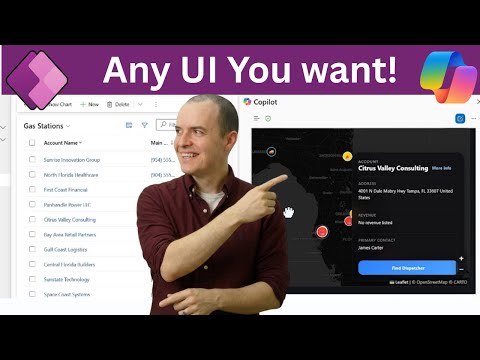
M365 Copilot: Build Any UI in Power Apps
Solutions Architect, YouTuber, Team Lead
Microsoft Copilot builds map UIs from Dataverse with GitHub Copilot, packaging MCP apps for Teams and Power Platform
Key insights
- Model-driven Power Apps as declarative agents: Makers can surface model-driven apps inside Microsoft 365 Copilot so the app shows interactive UI components in the Copilot pane.
Users interact with app data and logic without leaving Copilot. - Custom tools and rich app-powered UI: Makers add tool metadata (name, description, instructions) so Copilot decides when to run a tool, and embed interactive widgets (MCP-compliant Fluent UI) for a more app-like experience inside conversations.
This moves Copilot beyond text replies into structured UI. - Demo workflow with an interactive map: The video builds a map that visualizes Dataverse records (gas stations low on fuel), generates UI using GitHub Copilot CLI in VS Code, customizes the visualization, and packages it as a declarative agent.
No canvas app or Power BI report was required. - Packaging & deployment: Steps include enabling Copilot support in the model-driven editor, packaging the app for Copilot, and deploying the agent to Copilot surfaces such as Teams and Dataverse.
Tenant and environment admin controls in Power Platform govern availability. - Current limitations: The public preview is largely read-only for data and has feature gaps to track before full production use.
Expect capabilities to expand as Microsoft develops the preview. - Key benefits: You gain faster delivery, reuse of existing Dataverse apps and business logic, and more natural in-context interactions for users.
Embedded UI widgets let Copilot behave more like an app than a chat-only assistant.
Overview
Sean Astrakhan of Untethered 365 published a YouTube video that demonstrates how to make a model-driven Power App appear inside Microsoft 365 Copilot as a declarative agent, complete with an interactive map UI. The walkthrough uses a dataset of gas stations running low on fuel to show a practical business scenario, and it highlights how makers can surface app-driven experiences directly within Copilot instead of only returning text answers. In short, the video frames a new pattern where apps join conversational workflows, blending app UI and natural language in the Copilot pane.
Demo walkthrough
First, Astrakhan builds an interactive map visualization from scratch and ties it to Dataverse data, demonstrating the full authoring flow inside the model-driven editor. Then he generates the front end with the GitHub Copilot CLI in Visual Studio Code, iterates on the visualization, and packages the result as an MCP app that Copilot can surface. Finally, he deploys the app to both Teams and Dataverse to show the experience running inside real Microsoft 365 surfaces during a live demo.
How the pieces fit together
At the core of the approach is the ability for a model-driven app to be exposed as a declarative agent so that Copilot can present not just responses but interactive widgets and forms. Makers enable support in the app settings, which packages the app for use by Copilot, and administrators can control tenant and environment level access for the feature. Moreover, the preview includes ways to add richer UI components that behave like small app experiences, not simply chat cards, so users can take direct action inside the conversation.
Generating and customizing the UI
Astrakhan shows how the GitHub Copilot CLI helps generate a starting UI, which he then customizes in VS Code to match the visualization requirements and business logic. Consequently, makers can move quickly from prompt to prototype, and then iterate to improve map styling, filters, and data bindings. However, the process still requires sensible developer oversight because the generated code needs testing, refinement, and sometimes manual fixes to meet production expectations.
Limitations and current tradeoffs
The video is candid about key constraints, most notably that many Copilot-driven app experiences remain read-only in this early preview, which limits workflows that require direct writes or complex transactions. Therefore, teams must weigh the benefit of faster discovery and visibility against the need for full two-way application logic and validations that traditional apps provide. Additionally, although declarative agents speed up delivery by reusing model-driven artifacts, they may offer less fine-grained control compared with building a bespoke canvas app or a custom web component, which affects UX polish and specialized behavior.
Deployment and governance implications
Deploying an MCP app into Teams and Dataverse simplifies distribution, but it raises governance and security considerations that organizations must address before broad rollouts. For example, tenant administrators must configure who can enable Copilot features, and teams should establish testing and change control to prevent accidental data exposure or inconsistent app behavior. In practice, balancing rapid prototyping with robust governance means adding guardrails such as environment separation, logging, and approval workflows to reduce operational risk.
Practical challenges for makers
Makers who adopt this pattern will face a mix of authoring and operational challenges, from writing clear prompt metadata for custom tools to maintaining the generated UI over time as Dataverse schemas evolve. Moreover, debugging interactions that span Copilot prompts, model-driven configuration, and generated code can require cross-discipline skills spanning Power Platform admin work and front-end troubleshooting. Consequently, teams should plan for iterative refinement, allocate time for testing across surfaces, and build monitoring to catch unexpected behaviors early.
Tradeoffs in UX and maintenance
The main tradeoff is between speed and control: declarative agents let you ship faster and reuse existing Dataverse logic, yet they can limit how deeply you customize interactions compared with hand-coded apps. Over time, maintenance costs may shift depending on whether the project remains primarily prompt-driven or evolves into a bespoke solution that needs ongoing developer attention. Therefore, decision-makers should weigh immediate ROI against long-term maintainability when choosing this route for critical workflows.
Why this matters now
Ultimately, Astrakhan’s video highlights a meaningful evolution in how Power Apps can participate in conversational AI experiences, making app logic and UI more discoverable across Microsoft 365. As Copilot extensibility matures, organizations will gain new ways to surface actionable data without forcing users to switch context, which can improve productivity for common tasks. Still, the approach requires careful planning around permissions, testing, and the limits of current preview features to deliver reliable outcomes.
Conclusion
The demonstration by Sean Astrakhan offers a practical and balanced look at bringing model-driven apps into Microsoft 365 Copilot through MCP apps and declarative packaging, showing both the promise and the boundaries of the current preview. For makers and architects, the takeaway is that this path accelerates prototyping and user discovery, but it also demands governance and attention to interaction limits. Consequently, teams should experiment with non-critical workflows first, refine their authoring and deployment practices, and plan for gradual adoption as the platform capabilities expand.

Keywords
M365 Copilot Power Apps, Copilot in Power App, Declarative Agents Power Apps, Custom UI Power App, Power Platform Copilot, Build conversational agents Power Apps, Power Apps UI customization, Copilot integration Power Apps