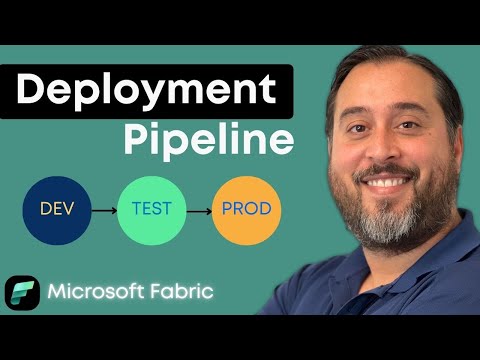
Fabric Deployment Pipelines: Quick Start
Microsoft Fabric Deployment Pipelines: move content from dev to prod, version safely, promote changes and manage workspaces
Key insights
- Deployment Pipelines: A structured way to move content across development, test, and production stages.
They use 2–10 stages to version artifacts and promote updates safely while reducing risk. - New Pipeline Design and Variable Library: The redesigned pipeline (GA Sept 2025) improves usability and replaces the old model.
Variable libraries let teams reuse parameters across pipelines and notebooks for consistent deployments. - Terraform Provider and CI/CD integration: Terraform support enables infrastructure-as-code and automated role assignments.
Build CI/CD flows with Azure DevOps and Service Principals for repeatable, cross-tenant deployments. - Pairing items and the deployment process: Pair corresponding items across stages to control what moves between workspaces.
Deployments can add or update items, but gateway and connection settings require manual reconfiguration after promotion. - Copy Job features and network support: New Copy Job capabilities include truncate destination, query-based full or incremental copy, and multiple folder handling.
Invoke pipeline and semantic model refresh activities now support on-premises and VNet Gateway scenarios for hybrid environments. - Debugging & Scheduling, Version control, and Permissions: Pipelines support expression evaluation for debugging and more scheduling slots (up to 20).
Use version control and role-based permissions to keep environments consistent and governed.
Overview of the Video
The YouTube video by Pragmatic Works introduces viewers to the basics of Microsoft Fabric Deployment Pipelines, aimed at teams moving work from development to test and production. In plain language, the video highlights how pipelines help version content, promote changes safely, and keep Fabric environments consistent. Moreover, the presenter frames the feature as especially useful for teams that manage multiple workspaces or adopt Fabric across several projects. Consequently, viewers can quickly grasp why pipelines matter for governance and repeatable delivery.
Importantly, the video also notes that a redesigned pipeline experience reached general availability on September 30, 2025, replacing an older model. As a result, teams should plan migration strategies because the legacy pipeline will be retired in a coming quarter. The presenter summarizes new capabilities such as better CI/CD integration, improved debugging, and broader resource support. Thus, the video serves as both a primer and an update for practitioners working with Fabric.
Key New Features Highlighted
First, the video emphasizes the new pipeline UI and backend improvements that aim to make deployment flows easier to manage at scale. In addition, it calls out the Variable Library, which simplifies parameter reuse across pipeline components and notebooks, thereby reducing repetitive configuration. The presenter explains that variable libraries extend support beyond simple shortcuts into more complex CI/CD scenarios, which helps teams keep configurations consistent across environments. Therefore, teams gain flexibility and fewer manual edits when promoting content.
Second, the video discusses integration with infrastructure-as-code through a Terraform provider, which now supports managing Fabric resources and role assignments. Meanwhile, Azure DevOps and service principal support enable automated cross-tenant deployments for larger organizations. Furthermore, the update expands scheduling and debugging capabilities, and adds preview features like an enhanced Copy Job activity for more robust data movement. Collectively, these features improve automation, but they also introduce new governance considerations.
How Deployment Pipelines Work
The presenter walks through the mechanics: pipelines define between two and ten stages, usually representing development, test, and production environments. Items in each workspace are paired across stages so that specific datasets, reports, and models stay linked as they move forward. When promoting content, pipelines offer options to add or update items, and they preserve versioning to enable rollbacks when needed. Consequently, the flow helps teams reduce risk and track what changed at each stage.
However, the video makes clear that some settings do not carry over automatically. For example, gateway configurations used for scheduled refreshes must be reconfigured after deployment, and administrative permissions may require manual adjustments. Also, the presenter demonstrates how the pipeline evaluates expressions for debugging and allows multiple schedules per pipeline to support complex operations. Thus, while automation covers many tasks, some manual steps remain necessary for complete environment parity.
Tradeoffs and Operational Challenges
On one hand, the improved automation and CI/CD integrations reduce manual effort and increase repeatability, which benefits larger teams and regulated environments. On the other hand, teams must balance automation against governance; wider automation can speed deployments but raises the risk of propagating misconfigurations. Consequently, organizations should plan approval gates and testing steps to avoid pushing incomplete or insecure artifacts to production.
Additionally, using Terraform and service principals introduces both benefits and complexity: infrastructure-as-code gives traceability and repeatability, yet it requires teams to maintain additional scripts and permissions. Likewise, support for on-premises and VNet gateways expands deployment scenarios, but it adds networking and security considerations that teams must validate. Therefore, the choice between fully automated pipelines and cautious, staged promotion depends on team size, regulatory needs, and operational maturity.
Practical Recommendations for Teams
First, teams should start by mapping environments and identifying which items need pairing across stages, and then enforce naming conventions and role assignments to prevent drift. Next, adopt the Variable Library for common parameters so that changes propagate predictably and reduce manual edits. Also, invest time in configuring service principals and testing Terraform scripts in a safe staging tenant before running them at scale.
Finally, include manual checks where automation cannot cover context-specific settings such as gateways and access controls, and document those steps in deployment runbooks. As a result, teams can enjoy the speed and consistency of Deployment Pipelines while limiting surprises in production. Overall, the video from Pragmatic Works delivers a clear, practical introduction that helps teams weigh benefits and tradeoffs when adopting Fabric deployment workflows.
Keywords
Fabric deployment pipelines, Microsoft Fabric deployment, Microsoft Fabric CI/CD pipelines, Fabric pipelines tutorial, Deploy pipelines in Microsoft Fabric, Microsoft Fabric release management, Fabric infrastructure as code, Microsoft Fabric best practices