Microsoft Copilot Studio: Set Up Evals
Certified Power Apps Consultant & Host of CitizenDeveloper365
Microsoft guide to Copilot Studio agent evaluations: tests, similarity and quality checks with Power Platform LLMs
Key insights
- Agent Evaluation: The video explains that Copilot Studio’s evaluation feature lets you systematically test and validate chatbot agents to ensure accurate, consistent responses.
- Test Set: Create test sets by importing files, reusing Test Pane chats, adding cases manually, or selecting auto-generated questions to simulate real user inputs.
- Test Methods: Choose methods like exact match, partial match, similarity (semantic scoring), compare meaning, or general quality to measure different response aspects.
- AI test generation: Use AI-generated queries to expand coverage quickly and surface edge cases the agent might miss during manual testing.
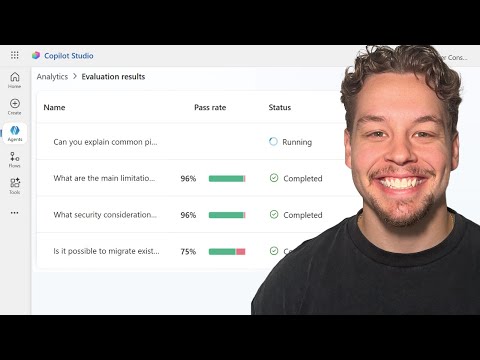
- Pass Rate: Run evaluations to simulate conversations, score responses against expected results, and set threshold-based pass rates to identify failures and needed improvements.
- Activity Map: Review failed cases with the activity map and logs, iterate on prompts or data, and rerun tests to improve agent reliability and business alignment.
Overview of the Video by Griffin Lickfeldt (Citizen Developer)
In a recent YouTube video, Griffin Lickfeldt (Citizen Developer) demonstrates how to set up Evaluations in Copilot Studio, Microsoft's environment for building chatbot agents. The presentation aims to help makers and non-technical builders understand how to create test cases, run evaluations, and interpret results to improve agent performance. Moreover, Lickfeldt breaks down key evaluation methods and shows practical examples, making the features approachable for both beginners and experienced users.
Throughout the video, he emphasizes the role of structured testing in delivering reliable conversational experiences. He also explains how different test methods—such as exact match, similarity scoring, and general quality checks—fit into common validation workflows. As a result, viewers can see how to move from manual trial-and-error to repeatable, automated evaluations.
The video's tone is instructional and focused on applied steps rather than theory, and it includes on-screen walkthroughs of the Copilot Studio interface. Consequently, the material is useful for teams who want to formalize QA practices for their agents. Importantly, Lickfeldt frames testing as an ongoing process, not a one-time action.
Key Features Demonstrated
Lickfeldt highlights several central features that make evaluation in Copilot Studio practical, starting with the ability to create and run Test Sets from multiple sources. He shows how to import questions from files, reuse recent test chats, add cases manually, and even generate queries automatically with AI-assisted suggestions. These options help teams cover more scenarios quickly while keeping tests aligned with actual usage.
He also demonstrates configurable test methods, explaining when to use exact match versus similarity scoring with cosine similarity, and when to rely on a general quality assessment that leverages LLMs. He points out that exact match is strict but clear, while similarity methods tolerate phrasing differences and are better suited to conversational outputs. Consequently, makers can choose the right mix depending on the agent’s purpose and expected variability in responses.
Finally, the video shows how Copilot Studio reports results, including per-case pass/fail outcomes and aggregated metrics like the Pass Rate. This feedback loop helps teams identify patterns and prioritize fixes for intents or flows that underperform. The visual analytics and activity map make it easier to trace failures back to the agent's logic or content sources.
Step-by-Step Walkthrough
In the step-by-step segment, Lickfeldt walks viewers through opening an agent, accessing the Analytics or Test Pane, and selecting the option to create a new Test Set. He then covers the choices for populating the set—manual entry, import, recent chats, or AI-generated queries—and explains tradeoffs for speed and coverage. For instance, importing a well-crafted CSV gives precise expectations, while AI generation helps simulate broader user language.
Next, the video shows how to define expected responses and choose test methods per case, which is crucial for accurate scoring. Lickfeldt advises that expected responses are mandatory for match-based methods but optional for general quality checks, which use model-based judgment. He demonstrates running the evaluation and interpreting the system-assigned Pass and Fail labels, emphasizing that thresholds can be tuned to business needs.
He rounds out the walkthrough with guidance on iterative testing: run, review failures, update training data or prompts, and repeat. This iterative loop encourages frequent, modest updates rather than large, infrequent overhauls. As a result, teams can steadily raise quality without disrupting live interactions excessively.
Tradeoffs and Practical Challenges
The video candidly addresses tradeoffs involved in choosing test methods and thresholds, noting that more permissive similarity scores reduce false negatives but increase the risk of false positives. Conversely, strict exact matches lower false positives but can flag acceptable, paraphrased responses as failures. Therefore, teams must balance sensitivity and specificity based on the agent's role, such as informational FAQ bots versus compliance-sensitive assistants.
Lickfeldt also discusses challenges around generating meaningful test data, especially for niche domains where AI-generated queries may miss edge cases. He suggests combining curated examples with AI-augmented sets to get broader coverage while preserving domain accuracy. Additionally, maintaining tests as the agent evolves requires governance to avoid stale expectations that produce misleading results.
Operational constraints also appear, including the need for cross-team coordination when fixes touch knowledge bases or connector logic. He points out that some failures stem from source content rather than model behavior, which means remediation may involve content updates, prompt tuning, or connector debugging. Thus, evaluation is a multidisciplinary activity that needs clear roles and processes.
Recommendations and Next Steps
To conclude, Lickfeldt recommends starting small with a focused test set and then expanding coverage with AI-aided generation and imports. He encourages teams to set realistic Pass Rate targets, align metrics with business outcomes, and automate recurring evaluations to catch regressions early. These practices help keep agents reliable in production and support continuous improvement.
He also urges documentation of test case rationales and version control for test sets, so teams can trace why certain thresholds were chosen. Finally, he advises combining analytics insights with user feedback to prioritize fixes that matter most to real users. Overall, the video serves as a practical guide for makers seeking to formalize testing and elevate agent quality within the Copilot Studio ecosystem.

Keywords
Microsoft Copilot Studio evaluations, setup evaluations Copilot Studio, Copilot Studio evaluation tutorial, how to evaluate copilots in Copilot Studio, Copilot Studio testing and validation, Copilot Studio evaluation metrics, Copilot Studio feedback loop setup, Microsoft Copilot model validation