Overview
The newsroom reviewed a recent YouTube demonstration by Ami Diamond [MVP], who showcased how to create and add a striking HTML page inside SharePoint. In the video, Ami built a company meetup invitation that looked and behaved more like a modern landing page than a typical intranet post. Consequently, his walkthrough highlights new ways to present events, onboarding content, and internal campaigns within Microsoft 365. The piece frames this capability as a step toward richer, web-style experiences inside the corporate intranet.
Importantly, the video does not claim that SharePoint now allows arbitrary, full-site HTML editing in the same way classic pages once did. Instead, Ami demonstrates practical workarounds and a recommended path that balances design freedom with platform support. As a result, viewers get a clear sense of what is possible today and what remains limited by the platform. Moreover, the presentation is practical and aimed at content creators and IT pros who want polished internal pages fast.
What Ami Demonstrated
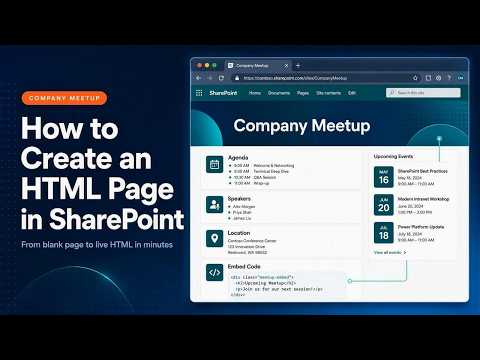
In the example, Ami created an event registration landing page with branding, agenda highlights, speaker details, and a registration call-to-action built directly in a modern SharePoint environment. He used familiar elements such as hero visuals and web-style layout to make the page feel like a dedicated microsite while keeping content inside the corporate intranet. Therefore, the result reads as a professional event experience rather than a plain form or list. The video shows the end-to-end look and explains the composition choices clearly.
Furthermore, Ami explains how to include custom HTML snippets without breaking supported models, and he points viewers towards the supported methods to embed or extend the page. He emphasizes the use of the Embed option for simple HTML snippets and suggests SPFx for deeper custom behavior and production-grade solutions. Consequently, the demonstration balances creative design with platform best practices. It also clarifies that classic HTML injection is no longer the mainstream approach for modern SharePoint pages.
How to Add HTML in SharePoint: Practical Steps
First, Ami recommends starting with a modern pages template to establish layout and responsiveness, and then adding web parts for core content like text, images, and buttons. Next, he shows how to use the Embed web part to surface an externally hosted or library-stored HTML fragment when the page needs custom styling or interactive elements. For more complex needs, he demonstrates how to develop an SPFx component that can carry HTML, CSS, and JavaScript in a supported, maintainable package. Thus, creators can blend SharePoint’s native tools with custom code while staying within supported extension models.
Additionally, Ami points out operational details such as saving assets to document libraries and confirming security settings for embedded content. He advises testing across browsers and devices to keep the experience consistent for employees. Finally, he encourages teams to document custom components so future admins can maintain them easily. These steps help teams move from prototype to a stable production page inside Microsoft 365.
Tradeoffs and Challenges
Balancing design freedom against platform support presents clear tradeoffs that Ami covers in the video. On one hand, embedding plain HTML or using lightweight snippets grants rapid visual customizations and can yield striking pages quickly. On the other hand, relying on ad-hoc code can complicate maintenance, raise security concerns, and break with future platform updates if not packaged properly. Therefore, Ami recommends choosing the right approach based on longevity and audience.
Moreover, choosing SPFx brings robustness but requires development skills, deployment pipelines, and governance controls that smaller teams may lack. Conversely, using only built-in web parts and templates keeps pages simple and low-risk but may limit fine-tuned branding and interactive behaviors. Thus, organizations must weigh speed and aesthetics against maintainability and compliance. Ami’s walkthrough frames these challenges sensibly, helping teams pick a path aligned with their resources and goals.
Recommendations and Takeaways
In conclusion, the video by Ami Diamond [MVP] offers a realistic roadmap for teams that want modern, attractive pages inside SharePoint without abandoning platform guidance. He advocates starting with a modern page template, using web parts for content, embedding simple HTML when useful, and choosing SPFx for scalable customizations. Consequently, teams can achieve a near-website experience while keeping content manageable and secure.
Ultimately, Ami’s tutorial is useful for content authors and IT leaders who must balance user experience, supportability, and governance. As a result, the newsroom recommends teams pilot the approach for event pages or onboarding sites and formalize a development-to-deployment process if they move toward more complex customizations. The video is a clear, practical resource that clarifies what is possible today and how to proceed responsibly.
.jpeg?w=700&output=webp)