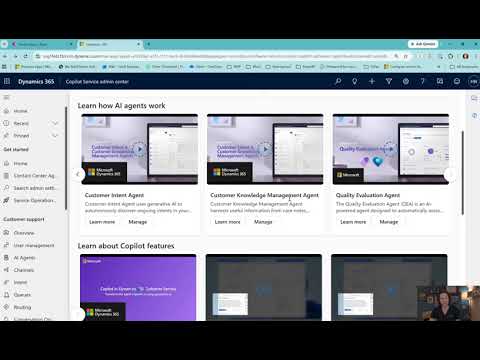
Dynamics 365: Copilot Service Admin Tour
Microsoft MVP | User Adoption, Dynamics 365 + Power Platform Expert at Reenhanced
Microsoft expert guide to updated Dynamics Three Sixty Five Customer Service Copilot Admin Center AI tour
Key insights
- The Copilot Service admin center is the unified admin app for Dynamics 365 Customer Service.
It centralizes setup for cases, queues, knowledge, channels, routing, agent profiles, and service schedules. - Microsoft applied naming and consolidation by renaming older Customer Service and Contact Center admin apps to the Copilot Service admin center and deprecating legacy admin tools.
This gives admins one consistent place to find and configure Customer Service capabilities. - Admins configure Copilot tools under Agent experience and Productivity, including the Copilot help pane, summaries, Ask a question, suggest-a-response, and write-email features.
These features can be enabled per agent experience profile so you control who sees which Copilot functions. - The admin center links to Copilot Studio to extend Copilot with external knowledge sources like SharePoint, websites, files, and Dataverse.
Some knowledge-source options are marked preview, so review settings before enabling them for production. - Copilot requires the right environment and data-sharing settings in Power Platform and may vary by geography.
Make sure agents are assigned to the correct profile and that data access policies match your compliance needs. - The main benefit is centralized administration: fewer admin apps, simpler navigation, and a single control point for AI, routing, channels, and service rules.
The transition needs no data migration and makes it easier to tailor Copilot for different teams and use cases.
Video summary and context
In a recent YouTube video, Heidi Neuhauser [MVP] offers an updated tour of Microsoft’s administration experience now called the Copilot Service admin center. The presentation explains how Microsoft consolidated earlier admin apps and rebranded them to form a unified place for Customer Service configuration. Consequently, viewers get a practical walkthrough rather than a rollout of an entirely new product.
Neuhauser clearly frames the change as a navigation and naming update that aims to simplify administration. She shows where features such as cases, queues, knowledge articles, and routing live in the new interface. Moreover, she points out that the consolidated view intends to reduce the time admins spend hunting for settings across different apps.
What’s new: naming, consolidation, and user paths
The video highlights Microsoft’s renaming of the former Customer Service and Contact Center admin centers to the Copilot Service admin center, a change introduced during the broader 2025 Copilot Service rebranding. In addition, Neuhauser notes that older tools like the Omnichannel admin center and some legacy service management views are being deprecated in favor of the unified experience. Therefore, admins should expect a single task-oriented site map with overview pages and feature landing pages that help surface capabilities faster.
However, she also cautions that the updated tour is not a sudden replacement for customizations tied to older admin apps. Organizations that rely on bespoke extensions or deep integrations may see differences, and they should evaluate dependencies before switching workflows. As a result, the recommended approach is to test the unified experience in a safe environment before fully relying on it in production.
Copilot features and admin controls
Neuhauser demonstrates that Copilot-related controls are now integrated under areas labeled Agent experience and Productivity in the admin center. Admins can toggle capabilities such as the Copilot help pane, live conversation summaries, case summaries, and suggestions that scan customer conversations to propose responses. Also, she shows how these features can be assigned to specific agent experience profiles so teams get tailored AI assistance.
Importantly, the presenter emphasizes that default out-of-the-box profiles typically allow Copilot features unless a custom profile restricts them. Moreover, she points out administrative steps that ensure agents are assigned to the correct profile and that environment settings in Power Platform permit the features to function. Consequently, proper configuration across environments and data-sharing settings is a prerequisite for reliable Copilot behavior.
Extensibility, grounding, and knowledge sources
Neuhauser explores how the new admin model ties into Copilot Studio and the move toward using external knowledge sources. For example, she reviews options to ground Copilot on SharePoint documents, Dataverse tables, websites, and files rather than limiting it to built-in knowledge articles. While some of these options remain in preview, the trend shows Microsoft shifting the admin center toward being the control point for how Copilot is extended and assigned to agents.
At the same time, she underlines tradeoffs associated with using external sources. On one hand, broader knowledge access can improve answer relevance and speed. On the other hand, opening external sources increases the need for governance, data security checks, and careful configuration so Copilot does not surface incorrect or sensitive information indiscriminately.
Tradeoffs, governance, and adoption challenges
The video responsibly addresses challenges organizations face when balancing centralized administration with customization needs. While centralization reduces navigation overhead and improves consistency, it can also require reworking custom solutions that depended on deprecated admin apps. Therefore, teams must weigh the efficiency gains against the cost and risk of updating customizations and integrations.
Neuhauser also discusses governance concerns, such as regional availability, data residency, and permissions that affect Copilot feature rollout. Admins must coordinate environment settings, data-sharing permissions, and privacy controls to meet compliance requirements and protect customer data. Ultimately, organizations need a staged adoption plan that includes testing, training, and monitoring to manage both technical and human factors.
Practical guidance and next steps
In closing, Neuhauser recommends that admins begin exploring the Copilot Service admin center in non-production environments and validate any dependencies on older admin apps. She reassures viewers that Microsoft does not require data migration for the unified admin experience, but she also advises checking custom solutions for compatibility. Consequently, the sensible path is gradual adoption with a focus on governance and user training.
Overall, the video provides an actionable tour for IT and service leaders who manage Dynamics 365 Customer Service. It clarifies what has changed, shows where to find Copilot controls, and highlights the real tradeoffs between centralization and customization. Therefore, the updated tour serves as a practical starting point for teams planning Copilot adoption while underscoring the need for careful preparation and governance.

Keywords
Dynamics 365 Customer Service Copilot, Copilot Service Admin Center tour, Dynamics 365 Copilot admin guide, Copilot setup Dynamics 365, Customer Service AI Copilot features, Copilot configuration walkthrough Dynamics 365, Managing Copilot in Dynamics 365 Customer Service, Copilot Service Admin best practices