Dynamics 365 CE: Get AI Agents Ready
Microsoft MVP | User Adoption, Dynamics 365 + Power Platform Expert at Reenhanced
Microsoft Dynamics Three Sixty Five CE AI agents: five pillars of agent readiness with Heidi Neuhauser MVP
Key insights
- Dynamics 365 CE AI Agent Readiness shifts Dynamics 365 from a record system to a system of action that lets agents research, enrich data, recommend next steps, and automate work using Copilot and embedded AI.
The video frames readiness as preparing apps and data so agents can act, not just summarize. - Recent updates from the 2026 wave and late‑2025 announcements add agent capabilities: the Sales Opportunity Agent is GA, Recommended Actions are in public preview, Data Enrichment is GA for Premium, and Voice to CRM Notes is in preview for Outlook and mobile.
These features help sellers capture notes, update records, and keep CRM data current with less manual work. - Contact center and service improvements include GA for the Customer Assist Agent and Quality Assurance Agent, plus a US preview of the Service Operations Agent.
These agents support live interactions, monitoring, and operational tasks to improve service quality and response times. - Why it matters: teams gain AI-assisted execution that boosts seller productivity, speeds service resolution, and reduces manual updates.
Grounding agents in Customer Insights – Data and unified customer profiles improves relevance and trust in agent recommendations. - Core technical stack explained simply: Dynamics 365 CE data provides context, Customer Insights – Data unifies profiles, and Copilot Studio builds and configures agents while first‑party agents deliver common workflows.
This setup lets organizations customize agents while using Microsoft’s ready-made capabilities. - Readiness and governance focus on tooling and responsible scale‑out: Copilot Studio now shows a consolidated status view for publishing errors, runtime issues, and config blocks, and Microsoft emphasizes responsible AI and capacity planning.
These controls help teams deploy agents with clearer monitoring and safer behavior.
Video summary and context
Heidi Neuhauser [MVP] published a YouTube video that drills into the five pillars of AI agent readiness for Microsoft’s customer engagement platform. In the clip, she frames the shift as a move from a traditional record-keeping CRM to a proactive system of action where agents can research, enrich, recommend, and automate routine work. Consequently, the video highlights recent 2025–2026 updates that push Dynamics 365 toward deeper Copilot integration and more agentic experiences.
What the five pillars mean
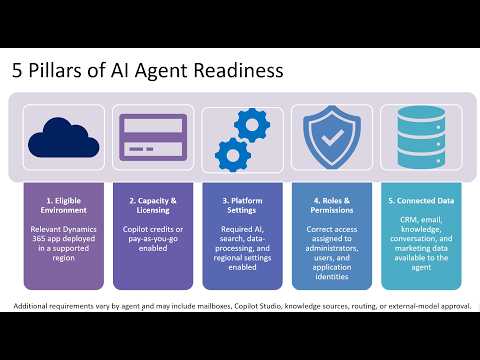
Neuhauser groups readiness into five practical areas: agent capabilities, data grounding, Developer Tools, governance and capacity, and first-party agent coverage. She explains that each pillar plays a role in turning live customer context into trustworthy actions, noting that none works alone and that their combined strength determines real-world impact. Thus, organizations should treat readiness as an integrated program rather than a set of isolated features.
New features and practical examples
The video calls out several recent features that illustrate how Microsoft is operationalizing the concept. For sales teams, she highlights the Sales Opportunity Agent, which pulls signals from Dynamics 365 and Microsoft 365 to surface risks and suggested next steps, and the public preview of Recommended Actions to keep CRM fields current; likewise, Data Enrichment and Voice to CRM Notes aim to cut manual entry for sellers. For service organizations, Neuhauser points to the availability of contact center agents such as the Customer Assist Agent and the Quality Assurance Agent, while noting that the Service Operations Agent remains in preview in limited regions.
Data, tooling, and operational tradeoffs
She stresses that reliable outcomes depend on strong data grounding, with Customer Insights – Data described as the central layer for unified profiles that agents use to make decisions. Nevertheless, the tradeoff is clear: investing in a unified data layer reduces hallucinations and improves trust but raises upfront integration and governance costs. Meanwhile, Copilot Studio makes it easier to build or adapt agents, yet organizations must balance the speed of deployment against the care required for configuration, testing, and error handling.
Governance, monitoring, and scaling challenges
Neuhauser emphasizes governance as one of the five pillars and highlights Copilot Studio’s preview pages that consolidate publishing errors and runtime issues into a single status view for administrators. Even so, teams face hard choices between agility and control: loosening restrictions speeds experimentation but increases the risk of incorrect recommendations or compliance gaps. In addition, scaling agents introduces capacity and cost questions, so administrators must plan for throughput, logging, and responsible AI practices as they expand agent use.
Practical implications for customers and teams
For sales and service leaders, the immediate benefit is higher productivity through automated research, note capture, and action recommendations that reduce manual work. Yet, Neuhauser cautions that the full payoff requires organizational change: updating workflows, retraining staff, and strengthening data hygiene to feed agents reliable inputs. Therefore, teams should pilot agents on focused scenarios, measure outcomes, then broaden deployment while keeping governance close at hand.
Balancing customization and out-of-the-box value
The video outlines another tradeoff between custom agents and first-party agents. First-party agents give rapid wins for common scenarios and reduce development effort, but custom agents let organizations encode unique processes and competitive workflows. Accordingly, Neuhauser recommends a mixed approach: use first-party agents to capture low-hanging fruit, and selectively invest in tailored agents where differentiation or complex process control matters most.
Conclusion and next steps
Overall, Heidi Neuhauser’s presentation offers a pragmatic view of moving Dynamics 365 CE from passive data storage to active, agent-driven execution. She invites organizations to focus on the five pillars together—capabilities, data grounding, tooling, governance, and agent coverage—because neglecting any one area undermines the rest. As a next step, teams should evaluate their data foundation, run controlled pilots with Copilot Studio, and build governance practices that let agents scale safely and effectively.

Keywords
Dynamics 365 CE AI agent readiness, Dynamics 365 AI agents, Dynamics 365 CE AI readiness checklist, Dynamics 365 Customer Engagement AI, Dynamics 365 AI deployment best practices, Dynamics 365 CE intelligent agents, Dynamics 365 Customer Service AI, Dynamics 365 AI readiness assessment